Preserve Design Intent: 8-Field Architecture Meeting Minutes Template
Preserve Design Intent: 8-Field Architecture Meeting Minutes Template

Use a one-page architecture meeting minutes template in Word or Google Docs that captures attendees, decisions, and action owners. Copy it, fill in the project header, and you can start documenting your next meeting in under two minutes. The right template records eight fields consistently: project ID, date and attendees, agenda, discussion notes, decisions, action items with owners and due dates, and the status of open items from last time.
TL;DR:
- Using a standardized, one-page template with eight key fields ensures comprehensive, traceable, and searchable meeting documentation throughout a project.
- Regular and prompt review within 48 to 72 hours, along with clear distribution and version control, reduces disputes caused by incomplete or outdated minutes.
- Linking decisions, action items, and references directly to drawings, RFIs, or emails preserves context and supports project accountability.
- Tailoring minutes by meeting type, such as design review, client, or site inspection, optimizes importance and detail for the specific purpose.
- Transitioning from simple templates to project-memory tools is essential for complex projects needing source-backed decisions and cross-phase consistency.
Table of Contents
- Quick-Start: Editable Template Formats and a 60-Second Setup
- Field-by-Field: The 8 Core Elements Every Architecture Meeting Minutes Template Must Include
- Copy-Ready One-Page Sample Minutes
- Operational Rules: Drafting, Review, and Distribution
- How Project-Memory Tools Extend a Template Into Traceable Decision Records
- Tailoring the Template for Different Meeting Types
- Handling Confidentiality and Sensitive Information
- Follow-Up: Reminders and Tracking Action Item Completion
- A Practitioner’s Note on Minute-Taking Pitfalls
- Turn Your Minutes Into a Living Project Record
- Sources
Quick-Start: Editable Template Formats and a 60-Second Setup
Word and Google Docs work best for most architecture meetings because they’re fast to fill in and easy to email or share as a link. Canva makes sense if your studio wants a branded look for client-facing minutes, though it’s slower to edit mid-meeting. Google Sheets earns its place on multi-phase projects where you need to filter action items by owner or status across dozens of meetings.
Setup takes four steps:
- Copy the template file into your project folder, naming it with the project code and meeting date.
- Fill the header: project name, meeting type, date, time, location or video link.
- Attach or link the drawings, specs, or RFIs the meeting will reference; for detailed guidance on documenting as-built drawings, see this complete guide for construction teams.
- Share it with the distribution list before the meeting starts, not after.
For a routine coordination call, a condensed one-pager covers everything you need. For design development reviews or contract milestones, switch to an extended version with more room for discussion notes and a longer decision log. The decision log template is worth a look if you’re mapping decisions to action items regularly across phases.
Field-by-Field: The 8 Core Elements Every Architecture Meeting Minutes Template Must Include
A usable architecture meeting minutes template needs eight fields, and skipping any one of them creates gaps that surface later, usually during a dispute or a handover to a new team member.
- Project and meeting identification. Use a consistent code (project number plus meeting number, like “2401-MTG-07”) so minutes stay searchable across a long project timeline.
- Date, time, location, and reference. Include the video link if remote, and note which phase of the project the meeting falls in.
- Attendees with roles and contact details. List name, firm, and role abbreviation (PM, AOR, MEP, Owner) so a reader six months later knows who said what.
- Agenda and goals. State what the meeting intended to resolve, and reference specific drawing sheets or spec sections by number.
- Discussion topics. Record facts, not editorializing. When two parties disagree, note both positions neutrally rather than picking a side in the minutes themselves, a practice Trauner Consulting flags as essential for construction records that may later matter in a dispute.
- Decision log. Summarize the decision, the reasoning behind it, and link the drawing or RFI number it affects.
- Action items. Assign an owner, a due date, and a short ID (like “AI-07”) so it’s traceable in the next meeting’s matters-arising section.
- Matters arising. Carry forward open items from the last meeting with a current status, so nothing quietly disappears between meetings.
Pro Tip: Number your action items sequentially across the whole project, not per meeting. “AI-42” is unambiguous in an email six weeks later; “Action 3 from the March meeting” is not.
Copy-Ready One-Page Sample Minutes
Here’s a filled example you can adapt directly. Keep the tone factual and the entries short.
Project 2401, Riverside Studio Addition Meeting Type: Design Development Review No. 4 Date: February 11, 2026 | Version: Rev A
Attendees:
- J. Alvarez, AOR (Architect of Record)
- T. Okafor, PM (Project Manager)
- S. Lin, MEP (Mechanical Engineer)
- R. Voss, Owner
Discussion:
- Roof drainage detail reviewed against Sheet A-401. MEP raised concern about scupper placement conflicting with the mechanical curb; AOR to revise.
- Owner requested a cost estimate on upgrading the west facade glazing from double to triple pane.
Decision:
Scupper location on the north roof will shift 18 inches west per MEP coordination, effective Rev A. Rationale: avoids conflict with rooftop unit curb per Sheet M-201.
Action Items:
- AI-31: AOR to issue revised roof plan by February 18. Owner: J. Alvarez.
- AI-32: PM to obtain glazing upgrade pricing by February 20. Owner: T. Okafor.
Attachments: Sheet A-401 (Rev prior), Sheet M-201, RFI-014.
Operational Rules: Drafting, Review, and Distribution
The template only works if your team follows a consistent process around it. Most disputes over minutes trace back to timing or ownership, not the template itself.
- The architect of record drafts the minutes, and a senior team member reviews them before they go out.
- Give that review a 48 to 72 hour window. Waiting longer lets memory fade and mistakes compound, a pattern Lorman Education Services notes as a common cause of disputed records.
- Keep the distribution list current in the file itself, not just in an email chain, and version each set of minutes clearly (Rev A, Rev B) rather than overwriting the previous file.
- Record disagreements neutrally. If two parties disagree on a technical point, write both positions and note that the issue is open, rather than resolving it in the minutes on the architect’s authority alone.
- Link every action item and decision to the drawing, RFI, or submittal number it affects, so anyone can trace the reasoning without reading the whole meeting history.
Construction industry guidance from Trauner Consulting treats meeting minutes as a contemporaneous record. Stakeholders present at a meeting are generally assumed to agree with what’s recorded unless they raise a correction promptly, which is exactly why the 48 to 72 hour review and distribution window matters.
How Project-Memory Tools Extend a Template Into Traceable Decision Records
A template captures what happened in one meeting. It doesn’t automatically connect that decision back to the transcript, email thread, or client comment that produced it, and six months later that gap is where “why did we decide this” questions start.
Centralized project platforms already show the direction this is heading: Autodesk’s Digital Builder notes that linking minutes to models and drawings inside one system reduces the coordination gaps that file-based templates leave behind. Project memory tools take that a step further by treating the decision itself as a structured, source-backed record. Some project memory tools turn meeting notes, transcripts, and client feedback into structured records that link each decision, action, and open question back to the exact conversation they came from.
- Decisions map directly to their source conversation, not just a summary line.
- Action items carry their rationale forward automatically, instead of losing context in a new file.
- Attachments and drawing references stay connected across meetings.
Pro Tip: If your project involves more than two consultants or spans multiple phases, a file-based template starts losing context at handover. That’s the point to consider a project-memory workflow instead of another spreadsheet.
Tailoring the Template for Different Meeting Types
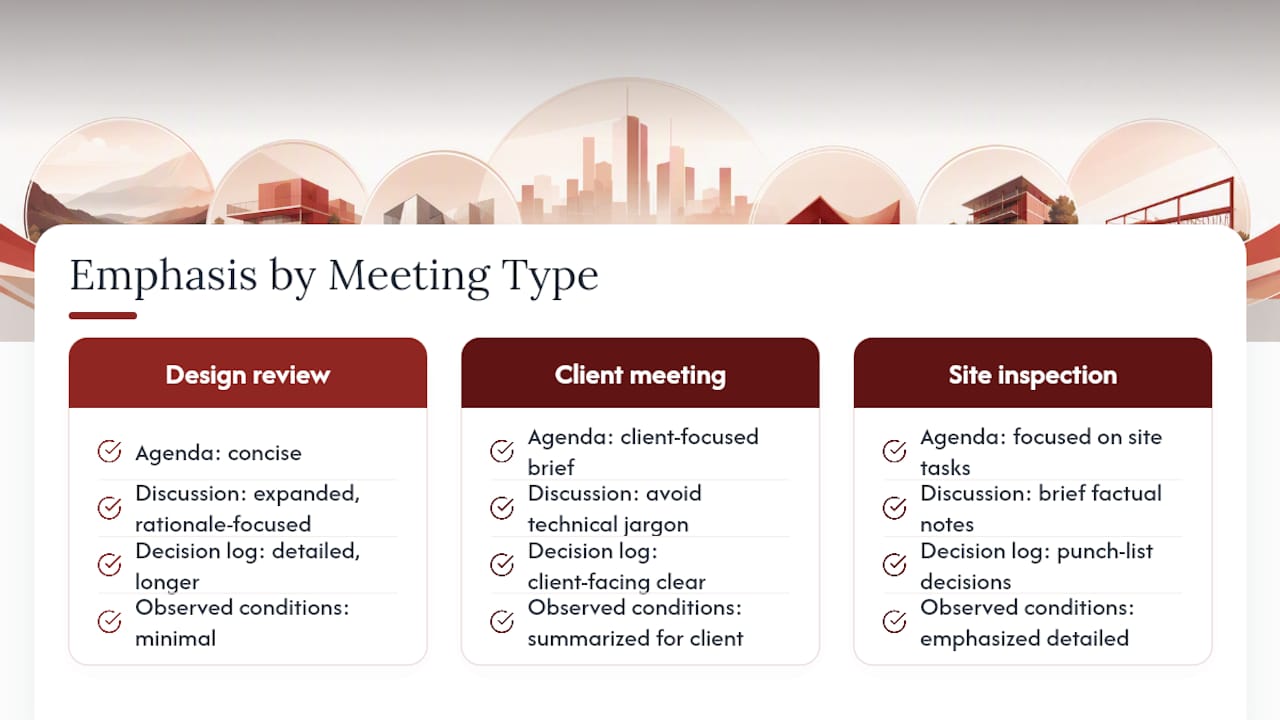
A design review, a client meeting, and a site inspection all need the same eight fields, but the weight shifts.
Design review meetings need more room in the discussion and decision sections, since these meetings generate the bulk of your rationale trail. Reference drawing sheet numbers directly in the discussion notes rather than describing them in prose, and expect the decision log to run longer than the agenda section.
Client meetings need a lighter touch. Skip internal technical jargon in the discussion notes and focus on decisions and action items the client actually needs to track. It’s worth adding a short “next meeting” line at the bottom so the client knows what to expect, since client-facing minutes often double as a trust document as much as a record.
Site inspection minutes shift the emphasis toward observed conditions and punch-list items rather than open-ended discussion. Attendees should include the trade contractors present, and action items typically carry shorter due dates, often within a week, since site issues tend to be time-sensitive. Photos referenced by number work better than lengthy written descriptions of field conditions.
The core template structure holds across all three. Only the balance between agenda, discussion, and action-item length needs to flex.
Handling Confidentiality and Sensitive Information
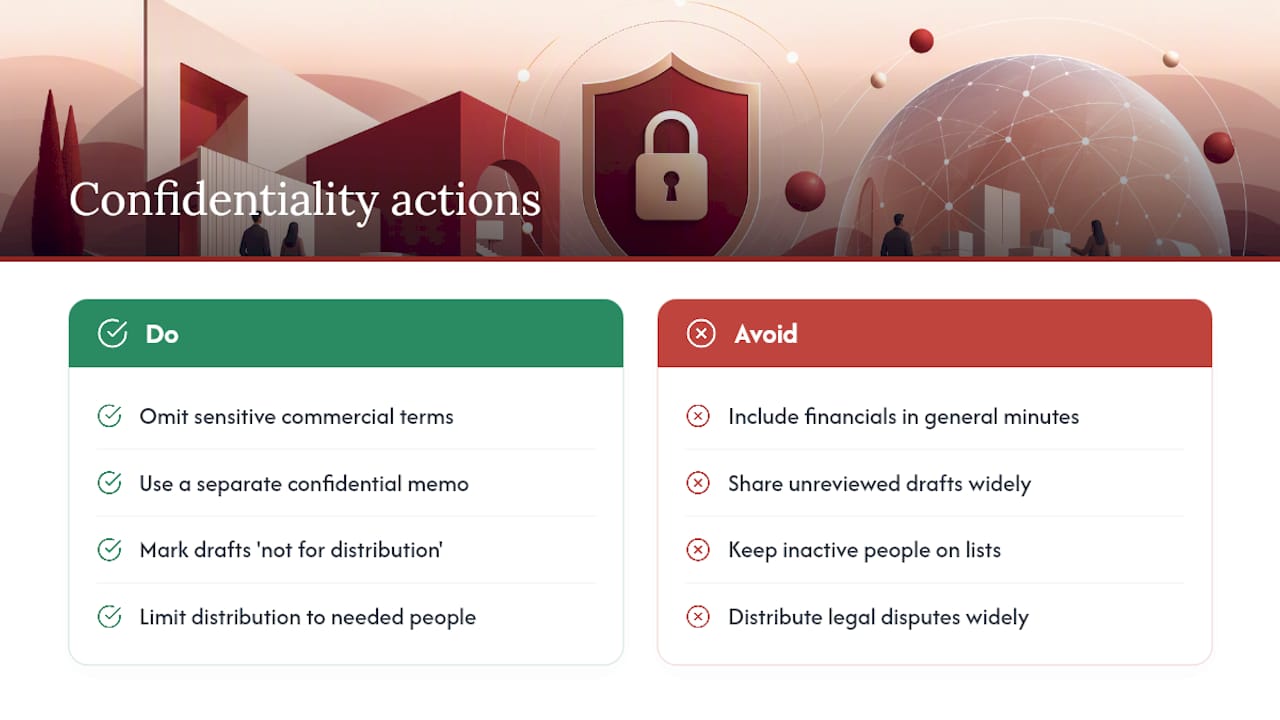
Meeting minutes often contain information that shouldn’t circulate beyond the immediate project team, cost figures, contract disputes, personnel issues, or client financial details raised in passing.
Keep sensitive commercial terms out of the general distribution version, and note in the minutes that a separate confidential memo covers a specific topic if needed, rather than including the detail directly. Mark any draft clearly as “draft, not for distribution” until it’s reviewed, since an unreviewed draft can leak sensitive detail before anyone catches it.
Restrict distribution lists to people who genuinely need the record, and remove anyone who’s no longer active on the project promptly. If minutes reference legal or contractual disputes, route them through your firm’s standard risk-management process before wide distribution, since those records can surface later in a claim.
Follow-Up: Reminders and Tracking Action Item Completion
Minutes that never get revisited are just documentation for its own sake. The follow-up loop is where the template actually earns its keep.
Set a standing rule: every action item from one meeting gets a status check in the next. Ambiguous status (“in progress” with no date) accomplishes nothing, so use three states only, open, complete, or blocked, with a reason noted for blocked items.
Send a short reminder two to three days before each item’s due date rather than waiting until the meeting to discover it’s overdue. A simple calendar reminder or a shared task tracker linked to the minutes file works fine for smaller teams. For projects with a dozen or more open items across multiple consultants, a dedicated tracker or a project-memory system that flags overdue items automatically saves real time compared to scanning old minutes files by hand.
A Practitioner’s Note on Minute-Taking Pitfalls
The most common mistake isn’t a missing field. It’s an action item with no clear owner, “the team will look into it,” written down and never revisited. The second most common is minutes sitting in a draft folder for two weeks before anyone sees them, by which point the details have already blurred in everyone’s memory. Neither mistake is dramatic on its own, but they compound over a multi-year project. A short team standard, one template, one review window, one distribution list, prevents most of it before it starts.
, Rajas
Turn Your Minutes Into a Living Project Record
A template captures a meeting. What it can’t do on its own is connect that decision back to the exact conversation, transcript, or client email that produced it, and that gap is where design intent quietly gets lost over a long project. Project memory tools can close that gap by converting meeting notes, recordings, and client feedback into structured entries that trace every decision, risk, and open question back to its source.

Templates still work well for smaller projects with one or two consultants and a short timeline. Once a project spans multiple phases, multiple firms, or a handover between team members, a file-based system starts losing context faster than anyone drafting minutes can keep up with. That’s the point to look at a project-memory workflow instead of another folder of Word files. You can read more on automating meeting note capture on the blog, or go straight to The Intent Ledger’s pricing page to see which plan fits your studio’s project volume.
Sources
- What Should You Include In Construction Project Meeting Minutes, White Paper | Lorman Education Services
- Construction Project Meeting Minutes: What To Include | Trauner Consulting
- Construction meetings: a guide & minutes template for success, Autodesk / Digital Builder