Action Items Tracking for Project Managers: A Working System
Action Items Tracking for Project Managers: A Working System

Action items tracking is the practice of logging every commitment made in a meeting or project with one owner, one due date, and one confirmed outcome, then following that item until it closes. Do this now, before the details fade:
- Capture the item the moment it’s said, in the exact words used.
- Assign exactly one owner. Never write “team” or “everyone.”
- Set a real calendar date, not “soon” or “next week.”
- Read it back aloud and get a verbal yes before the meeting ends.
Use this line as your starting template: “[Owner] will [deliverable] by [date], done when [specific outcome].” Pull up your last meeting notes right now, find the top three commitments, and confirm the owner and date with each person within 24 hours.
Key Takeaways
Action item tracking works when every item has exactly one owner, a real due date, and a written definition of done, confirmed out loud before the meeting ends.
| Point | Details |
|---|---|
| Use one owner per item | Split multi-person tasks into separate line items so accountability never gets shared. |
| Capture in real time | Log commitments as they’re spoken, then read them back for verbal confirmation before adjourning. |
| Distribute within 24 hours | Send the finalized list the same day or next morning so momentum doesn’t fade. |
| Track four KPIs | Watch completion rate, overdue count, time to complete, and active items per person. |
| Move to project memory when items recur | Tools like The Intent Ledger link action items to source conversations once carry-overs and repeated decisions become common. |
Table of Contents
- What Is Action Items Tracking and Why Most Teams Get It Wrong
- What Fields Belong in Every Action Item Log
- How Do You Write an Action Item That Actually Gets Done?
- How to Capture Action Items During and After Meetings
- Which Templates and Spreadsheet Setups Actually Work?
- How Should You Prioritize and Set Due Dates?
- How Do You Connect Action Items to the Project Plan?
- Which Tool Fits Your Team: Spreadsheet, PM Software, or Something Else?
- What KPIs Show Your Tracker Is Actually Working?
- What Do Well-Formed Action Items Look Like in Practice?
- Where Does Action Item Tracking Usually Break Down?
- How Project Memory Reduces Rework on Action Items
- What Practicing Project Managers Actually Do Differently
- How The Intent Ledger Fits Into an Action Items System
- Frequently Asked Questions
- Sources
What Is Action Items Tracking and Why Most Teams Get It Wrong
Action items tracking differs from meeting notes in one crucial way: notes record what was discussed, while a tracker records what happens next and who is accountable for it. A meeting can produce five pages of notes and zero action items, which is exactly how good decisions die in silence.
The payoff for doing this well shows up in three places: fewer stalled decisions, visible accountability instead of “I thought someone else had it,” and a completion rate you can actually measure over time.
The cost of skipping it is just as concrete. Duplicated work happens when two people quietly pick up the same task. Schedule slippage happens when a blocked item sits untouched for three weeks because nobody was watching it.
The scale of the problem: A significant portion of business meetings are considered unproductive, and weak capture and follow-up practices are a recurring driver of that waste.
- Meetings without a tracker tend to repeat the same open questions week after week.
- Teams with a visible tracker report fewer “wait, who owns this?” moments in status meetings.
What Fields Belong in Every Action Item Log
An action item log needs seven fields, and skipping any one of them creates a predictable failure mode down the line.
- Item: a verb-led description of the deliverable, not a topic name.
- Owner: exactly one person. Multi-person work gets split into separate line items, one per owner.
- Due date: a real date, never “ASAP” or “end of sprint.”
- Status: open, in progress, blocked, or done. Four states, no more.
- Source meeting: where the item came from, so anyone can trace it back to context.
- Priority: high, medium, or low, so the owner knows what to do first.
- Notes: the definition of done and any dependencies.
The single-owner rule matters more than it sounds. If a design review produces “update the floor plan and notify the client,” that’s two people’s work disguised as one task. Split it: one item for the drafter, one for whoever sends the client email.
Here’s a fully filled example: Item: Upload revised elevation drawings to shared folder. Owner: Priya Nair. Due date: March 12, 2026. Status: In progress. Source meeting: Design review, March 5. Priority: High. Notes: Done when v3 file is uploaded and client has been emailed the link.
Pro Tip: If an item’s owner field would need two names, it’s not one action item. Write two.
How Do You Write an Action Item That Actually Gets Done?
Vague action items die quietly. The fix is a structure borrowed from basic journalism: the 4 W’s.
- Who owns it, by name, not by role or team.
- What they’re delivering, described with a specific verb, not a vague noun.
- When it’s due, as a calendar date.
- What success looks like, meaning a Definition of Done specific enough that anyone could verify it without asking the owner.
That last piece is the one teams skip most often, and it’s the one that prevents rework. A vague item like “follow up with vendor” invites a vague result. A tight version tells the owner exactly what finished looks like.
- Simple: “Marcus will send the updated contract to legal by Friday, done when legal confirms receipt.”
- Moderate: “Elena will revise the lobby lighting plan by March 18, done when the updated PDF is in the shared drive and the electrician has reviewed it.”
- More complex: “The site team will complete the structural inspection report by April 2, done when the report is signed off by the engineer of record and uploaded to the project folder.”
Copy this line directly into your notes or tracker: “[Owner] will [verb + deliverable] by [date], [definition of done].”
How to Capture Action Items During and After Meetings
The gap between what’s said in a meeting and what makes it into a tracker is where most action items disappear. Close it with a fixed sequence, every time.
- Capture the commitment in real time, in the words the person used, not a paraphrase you’ll clean up later.
- Name the owner out loud before moving to the next topic.
- Set a calendar date in the meeting, not “we’ll figure that out.”
- Read the item back to the group before closing the discussion.
- Get a verbal confirmation from the owner.
- Distribute the finalized list within 24 hours of the meeting ending.
MeetingDecisions’ guidance on ownership and follow-up points to exactly this pattern: capture immediately, confirm in the room, and distribute fast, as the behaviors that separate teams with high completion rates from teams that lose items in the shuffle.
Assign a scribe separate from the facilitator whenever possible. Running the discussion and logging every commitment at the same time is how items get missed.
Pro Tip: Give the scribe a running template with the seven fields already laid out. Filling blanks is far less demanding than inventing structure mid-conversation.
Which Templates and Spreadsheet Setups Actually Work?
A spreadsheet remains the fastest way to start, and it works for teams of almost any size if you set it up right the first time.
- ID: a simple sequential number for reference in conversation.
- Item: the verb-led deliverable description.
- Owner: one name.
- Due date: an actual date field, not text.
- Status: a dropdown, not free text, so it’s filterable.
- Source meeting: the meeting name and date.
- Priority: high, medium, or low.
- Notes: definition of done and dependencies.
MeetingTango’s action item tracker template recommends this same seven-field structure paired with a quick review at the start of each meeting, which keeps the log from turning into a graveyard of forgotten rows.
In Excel or Google Sheets, three settings do most of the work:
- Data validation on the Status column, limited to Open, In Progress, Blocked, Done.
- Conditional formatting that turns a row red once the due date passes and status isn’t Done.
- A filter or slicer set to Owner, so each person can view only their own open items.
Example row: ID: 014 | Item: Send RFP responses to procurement | Owner: David Chen | Due: March 20, 2026 | Status: In Progress | Source: Vendor call, March 6 | Priority: High | Notes: Done when procurement confirms all three vendor packets received.
How Should You Prioritize and Set Due Dates?
Not every item deserves the same urgency, and pretending otherwise buries the things that actually block progress.
- P1 / High: blocks other work or a milestone. Needs a date within days.
- P2 / Medium: important but not blocking anything yet. Days to a couple weeks is reasonable.
- P3 / Low: nice to close out, no downstream dependency. Weeks is fine.
Realistic due dates come from short windows, not optimism. A four-week task with a single deadline invites procrastination and a late surprise. Break it into two or three milestones instead, each with its own check-in.
Escalation needs a rule, not a feeling. If an item sits in “Blocked” status for more than one review cycle, it goes to the project lead by name, with a note on what’s blocking it and who can unblock it.
How Do You Connect Action Items to the Project Plan?
An action item that never touches the actual work plan becomes a floating obligation nobody remembers exists.
- Tag each item to its project or phase so it shows up in the right context.
- Link items to the specific task, drawing, or document they affect.
- Add major recurring items as milestones in the work plan itself, not just the tracker.
PMI’s guidance on running project status meetings recommends a consistent agenda structure, and opening every meeting with an action item review is the cheapest way to keep that structure honest. Add a midweek check-in for anything marked high priority. Keep the source meeting noted on every item. Strip that context out and an action item becomes an anonymous backlog ticket nobody feels ownership over.
Which Tool Fits Your Team: Spreadsheet, PM Software, or Something Else?
Four approaches cover almost every team, and the right one depends less on preference than on size and cadence.
| Approach | Best fit | Main limitation |
|---|---|---|
| Shared doc | Very small teams, informal cadence | No status filtering, easy to lose track of overdue items |
| Spreadsheet | Small to mid teams, weekly reviews | Requires manual upkeep, no automated reminders |
| Project management software | Mid to large teams, multiple concurrent projects | Setup overhead, can bury action items among general tasks |
| Dedicated meeting or project memory tool | Teams needing traceability back to source conversations | Newer category, learning curve for adoption |
MeetingTango’s breakdown of tracker types frames this as a trade-off between simplicity and structure. As team size or project complexity grows, manual systems start to plateau because they depend entirely on someone remembering to update them.
Before picking a tool, run through this checklist: How many people need visibility? How often do you review status? Who has the bandwidth to maintain the tracker by hand? Do you need automated reminders? Do you need to trace an item back to the exact conversation that created it?
That last question is usually the tipping point. Read notes that manual trackers tend to stall precisely because they rely on a human to chase updates, which is where automated reminders and carry-forward rules earn their keep.
What KPIs Show Your Tracker Is Actually Working?
A tracker full of rows tells you nothing by itself. Four numbers tell you whether the system is functioning:
- Completion rate: percentage of items closed by their original due date.
- Overdue count: how many items are currently past due, tracked weekly.
- Average time to complete: from creation to closure, flagging items that linger.
- Active items per person: anyone carrying more than five or six open items at once is a warning sign, not a badge of productivity.
A workable dashboard needs just three widgets: an overdue list sorted by age, a completion rate trend line over the past six weeks, and a per-person load view. That’s enough to catch problems before they become excuses.
Automate what you can. Set reminders two days before due dates, build a carry-forward rule that flags anything overdue at the next meeting instead of letting it quietly age, and send a weekly digest so status doesn’t depend on someone opening the spreadsheet. Given that meetings carry a real, calculable cost, a tracker that prevents rework from a missed item pays for the ten minutes it takes to set up.
What Do Well-Formed Action Items Look Like in Practice?
Four examples across different contexts, each with the ownership and deadline built in:
- Design review: “Sofia will revise the second-floor egress plan by March 14, done when the fire marshal’s comments are addressed and the redline is uploaded.”
- Vendor follow-up: “James will confirm delivery dates with the millwork vendor by March 10, done when written confirmation is in the project email folder.”
- Risk mitigation: “Aisha will assess the foundation soil report by March 21, done when a go/no-go recommendation is sent to the client.”
- Client deliverable: “The team will submit the schematic design package by April 1, done when the client has received the PDF and scheduled a review call.”
Each one names exactly one owner, states a real date, and defines what “finished” means without requiring a follow-up question.
Where Does Action Item Tracking Usually Break Down?
Most tracking failures trace back to the same handful of habits, and they’re fixable once you see them clearly.
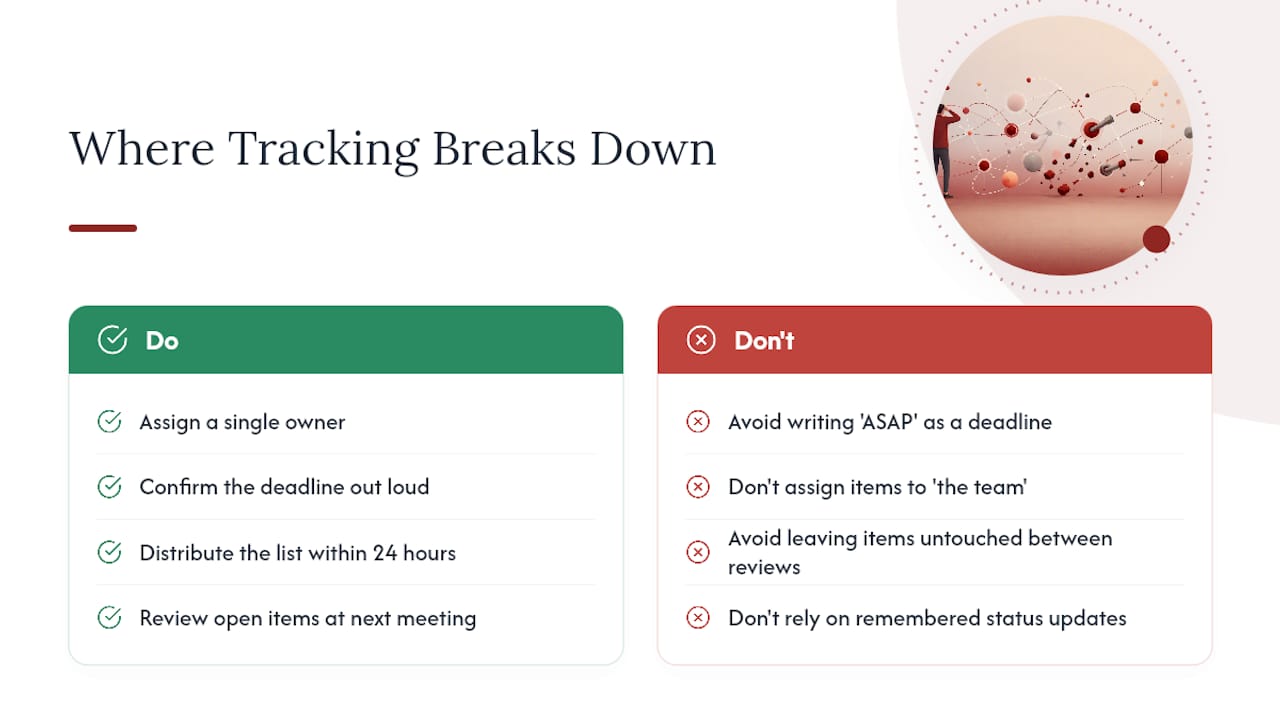
Do: assign a single owner, confirm the deadline out loud in the meeting, distribute the list within 24 hours, and review open items at the start of the next meeting.
Don’t: write “ASAP” as a deadline, assign an item to “the team,” let items sit untouched for more than one review cycle, or let status updates happen only when someone remembers to ask.
If completion rates start dropping, look for the cause before adding more process. Often it’s one overloaded person carrying too many open items, or a tracker nobody opens between meetings.
Pro Tip: If more than a quarter of your open items are marked “blocked,” that’s not a task problem. That’s a decision-making bottleneck somewhere upstream, and it needs a name attached to it.
Watch for these warning signs specifically: a cluster of “blocked” items with no owner working to unblock them, one person consistently overloaded while others carry two or three items, and the same commitment reappearing meeting after meeting under slightly different wording.
How Project Memory Reduces Rework on Action Items
A spreadsheet tells you what’s due. It rarely tells you why a decision was made or which conversation produced a given commitment, and that gap is where design teams lose the most time.
Structured records that link each action item back to its source conversation, sometimes called project memory, solve a different problem than a status column does. When a new team member asks “why did we choose this detail,” a traceable record answers in seconds instead of triggering a hunt through old email threads.
- Faster onboarding, since new hires can trace decisions instead of asking around.
- Fewer repeated debates over choices the team already settled weeks earlier.
- Cleaner dispute resolution when a client or contractor questions a past decision.
Consider adopting this layer once you notice the same items carrying over meeting after meeting, once anyone is holding more than five open items, or once “who decided this?” starts coming up regularly in reviews.
What Practicing Project Managers Actually Do Differently
The PMs whose trackers stay clean share a small set of habits, not a bigger tool. They open meetings with a short accountability round, five to ten minutes where each owner reports status before anything new gets discussed. That single ritual, more than any software feature, is what keeps items from quietly aging into irrelevance.

They also cap open items per person on sight. Once someone hits six or seven, that’s a conversation about redistributing load, not a note in the tracker.
Treat tracking as a shared habit the team owns together, not a surveillance system run by one person. The teams that stick with it longest are the ones where checking status feels like normal work, not an audit.
How The Intent Ledger Fits Into an Action Items System
Everything covered so far, single ownership, real dates, traceability, and reminders, is the checklist any tool needs to satisfy. The Intent Ledger builds those requirements around the conversations that produce action items in the first place, rather than treating the tracker as a separate spreadsheet you update from memory after the meeting ends.

It turns meeting notes, transcripts, and critique feedback into ILM Records that link each action item straight back to the discussion that created it, so an owner or due date is never disconnected from the “why” behind it. Three capabilities map directly onto what this article covers:
- Automated capture that ties every action item to its source conversation, not a manually typed line.
- Carry-forward visibility so overdue or blocked items surface again instead of aging quietly.
- Completion analytics that show which owners and item types are stalling.
If your team is losing track of design decisions between meetings, a two to four week pilot with one active project is a reasonable way to see the difference. Track your completion rate and time-to-close before and after, and watch whether “why did we decide this” questions get answered faster. Visit the The Intent Ledger product page to start a pilot.
Frequently Asked Questions
What is action items tracking, in one sentence? It’s the practice of logging every commitment with one owner, one due date, and a defined outcome, then following it until it’s marked done.
What’s the difference between an action item log and meeting notes? Meeting notes record what was discussed; an action item log records what happens next and who is responsible for it.
How often should a team review its action item tracker? Weekly, at minimum, with a short accountability round at the start of each meeting and a midweek check on anything marked high priority.
What’s the biggest reason action items don’t get done? Missing or shared ownership. An item assigned to “the team” almost never gets finished, because no single person feels responsible for it.
When should a team move from a spreadsheet to dedicated software? Once the same items keep carrying over meeting after meeting, once someone is holding more than five or six open items, or once tracing a decision back to its source conversation becomes a regular need.
Sources
- More than a third of business meetings are unproductive due to a lack of generational diversity, LSE
- Estimate the cost of a meeting with this calculator, Harvard Business Review
- Secrets of running project status meetings, PMI