How to Automate Meeting Notes for Design Teams
How to Automate Meeting Notes for Design Teams

Turn meeting audio, transcripts, client comments, and critique feedback into structured, artifact-linked project-memory records, not summaries. The right approach requires three things from every record: a linked artifact (drawing, model, or spec), a named decision owner, and a review trigger that tells the team when to revisit the call. Theintentledger implements this as ILM Records, purpose-built for architecture studios and design teams.
- Every decision gets attached to the geometry, drawing, or spec it affects.
- Ownership is explicit: one person’s name, not “the team.”
- A review trigger is set at capture time, not added later as an afterthought.
Key Takeaways
Structured, artifact-linked ILM Records, not transcripts, are the correct output of meeting notes automation for design teams, and adoption depends more on articulation habits than on tooling.
| Point | Details |
|---|---|
| Start with one project | Pilot on a single active project with three decision categories before scaling. |
| Require artifact links | Every record must link to a specific CAD element, BIM GUID, Figma frame, or drawing sheet. |
| Name one owner per record | Shared ownership means no ownership; one named person per decision. |
| Measure use, not volume | Track records referenced in reviews and time-to-answer queries, not total records created. |
| Theintentledger as implementation | Theintentledger converts meeting inputs into ILM Records with artifact links, review triggers, and exportable audit packets. |
Table of Contents
- What does “automate meeting notes” actually mean for design teams?
- Why automating meeting notes this way matters for design workflows
- What exactly should your automated system capture?
- What technical features should your automation actually require?
- How to roll out automated project memory from pilot to scale
- What do these workflows look like in a real design meeting?
- How do you know if the system is actually working?
- How to train your team on the automated system
- Backup and data recovery for automated project-memory systems
- Data privacy and security when you automate meeting notes
- Handling multilingual and international team inputs
- Integrating with Figma, Jira, and other tools beyond CAD/BIM
- Theintentledger puts this into practice for your studio
- What most teams get wrong about automating decision capture
- Sources
What does “automate meeting notes” actually mean for design teams?
For most of the web, “automate meeting notes” means AI transcription with a summary and a bullet list of action items. That is not what this guide covers. For design teams, meeting notes automation means converting meeting audio, transcripts, client comments, and critique sessions into ILM Records, structured, source-backed entries that document decisions, design intent, risks, open commitments, and unresolved questions, each traceable to the conversation it came from.
A valid ILM Record contains: a decision title, a named owner, the project stage, the options considered, the criteria used, the trade-offs accepted, the chosen outcome, downstream impacts, evidence links, a linked artifact (CAD file, BIM element, Figma frame, or drawing sheet), and a review trigger. Generic AI transcription produces none of that structure. It produces text. Project memory produces navigable reasoning.
Why automating meeting notes this way matters for design workflows
Lost design reasoning is the direct cause of rework, missed constraints, and slow handoffs. When a junior designer joins a project mid-stream, or a client questions a structural decision six months after it was made, the answer almost never lives in a meeting summary. It lives, if it was captured at all, buried in an email thread or a personal notebook.
Research on design rationale in AEC projects confirms that design rationale is often only implicit in CAD/BIM files, emails, or meeting minutes, and that the absence of explicit rationale leads directly to knowledge loss and rework. The Aalto University thesis on past design decisions found that teams frequently cannot reconstruct the reasoning behind earlier choices because documentation, artifacts, and people are not organized as navigable sources of reasoning. The fix is structural, not just technological.
Concrete benefits of structured project-memory automation:
- Traceability for design reviews: every decision links back to the conversation and the artifact, so reviews move faster.
- Faster onboarding: new team members read the decision log rather than interrogating colleagues.
- Fewer reconstruction tasks: no one spends hours recovering why a wall moved or a material changed.
- Audit trails for regulated work: planning submissions, building control, and client sign-offs all require documented rationale.
A single source of truth that consolidates intake, approvals, and running decisions reduces fragmentation and stops decisions from living in Slack threads or personal inboxes.
What exactly should your automated system capture?
ADDRA’s template-based recovery research shows why structured fields matter: when decisions are not captured with consistent schema, reconstructing them later is expensive and often incomplete. The minimum viable schema for a design team’s ILM Record includes fields such as decision title, owner as a named person, date and stage (phase label), options considered as a structured list, criteria used, trade-offs accepted in narrative form, chosen outcome, downstream impacts as bullet points, evidence links, artifact linkage, and review trigger, without specifying exact numbers or dates.
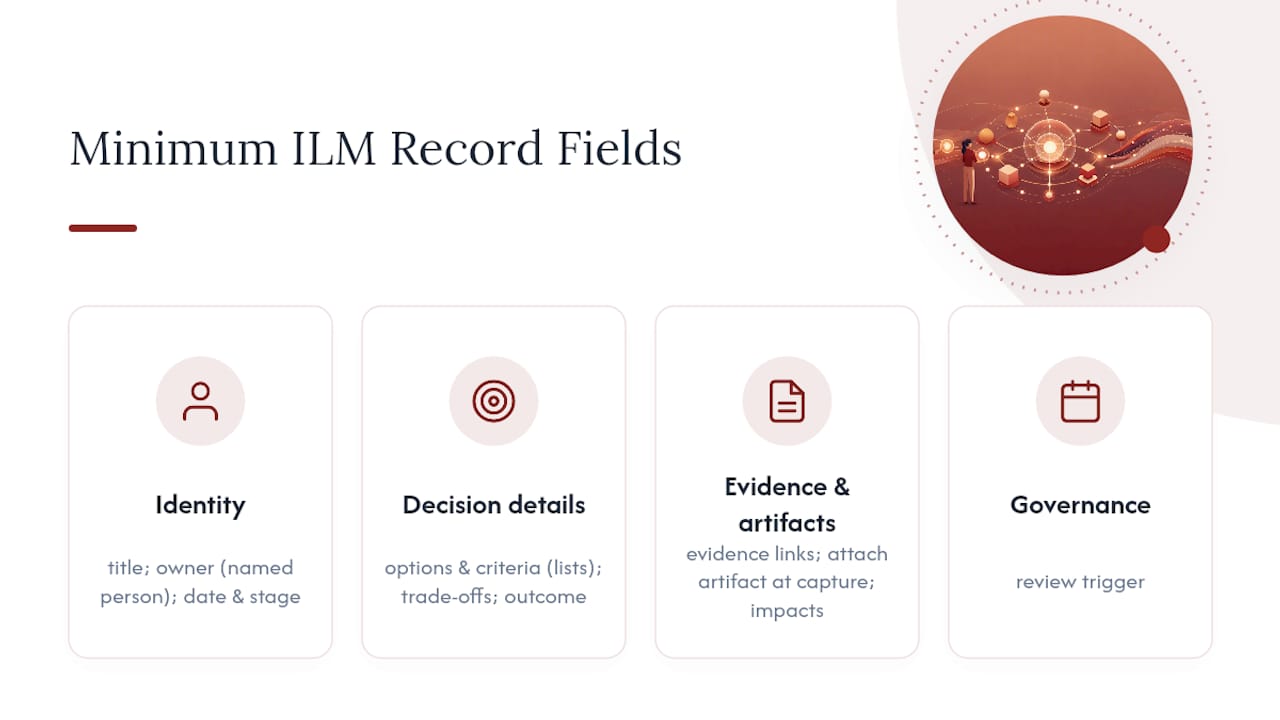
Fields like “options considered” and “criteria” work best as structured lists because they need to be scannable and comparable across records. “Trade-offs” and “rationale” work better as short narrative, two to four sentences, because the reasoning rarely fits a dropdown.
Attach the artifact link at capture time. A decision record with no artifact link is an orphan: it describes a choice, but cannot be found by anyone navigating the model or drawing set.
What technical features should your automation actually require?
Capture at the moment of work. That is the governing principle. ProMem’s model-based approach demonstrates that artifact-attached capture, where decisions are linked to geometry and design evolution is recorded as it happens, produces records that compound into a reusable engineering memory. Asking teams to document after the meeting, in a separate tool, is the single fastest path to an empty database.
Pro Tip: Set up your system so that creating an ILM Record takes fewer steps than sending a Slack message. If it takes longer, teams will use Slack instead.
Must-have technical behaviors:
- Artifact linkage: records attach to a specific CAD layer, BIM element GUID, Figma frame, or drawing sheet, not just a project folder.
- Immutable timestamped records: once created, a record’s original content cannot be silently edited; amendments create a new version.
- Lightweight capture UI: the capture form appears where the work happens, not in a separate app.
- Full-text search across records: decisions are findable by keyword, owner, stage, or artifact.
- Review workflow: records surface automatically when their trigger condition is met.
- Exportable audit packets: for planning submissions or client sign-offs, records export as a structured PDF or data file.
- Role-level permissions: clients see approved records; junior staff see relevant records; principals see everything.
Integration points to plan for: your PDM or BIM platform, your communication channel (Slack or Teams), and your project management tool. Security baseline: records stored with encryption at rest, access logs, and a defined data-retention policy.
How to roll out automated project memory from pilot to scale
Start with one project and three decision types. Trying to capture everything on day one guarantees abandonment.
- Define pilot scope. Pick one active project. Choose three decision categories to record: structural system, material selection, and client sign-off.
- Assign owners. Design lead owns structural and material decisions. PM owns client sign-offs. No shared ownership.
- Choose integrations. Connect to the BIM platform and the team’s communication channel first. Add PM tool integration in week three.
- Train participants. One 45-minute session covering the schema, the capture UI, and two worked examples. Written reference card distributed the same day.
- Run weekly reviews. Every Friday, the design lead checks records created that week: are artifact links present? Are review triggers set? Fix gaps before they compound.
- Scale after four weeks. If the pilot project has consistent records with artifact links, roll out to a second project and add the remaining decision categories.
| Milestone | Owner | Success signal |
|---|---|---|
| Pilot launch | Design lead + PM | First 10 records created with artifact links |
| Week 4 review | Records steward | Most records have owner and review trigger |
| Full rollout | Studio principal | All active projects using ILM Records |
| Quarterly audit | Records steward | Zero orphaned records; audit packet exportable |
Appoint a records steward, one person responsible for schema consistency and archival rules. Without this role, schema drift sets in within two months.
What do these workflows look like in a real design meeting?
Massing decision, schematic review. The design lead presents three massing options. As the team settles on Option B, the PM opens the capture form, links it to the relevant BIM mass element (by GUID), names the design lead as owner, lists the rejected options and the shadow-study evidence that drove the choice, and sets a review trigger: “Revisit if site boundary changes.” The structural engineer receives the record the next morning and adjusts their preliminary grid accordingly.

Facade material decision with supplier evidence. A supplier presents two cladding systems. The team selects System A based on thermal performance data and lead time. The record captures both systems, the thermal test report as an evidence link, the cost delta accepted, and the spec clause affected. The QS references this record three weeks later when the supplier revises pricing.
Code interpretation with owner and trigger. The project architect interprets a fire-separation requirement. The record names the architect as owner, links to the relevant code clause, notes that a building control pre-application query is pending, and sets the review trigger: “Revisit when building control responds.” When the response arrives, the trigger surfaces the record automatically.
How do you know if the system is actually working?
Measure use and usefulness, not completeness. A database of 200 records that nobody references is not a success.
Practical metrics to track weekly:
- Records created per project per week (baseline: at least one per design decision meeting)
- Records referenced in design reviews (ask leads to note when a record was consulted)
- Time to answer a historical query (how long does it take to find why a decision was made?)
- Handoff errors avoided (track instances where a new team member found the answer in the record log rather than asking a colleague)
Common failure modes and fixes:
- Documentation friction: capture takes too many steps. Fix: reduce the form to required fields only; make optional fields collapsible.
- Missing articulation: records exist but rationale fields are blank. Fix: articulation is a craft, train teams to name the decision and its anchors as part of execution, not after.
- Orphaned records: records created with no artifact link. Fix: make the artifact link field required at save time.
- Fragmented decisions: decisions still living in Slack or email. Fix: embed the capture shortcut directly in the communication channel.
How to train your team on the automated system
One session is not enough, but three sessions is too many. The right structure: a 45-minute launch session with two worked examples drawn from the team’s own project type, a written reference card (one page, schema fields and definitions), and a 20-minute check-in at the end of week two to address the questions that only arise after real use.
Junior designers and students need a different emphasis than principals. For juniors: focus on what counts as a decision and how to link an artifact. For principals: focus on review triggers and when to escalate a record to client sign-off. Freelance architects working solo need the schema but not the role-permission layer, simplify accordingly.
The most common training failure is teaching the tool before teaching the why. Start every session with a real example of a decision that caused rework because it was not documented. That takes two minutes and motivates the rest of the session more effectively than any feature walkthrough.
Backup and data recovery for automated project-memory systems
Project-memory records are long-lived assets. A decision made in schematic design may be referenced during construction administration three years later. Treat them accordingly.
Minimum backup requirements: automated daily snapshots stored in a geographically separate location, a tested restore procedure (not just a backup policy), and a defined recovery time objective matched to the studio’s project cadence. For most studios, a 24-hour recovery window is acceptable; for firms working on regulated or infrastructure projects, tighter windows apply.
Export records as structured data (JSON or CSV) at project milestones, not just at project close. A mid-project export after design development means that if the system is unavailable, the team has a readable record set. Audit packets exported as PDF serve the same function for client-facing records.
Data privacy and security when you automate meeting notes
Design meeting records contain commercially sensitive information: client briefs, budget constraints, supplier negotiations, and proprietary design decisions. Treat them with the same care as contract documents.
Key considerations: data stored with encryption at rest and in transit, access controlled by role (clients see only approved records, not internal deliberations), and a clear data-retention policy that specifies how long records are kept after project close. For international projects, confirm where data is physically stored, EU-based studios working under GDPR need records stored within the EU or in a jurisdiction with an adequacy decision.
Meeting audio and transcripts used as inputs for record creation carry additional sensitivity. Define whether raw audio is retained after record creation or deleted. Most studios are better served by deleting raw audio once the ILM Record is confirmed, keeping only the structured output.
Handling multilingual and international team inputs
Architecture and design projects routinely involve teams across multiple countries and languages. A facade consultant in Germany, a structural engineer in the UK, and a client in the Middle East may all contribute to the same decision thread.
The practical approach: capture the ILM Record in the project’s contractual language (usually English), with a brief note in the record’s evidence field if the source input was in another language. Do not attempt to auto-translate rationale fields, machine translation of technical reasoning introduces errors that compound over time. Instead, require the person closest to the source input to produce the English-language summary before the record is created.
For studios working in genuinely bilingual environments, a dual-language field for the decision title and outcome is worth the overhead. Everything else stays in the contractual language.
Integrating with Figma, Jira, and other tools beyond CAD/BIM
CAD and BIM are the primary artifact sources for architecture studios, but design teams also work in Figma, Jira, Notion, and similar tools. The integration principle is the same regardless of platform: the ILM Record links to a specific, addressable element, a Figma frame URL, a Jira issue ID, a Notion page, not just a project folder.
For product design teams using Figma: link records to the specific frame or component where the decision was implemented. For teams using Jira: attach the ILM Record to the relevant issue so that the decision history travels with the ticket. For Notion-based studios: embed the record reference in the relevant project page.
The integration does not need to be automated at first. A manual link pasted into the artifact field is sufficient for a pilot. Automated integration, where creating a record in the project-memory system automatically posts a reference to the linked Jira issue or Figma frame, is a scale-phase feature, not a day-one requirement.
Theintentledger puts this into practice for your studio

Theintentledger is built around exactly the principles this guide describes. It converts meeting audio, transcripts, critique sessions, and client comments into ILM Records, structured, source-backed entries with artifact links, named owners, timestamped versions, and review triggers. Every record traces back to the conversation it came from, so your team can answer “why did we make that call?” in seconds rather than hours.
The product maps directly to the must-have checklist: artifact linkage, immutable timestamped records, exportable audit packets for planning submissions and client sign-offs, and role-level permissions that keep internal deliberations separate from client-facing outputs. It is designed for architecture studios, design teams, project managers, junior designers, and freelance architects, not generic knowledge-management teams.
Start a trial or request a demo at Theintentledger to see ILM Records in action on a project like yours.
What most teams get wrong about automating decision capture
The conventional advice is to pick a tool and build a template. That is the wrong starting point. The real bottleneck, as Design Systems Collective’s analysis puts it plainly, is articulation, the conscious act of naming a decision and its anchors at the moment it is made. No tool fixes a team that has not practiced this.
The teams that adopt project-memory automation successfully share one habit: they treat the decision record as part of the design act, not as documentation that follows it. The designer who proposes Option B also names the criteria, the rejected alternatives, and the review trigger, right there, in the meeting. That takes 90 seconds. Recovering the same information six months later takes a morning.
Do: require decision owners and review triggers from day one. Do: make the artifact link mandatory. Don’t: require perfect prose in the rationale field, a rough sentence beats a blank field every time. Don’t: build a 20-field schema for a pilot; start with eight fields and add only what the team actually uses.
One pattern worth watching: studios that assign the records steward role to the most senior person available. Seniors are the worst stewards because they are the least available. Assign it to a mid-level PM or a senior designer who attends every project meeting. That person becomes the studio’s institutional memory, and the records become theirs to protect.
Sources
- ProMem: design evolution capture, visualization, and reuse (ASCE conference paper)
- Making sense of past design decisions in digital product teams (Aalto University thesis)
- Articulation is design craft (Design Systems Collective)