Client Brief Template: The 9 Sections You Need
Client Brief Template: The 9 Sections You Need

A client brief is the single document your team returns to whenever a decision, a deadline, or a stakeholder question needs an answer. Skip the definitions and steal this line to start yours right now:
Project: [name] | Primary outcome: [the one business result that defines success] | Core deliverable: [what you’re shipping] | Approver: [who signs off]
That’s the seed. Build outward from it, but don’t let the finished document sprawl. Keep the client brief template to one to three pages, and pin it somewhere the whole team sees daily.
- One-line starter: project + outcome + deliverable + approver
- Length target: 1 to 3 pages, no exceptions
- Location: pinned in the shared workspace, not buried in someone’s inbox
TL;DR:
- A standard client brief should be one to three pages, start with a clear project summary, and be pinned in a shared workspace for visibility.
- It must include nine sections: client snapshot, primary outcome, success metrics, stakeholder map, scope with out-of-scope list, timeline, brand assets, risks, and communication protocols.
- Drafting the brief involves collecting questionnaire responses first, then a sales call, followed by a quick review and sign-off within a week.
- Updating the brief should occur after kickoff, when scope or stakeholders change, and during routine 30-day reviews to maintain accuracy.
- Capturing the reasoning behind decisions through source-backed records, like the Intent Ledger, helps preserve context and reduces rework during project execution.
Table of Contents
- Client Brief Vs Creative Brief Vs Questionnaire
- The 9 Sections Every Client Project Brief Needs
- How Do You Write a Brief From Existing Inputs?
- What Mistakes Weaken a Client Brief?
- When Should You Update the Client Brief?
- How Do You Capture the Reasoning Behind Decisions?
- Tailoring the Brief to Different Project Types
- Should Clients Help Write Their Own Brief?
- Digital Vs Traditional Media: Adapting the Same Template
- Keeping the Brief Detailed Without Losing Focus
- Key Takeaways
- Sources
Client Brief Vs Creative Brief Vs Questionnaire
These three documents get confused constantly, and the mix-up causes real delays. A client brief defines the business problem and requirements, usually written by the client or the project lead. A creative brief translates that into creative direction, and your agency writes it. A questionnaire is the raw intake form that feeds both.
- Client brief: written by the client or PM, defines the “what” and “why”
- Creative brief: written by the agency, defines the “how” for the creative team
- Questionnaire: raw client answers that supply facts for both documents
The client hands you facts. You turn those facts into direction. Confuse the order and you end up designing before anyone agrees on the goal.
The 9 Sections Every Client Project Brief Needs
Nine sections show up across every solid client project brief template, and each one has a natural home for its input. Skip the blank-page problem entirely by pulling from the sources listed below.
- Client snapshot. Company name, decision-maker, one line of context. Pull this from sales notes or a quick public search before the kickoff call.
- Primary business outcome. Force yourself to name one measurable result, not three vague hopes. Source it directly from the kickoff conversation or the intake questionnaire.
- Success metrics. Break the outcome into 30, 60, and 90-day markers so progress is checkable before the final deadline arrives.
- Stakeholder map. List names, roles, who approves, and who only reviews. Nothing stalls a project faster than an unclear approver.
- Scope of engagement. Write in-scope items and, just as important, an explicit out-of-scope list, both drawn straight from the signed statement of work.
- Timeline and milestones. Phase dates plus any external deadlines the client has already committed to (a trade show, a board meeting, a launch window).
- Brand context and assets. Point to where logos, tone guidelines, and mandatory rules actually live, so nobody hunts for a font file mid sprint.
- Risks and watchouts. Name two or three specific risks, the early-warning sign for each, and who owns watching for it.
- Working agreement and communication. Response time expectations, revision round limits, and the sign-off process, spelled out before anyone can dispute them later.
Pro Tip: Draft the risks section straight from your sales call notes. Salespeople hear objections and hesitations months before delivery teams do, and those early flags are usually the risks that materialize later.
How Do You Write a Brief From Existing Inputs?
You don’t need fresh discovery to produce a strong brief. Most of what you need already exists in a questionnaire response and a sales handoff call. Here’s a sequence that gets a finished brief on the table before kickoff.
- Days 1 to 3: Send and collect the client questionnaire. This supplies the snapshot, outcome, and most of scope.
- Day 4: Hold a sales handoff call. This is where risks, budget context, and stakeholder dynamics surface.
- Day 5: Draft the full brief. The PM typically owns sections one through seven; the account lead or strategist reviews scope and risk.
- Days 6 to 7: Finalize and route for sign-off before kickoff, so the meeting opens with agreement instead of debate.
Pro Tip: Before you request sign-off, run one checklist: are the metrics measurable, is out-of-scope written down, is there a named approver, and is the SOW linked? If any answer is no, the brief isn’t ready. This pattern for structuring client brief templates holds up across most project types.
What Mistakes Weaken a Client Brief?
The same handful of errors show up across most weak briefs, and each one has a quick fix.
- Omitting out-of-scope. Fix it with a short three to five bullet exclusion list right under the scope section, not buried in the contract.
- Skipping risk capture. Fix it by lifting two or three lines straight from sales notes into the risks section instead of writing them from scratch.
- No sign-off or versioning. Fix it by adding an approver name, a date, and a version number at the top of the document.
- Overlong briefs. Fix it by moving detail into linked meeting notes and keeping the client requirements document itself scannable in under five minutes.
Skipping the exclusion list is the single most common cause of scope disputes down the line.
When Should You Update the Client Brief?
Update the brief at four points: right after kickoff, whenever a stakeholder changes, whenever scope changes get approved, and at a routine 30-day review. Waiting longer than that lets the document drift from reality.
- Triggers: post-kickoff correction, stakeholder swap, approved scope change, 30-day checkpoint
- Versioning: add a date, a one-line change note, and the approver’s name. Keep the change history linked elsewhere so the brief itself stays short.
- Ownership: the PM or delivery lead owns the document and reviews it on a set cadence rather than waiting for someone to notice it’s stale.
A brief nobody updates becomes a brief nobody trusts, and teams quietly stop referring to it.
How Do You Capture the Reasoning Behind Decisions?
The brief tells you what the team agreed to. It rarely tells you why. That gap causes rework months later when someone new joins and asks, “why did we choose this direction?” and nobody remembers the answer.
Record short quotes from sales calls, the exact meeting snippet tied to a pivotal decision, and a timestamp with an owner attached. Rationale management research backs this up directly: preserving the “why” behind a decision improves onboarding continuity and reduces the odds of relitigating settled choices.
The decision itself is only half the record. Without the reasoning attached to it, a new team member inherits the outcome but not the judgment that produced it, and that’s exactly when good decisions get second-guessed or quietly reversed.
Structured, source-backed records that tie a decision back to the exact conversation it came from close that gap without adding another document nobody reads.
Tailoring the Brief to Different Project Types
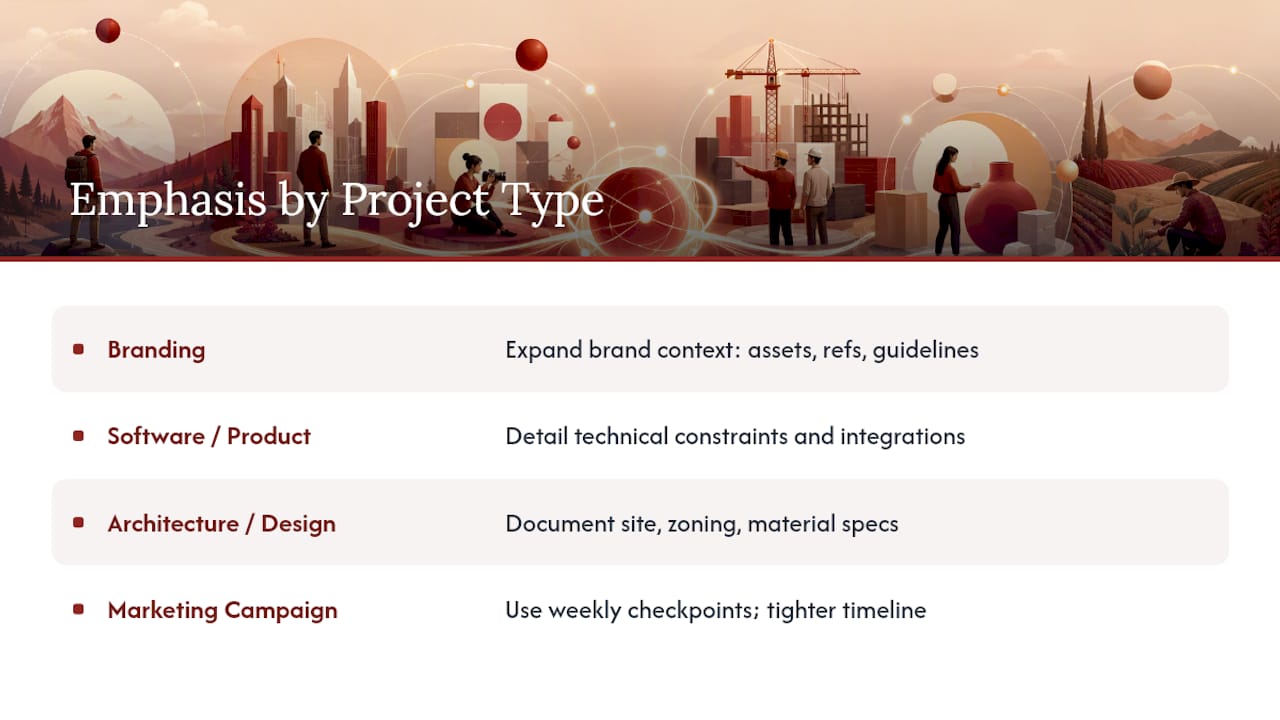
A brief for a website redesign doesn’t need the same fields as a brief for a rebrand or a research engagement, but the nine-section skeleton still holds. Adjust weight, not structure.
For a branding project, expand the brand context section into a full inventory: existing assets, competitor visual references, and any legacy guidelines the new work must respect or deliberately break from.
For a software or product project, the scope section carries more weight than usual. Technical constraints, integration points, and platform requirements belong there in detail, since ambiguity in scope costs far more in development than in a static design project.
For architecture and design-heavy engagements, the design brief resources from RGD show why physical constraints, such as site conditions, zoning, and material specifications, deserve their own subsection under scope rather than getting folded into general notes.
For a short-term marketing campaign, compress the timeline section into weekly checkpoints instead of monthly phases, since campaigns move faster and drift is harder to catch late.
The nine sections stay constant. What changes is which section gets the most ink, based on where that project type actually generates ambiguity.
Should Clients Help Write Their Own Brief?
Yes, and the briefs that skip this step tend to fail quietly. A brief the client never reviewed is really just the agency’s interpretation of a conversation, and interpretations drift from intent more than people expect.
Send the questionnaire directly to the client rather than filling it out on their behalf from memory. Their own words about the primary outcome are more precise than a paraphrase, and their phrasing often reveals priorities a summary would flatten.
Walk through the drafted brief with the client before final sign-off, section by section if the project is complex. This isn’t a formality. Clients frequently catch scope gaps or misstated priorities that the internal team missed simply because they’re seeing the document for the first time with fresh eyes.
Require an explicit approver, not a passive “looks good” in an email thread. Naming a single accountable person prevents the common scenario where three stakeholders each assumed someone else had signed off.
Buy-in isn’t a courtesy step. A client who helped shape the brief is far less likely to dispute scope later, because the document reflects their own words back to them rather than your team’s guess at what they meant.
Digital Vs Traditional Media: Adapting the Same Template
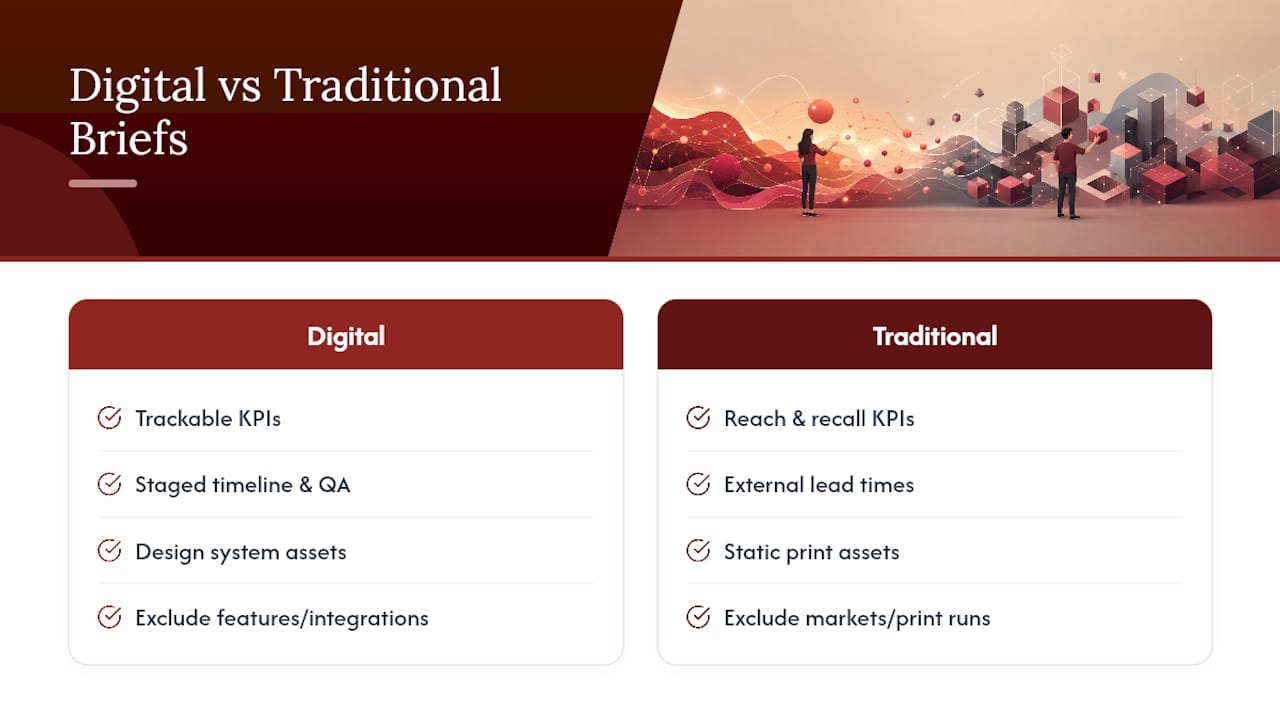
The nine sections translate across both digital and traditional projects, but the details inside each section shift meaningfully.
For a digital project (a website, an app, a digital campaign), success metrics tend to be concrete and trackable: conversion rate, page load time, sign-up volume. The timeline section often includes staging and QA phases that traditional projects don’t need. Brand assets typically live in a design system or component library rather than a static PDF.
For a traditional media project (print, broadcast, out-of-home), the timeline section carries more external dependency: printer lead times, media buying deadlines, broadcast slot availability. Success metrics shift toward reach, impressions, or brand recall studies rather than click-based data, since traditional channels don’t offer the same real-time tracking.
Scope also behaves differently. A digital brief’s out-of-scope list might exclude specific features or integrations. A traditional media brief’s out-of-scope list might exclude specific markets, print runs, or media channels the budget doesn’t cover.
The stakeholder map matters more in traditional media, too, since print and broadcast often involve external vendors (printers, media buyers, production houses) who need their own line in the brief alongside internal approvers.
Keeping the Brief Detailed Without Losing Focus
The instinct to add more detail is natural, and it’s usually the wrong instinct. A brief longer than three pages tends to go unread entirely, which defeats its purpose regardless of how thorough it is.
The fix isn’t cutting information. It’s relocating it. Detailed technical specs, full brand guideline documents, and extended stakeholder bios belong in linked reference material, not in the brief itself. The brief holds the summary and a link; the detail lives one click away for anyone who needs it.
Ask one test question for every sentence you’re tempted to add: would a new team member joining mid-project need this to make a good decision today? If the answer is no, it belongs in a linked doc, not the core brief.
Scope and risk sections are the two exceptions worth erring toward more detail. A vague out-of-scope bullet or a risk description with no early-warning sign is functionally useless. Everywhere else, brevity wins.
A note on standardization and outcomes
Teams that adopt one brief template across every project stop relitigating the same structural arguments each kickoff. Standardize the nine sections, require a named approver, and the arguments shift from “what should this document even contain” to the actual work. Capture the reasoning behind decisions, not just the deliverables, or you’ll answer the same questions twice.
, Rajas
Turn Meeting Notes Into Source-Backed Brief Entries
Most teams lose the reasoning behind a brief entry within weeks. Someone remembers the decision but not why it was made, and the next person to touch the project inherits a guess instead of a record.

The Intent Ledger turns project conversations, transcripts, and critique feedback into ILM Records, structured entries that attach each decision, risk, and open question back to the exact conversation it came from. Instead of writing “client wants a bolder direction” into your brief and losing the context, an ILM Record preserves the client’s actual words, the timestamp, and who raised it. That means your risks section and your working agreement stop relying on memory and start relying on a traceable source.
If your team is tired of rebuilding rationale from scratch every time someone asks “why did we decide this,” start a trial at The Intent Ledger and connect your next client meeting to your brief directly.
Key Takeaways
A client brief works because it forces one measurable outcome, nine defined sections, and a named approver onto a single scannable page the whole team actually reads.
| Point | Details |
|---|---|
| Start with one line | Project, primary outcome, deliverable, and approver form the seed of every brief. |
| Fill all nine sections | Snapshot, outcome, metrics, stakeholders, scope, timeline, brand, risks, and agreements each need a home. |
| Draft it in a week | Questionnaire days 1 to 3, sales handoff day 4, draft day 5, sign-off by day 7. |
| Version instead of rewrite | Add a date, change note, and approver name each time the brief updates. |
| Preserve the rationale | The Intent Ledger’s ILM Records attach source-backed context to brief entries so the “why” survives past kickoff. |
Sources
- Client Brief Template: 9 Sections You Can Copy (Rock)
- Client Brief Template: What to Include (Aviy)
- Client/Design Brief (RGD)