Connect Notes to Tasks: Turn Decisions Into Traceable Work
Connect Notes to Tasks: Turn Decisions Into Traceable Work

Capture the decision in your meeting note, create an action item with an owner and a due date, then drop a persistent link back to that note. That one pattern, repeated consistently, is what makes decisions traceable instead of forgotten. It’s the practical core of the IDA model, which frames information as the raw material for decisions and action as the point where decisions become results.
You don’t need new software to start. Pull up your last meeting note right now and do this:
- Find one decision that never got a linked action.
- Write the action as: what, who, when.
- Paste a link back to the source note in the task description.
Tools like meeting notes templates make this repeatable, and platforms like The Intent Ledger build the whole workflow around it for design teams that can’t afford to lose the reasoning behind a decision.
Key Takeaways
Connecting notes to tasks works when every action item carries an owner, a due date, and a persistent link back to the decision that created it.
| Point | Details |
|---|---|
| Use the IDA pattern | Capture information, name the decision, then attach an owner and due date to the action. |
| Pick one linking pattern | Choose backlinks, embeds, attachments, or frontmatter based on your team’s tool stack, not the fanciest option. |
| Enforce meeting cadence | Share notes within 1 hour, check in at 48 hours, and review open items at the next meeting. |
| Guard shared access | Check who inherits visibility into a note before attaching or linking it to a shared task. |
| Consider The Intent Ledger | It converts meeting notes and critique feedback into ILM Records that keep decisions linked to their source context automatically. |
Table of Contents
- How Do You Connect Notes to Tasks?
- What’s the Best Workflow for Turning Meeting Notes Into Action Items?
- Which Tools Actually Sync Notes and Tasks Well?
- How Do You Set Up Notes-to-Tasks Linking for One Project?
- Why Project Memory Matters More Than Task Lists Alone
- Keeping Shared Notes and Tasks Secure
- Trade-offs, Scale, and What Actually Determines Success
- Give Every Decision a Traceable Home
- Sources
How Do You Connect Notes to Tasks?
There’s no single right way to link notes and tasks. There are four workable patterns, and which one fits depends on how much friction your team will tolerate and how much verification you actually need.
-
Backlinks. You write a task, then paste a link to the note where the decision was made. Anyone who opens the task can jump straight to the original context. This is the lowest-effort pattern and the best for audit trails. Design reviews benefit enormously here. If a client questions why a material was swapped six weeks later, the task links directly to the meeting note where that call got made, not to someone’s memory of it.
-
Embeds. Some note apps let you drop a live task block directly inside the note. The task’s status updates in place, so anyone rereading the note later sees whether the action got done without leaving the page. This works well for project leads who review notes chronologically and want status visible without hunting through a separate task board.
-
Attachments. Instead of linking out, you attach the full note to the task. MeisterTask does this through an “Add attachment → Note” flow, where the attached note appears directly under the task’s attachments for anyone assigned to it. This suits situations where the assignee needs full context but shouldn’t have edit access to your notes system.
-
Frontmatter metadata. Power users store task IDs and sync status inside a note’s metadata fields, which lets automation read and write status without a human clicking anything. The Obsidian plugin Asana Connect works this way: it can create tasks from selected text and write the task’s ID and URL into frontmatter, which makes two-way verification possible later.
-
Quick capture. Whatever pattern you pick, add a “create task from selection” shortcut somewhere in your workflow. Decisions made in the middle of a meeting get lost the fastest, and a one-click capture is the difference between an action item and a regret three weeks later.
Pro Tip: If your note app supports frontmatter, use it. Writing a task ID directly into the note’s metadata is what makes automated status checks reliable, instead of hoping someone remembers to update a link by hand.
What’s the Best Workflow for Turning Meeting Notes Into Action Items?
Start with a templated note, not a blank page. A workable structure has three sections: meeting context, decisions, and action items, with a fourth “parking lot” for anything worth revisiting but not resolving now. This structure is what separates a decision from a task, and it matters more than most people think.
A decision is a statement of direction: “We’re switching to the aluminum cladding spec.” An action item is what happens because of that decision: “Maria updates the spec sheet and sends it to the fabricator by Friday.” Teams that blur the two end up with notes full of vague intentions and no way to check whether anything actually happened. Every action item needs four fields, no exceptions:
- What, the specific deliverable, not a vague verb.
- Who, one named owner, never “the team.”
- When, an actual date, not “soon.”
- Status, open, in progress, blocked, or done.
Timing matters as much as structure. Share the note within an hour of the meeting ending, do a 48-hour check-in on anything with a near-term deadline, and review open items at the start of the next meeting. This cadence isn’t arbitrary; research on meeting note practices ties fast sharing and short follow-up windows directly to higher completion rates.
One caution on automation: AI note-taking tools can now extract action items and push them into task systems automatically. Spinach even before automation enters the picture, which means AI extraction only helps if the underlying note already separates decisions from actions cleanly. Feed it a messy note and you’ll get messy tasks, just faster.
Which Tools Actually Sync Notes and Tasks Well?
You have three real options, and none of them is objectively “best.” Each trades setup effort for reliability.
Manual linking costs nothing to set up. You paste a URL from your task into your note, or vice versa, every time. It works fine for small teams with two or three active projects, but it depends entirely on human discipline. The moment someone forgets to paste the link, the connection is gone and nobody notices until it matters.
Plugin and extension sync gets you live embeds, create-from-selection capture, and frontmatter-based status sync, without needing a separate automation layer. Asana Connect for Obsidian is a working example: it lets you search and insert existing tasks, create new ones from highlighted text, and mark a task complete without leaving the note. The trade-off is setup time and the fact that it only works if your note app and task manager both support the integration.
Automation platforms and webhooks, the Zapier and IFTTT category of tool, handle cases plugins can’t reach, like pushing a note into a task system that has no native plugin. The common failure points are field mapping (a due date in one system doesn’t always map cleanly to a due date field in another) and permissions (a webhook often needs broader account access than a native plugin does). Community threads about connecting Google Keep notes to Google Tasks show how often people hit this wall and fall back on manual workarounds.
Whichever route you choose, confirm your setup syncs these five fields, or it isn’t really integrated:
- Task name
- Assignee
- Due date
- Status
- A link back to the source note
If you’re automating the pipeline from raw input to task creation, a guide on automating task creation from email covers the same field-mapping problems you’ll run into with notes.
How Do You Set Up Notes-to-Tasks Linking for One Project?
Run this checklist on a single project before rolling it out everywhere. It takes less time than the average status meeting.
- Pick one linking pattern (backlink, embed, attachment, or frontmatter) based on your team’s actual tool stack, not the fanciest option available.
- Publish a meeting notes template with decision and action-item sections, and make it the default for every project meeting.
- Set up one integration, or if you’re going manual, write down the exact convention everyone will follow (where the link goes, what format).
- Create a validation test: turn one real note into one real task, confirm the status syncs correctly, then click the backlink to make sure it actually opens the note.
- Set your follow-up cadence in writing, including who checks the parking lot at the next meeting.
Pro Tip: Test the validation step with a task that has a near-term due date. If the sync breaks, you want to find out in 48 hours, not three weeks into a project when nobody remembers what the original note said.
Why Project Memory Matters More Than Task Lists Alone
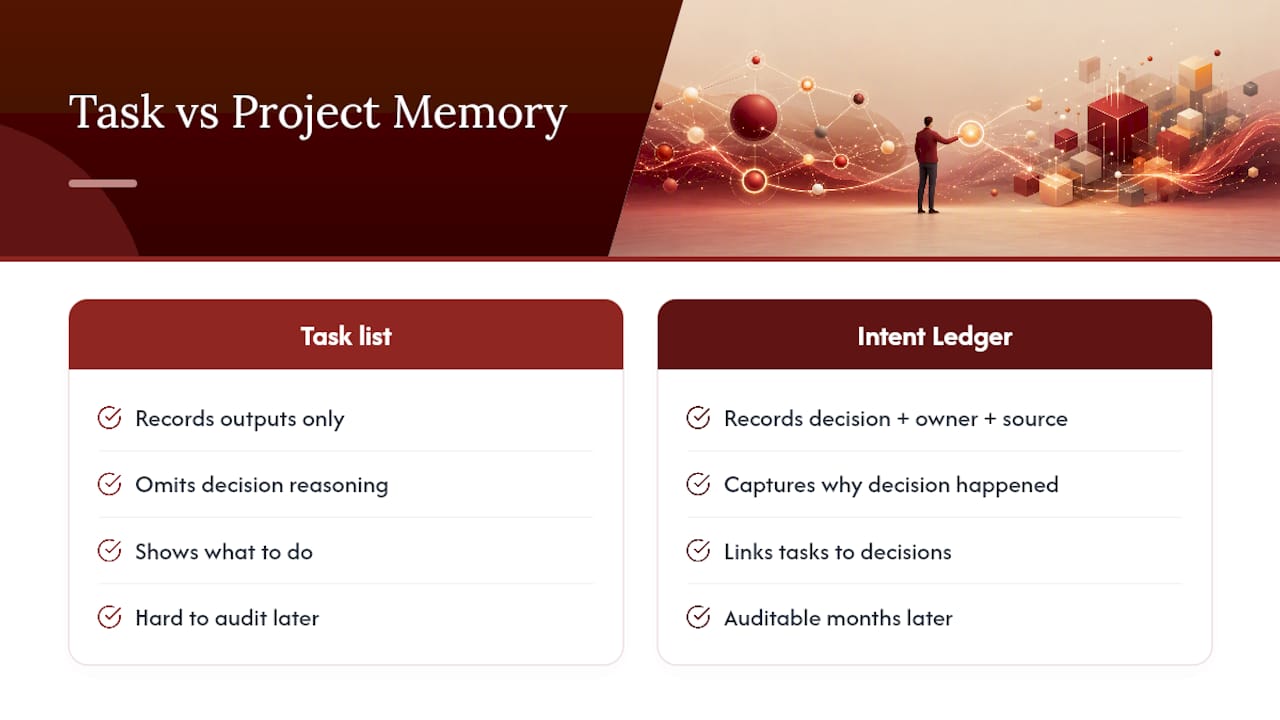
The IDA model exists because most teams over-invest in tracking outputs and under-invest in the information that produced them. Vorne’s framing treats information as the precondition for a good decision, and action as the moment that decision either pays off or doesn’t. A task list without a link back to the decision behind it is just a to-do list. It tells you what to do, not why you’re doing it, and “why” is exactly what gets asked six weeks later when a client or a contractor pushes back.
The Intent Ledger builds around that gap directly. Rather than storing a flat meeting summary, it turns project conversations, transcripts, and critique feedback into ILM Records, structured entries that keep the decision, the assigned owner, and the original source context attached to each other permanently.
A task without its source note is a command with no reasoning attached. Reconnect the two, and every action becomes something a teammate can audit six months later without asking “wait, why did we decide this?”
For design teams specifically, that reconnection matters more than in most fields, because so many decisions (a material swap, a code compliance workaround, a client-requested revision) get made verbally and then paraphrased badly in a follow-up email.
Keeping Shared Notes and Tasks Secure
Linking notes to tasks means more than one person can now see the reasoning behind a decision, which is exactly the point, but it also widens who can see sensitive material. Client feedback, budget discussions, and unresolved risks often live in the same note as the action items you’re syncing outward.

Before you connect a note to a task system, check who inherits access. A backlink shared inside a task usually opens to anyone with task-viewer permissions, even if that note itself sits in a more restricted folder. Attachments carry a similar risk: MeisterTask’s note-attachment feature makes the full note visible to anyone assigned the task, so a note written for internal review shouldn’t get attached to a task shared with a client.
Frontmatter and plugin-based sync introduce a different concern: API tokens. A plugin that writes task IDs into your note metadata typically needs a standing connection to your task manager’s account, and that token is a credential worth protecting the same way you’d protect any login. Rotate it if a team member with plugin access leaves the project.
A few habits reduce the exposure without slowing anyone down:
- Keep client-sensitive notes in a separate folder with tighter sharing than your general project notes.
- Review task-level permissions before attaching or linking a note that contains unresolved risks or pricing discussions.
- Treat any automation platform (Zapier, IFTTT, or similar) as a third party with its own access to your data, and check what it retains.
None of this means avoiding integration. It means deciding, deliberately, what belongs in the shared layer and what stays in the note.
Trade-offs, Scale, and What Actually Determines Success
Manual linking is fine for two people and three projects. Past that, discipline erodes and links stop getting pasted. The real predictor of success isn’t the tool, it’s whether someone owns the cadence: sharing fast, checking in at 48 hours, reviewing at the next meeting. A studio I’ve seen described avoided a costly material re-order entirely because a backlinked note let a junior designer trace a spec change back to the client conversation that caused it, before ordering the wrong finish. That’s project memory paying for itself in one afternoon.
, Rajas
Give Every Decision a Traceable Home
Design teams lose more time re-litigating old decisions than making new ones, and most of that time gets spent digging through email threads and half-remembered Slack messages. The Intent Ledger turns your meeting notes, transcripts, and critique feedback into ILM Records that keep the decision, its owner, and the original conversation attached to each other permanently, so the workflow described above (decision, action, backlink) happens automatically instead of depending on someone remembering to paste a URL.

Subscribers get traceable decisions tied to source context, structured ILM Records instead of flat meeting summaries, and follow-up dashboards that surface open action items before they turn into missed deadlines. If you’re managing more than a handful of active projects, that structure replaces the manual linking discipline this article just walked through. Start a trial at The Intent Ledger and turn your next project meeting into a record your whole team can trust months from now.
Sources
- The IDA Model: Information, Decision, Action | Vorne
- Asana Connect (Obsidian community plugin)
- How to write meeting notes that drive action (Krisp blog)
- Add Notes to Tasks | MeisterTask support