Copyable Critique Feedback Examples, Reusable Template for Designers
Copyable Critique Feedback Examples, Reusable Template for Designers

Critique feedback examples are short, specific comments (praise, problem, action, constraint, or question) that a reviewer attaches to a design at a given moment, with enough context to act on later. The minimum to make one useful: name what you’re looking at, tie it to a version or sheet, and assign an owner. The rest of this piece gives you the categorized phrases and a copy-ready template to make that happen on your next review.
TL;DR:
- Clear documentation of critique comments, linked to specific sheets, versions, and owners, ensures feedback is actionable and traceable across project revisions.
- Structured feedback records prevent comments from being forgotten or resurfacing unexpectedly, reducing unnecessary revision loops.
- Using specific, location-based critique prompts with defined next steps improves the quality and usefulness of review comments.
- Formal review formats and roles, such as pin-up or desk critiques with an explicit process, enhance the clarity and effectiveness of feedback sessions.
- Avoid vague or personality-driven comments by tying critique directly to project goals, code, or client requirements, fostering a constructive review environment.
Table of Contents
- Critique Feedback Examples You Can Copy and Adapt
- A Feedback Record Template You Can Reuse Today
- Turning Comments Into Closed, Verifiable Decisions
- Meeting Formats That Actually Produce Usable Feedback
- Constructive Critique Versus Destructive Critique: What Separates Them
- How to Receive Critique Without Getting Defensive
- Common Mistakes Reviewers Make When Giving Critique
- Cultural Considerations When Giving or Receiving Critique
- The Psychological Weight of Critique, and How to Manage It
- Critique Feedback Across Design, Writing, and Software Development
- Why Documented Critique Changes How Projects Actually Run
- Capture Critique as Traceable Records With The Intent Ledger
- Sources
- FAQ
Critique Feedback Examples You Can Copy and Adapt
Most design reviews die in vague language. “This feels off” or “love this direction” tells the next reader nothing about what to change or keep. The fix isn’t more feedback. It’s sharper feedback, sorted by what it’s actually trying to do.
Below are five categories of critique feedback examples, each with a short note on when to reach for it and what to attach so the comment survives past the meeting.
Positive preservation phrases protect the parts of a design that are working, so they don’t get accidentally cut in the next revision.
- “Keep the entry sequence as drawn. The staggered threshold solves the privacy issue we flagged in Round 2.” (Attach: sheet number, decision reference.)
- “This material palette reads cohesive from the north elevation. Don’t touch it before client sign-off.” (Attach: version, owner of the palette decision.)
- “The circulation diagram on page 4 is the clearest version yet. Use it as the base for the next iteration.” (Attach: version number, so it doesn’t get overwritten.)
Problem-spotting phrases name what isn’t working, without prescribing the fix. They’re the hardest to write well because vague criticism (“something’s wrong here”) is nearly useless.
- “The stair core reads as an afterthought against the main facade rhythm.” (Attach: elevation sheet, priority tier.)
- “Circulation crosses the service corridor twice on this floor. That’s a conflict, not a style note.” (Attach: floor plan sheet, owner for resolution.)
- “Visual hierarchy on the landing page buries the primary call to action below three competing headlines.” (Attach: screen name or file, priority.)
Action-oriented phrases convert a problem into a next step someone can actually execute.
- “Try pulling the stair core forward six inches and re-check the facade rhythm in elevation.” (Attach: owner, due date or next review round.)
- “Prototype two circulation options before the next pin-up: one with the service corridor relocated, one with a partition added.” (Attach: owner, version target.)
- “Run this through a lighting simulation before we commit to the skylight placement.” (Attach: who runs it, when it’s due.)
Constraint-flagging phrases surface budget, code, or structural limits before they become expensive surprises.
- “This cantilever exceeds what the structural engineer approved in the schematic phase. Flag for re-review.” (Attach: engineer of record, priority: must-fix.)
- “Client budget caps finishes at this tier. Confirm before specifying the stone veneer.” (Attach: budget line reference, owner.)
- “Egress width here doesn’t meet code for occupancy load. This isn’t a design preference, it’s a compliance issue.” (Attach: code section if known, must-fix priority.)
Question prompts surface assumptions the designer may not have stated out loud, and they tend to produce better answers than direct criticism does. Open prompts like “have you considered…” foster critical thinking and let designers own their solutions rather than simply following a reviewer’s instructions.
- “Have you considered how this reads at night, when the facade lighting is the only cue?”
- “What’s driving the column grid here? Structural, budget, or precedent?”
- “Who owns the decision on ceiling height in this zone?”
Pro Tip: Write the phrase first, then immediately add three words after it: sheet, owner, priority. A comment without those three anchors will get lost by the next review round, no matter how well it’s worded.
A Feedback Record Template You Can Reuse Today
A critique comment that isn’t tied to a location, a version, and a person is basically a sticky note that will fall off the wall. The fields below are the minimum for a comment to survive from one review to the next without someone having to reconstruct what was meant.
| Field | Why it matters |
|---|---|
| Context (session, date, sheet/version) | Ties the comment to a specific moment, not a vague memory |
| Exact comment (verbatim) | Prevents drift when the comment gets paraphrased later |
| Location | Pins the note to a sheet, screen, or coordinate, following the logic of markup lists that keep comment location and intent together |
| Why it matters | One line connecting the comment to a project goal, code issue, or client requirement |
| Priority | Must-fix, nice-to-have, or won’t-do |
| Owner | One name, never a team |
| Due date or target version | When the fix should show up |
| Verification | Who confirmed the fix and when |
Three filled examples, condensed:
- Studio pin-up: Context: Wednesday pin-up, Scheme B, v3. Comment: “Stair core reads disconnected from facade rhythm.” Location: East elevation, sheet A3.2. Priority: Nice-to-have. Owner: Maria. Target: next pin-up.
- Client review: Context: Client review, February 3, v5. Comment: “Client wants warmer material palette in the lobby.” Location: Interior elevations, sheet A5.1. Priority: Must-fix. Owner: Devon. Target: v6, verified by project lead.
- Technical coordination: Context: MEP coordination call, RFI 014. Comment: “Duct routing conflicts with structural beam at grid C4.” Location: Mechanical plan, sheet M2.0. Priority: Must-fix. Owner: structural engineer. Verification: sign-off required before permit set.
Link every entry back to the decision or version it came from. A decision log template makes that traceability automatic instead of something someone has to remember to do by hand.
Turning Comments Into Closed, Verifiable Decisions
A comment that never gets closed is worse than no comment at all. It sits in someone’s inbox, gets half remembered, and resurfaces three revisions later as a surprise. A Comment Resolution Sheet fixes this by giving every comment an ID, a response, a status, and a verifier, following a lifecycle of submission, review, consolidation, response, resolution, and close-out.
Five rules make this work without extra software:
- Define a review round explicitly. Consolidate all feedback for that round before anyone starts revising.
- Sort every comment into one of three tiers: Must-fix, Nice-to-have, Won’t-do. No comment stays untiered.
- Assign exactly one owner per comment. Shared ownership is how items get dropped.
- Link every resolved comment to the version where the fix appears, and record who verified it and when.
- Escalate to a decision gate or change order when a comment touches budget, code, or scope, not a routine revision.
Teams that centralize feedback in a single hub instead of scattering it across email and chat report fewer revision rounds and better client outcomes.
Meeting Formats That Actually Produce Usable Feedback
The format of a critique session shapes the quality of the comments it produces almost as much as the phrasing does. Three recipes cover most design team needs.
Pin-up review: 45 to 60 minutes. Presenter shows work for 5 minutes max, then opens the floor. Use the SHOW then ASK then FOCUS method: show the work, ask a specific question of the group, then focus discussion on that question before moving on. Limit presenters to two questions they actually want answered.
Peer-review circle: Groups of five to seven members meeting on a regular cadence with a defined agenda resolve issues faster than ad hoc reviews, especially when the agenda includes explicit action commitments before the session ends.
Desk crit: One-on-one, 15 to 20 minutes, best for early-stage or struggling work where a group setting would add pressure without adding value.
Assign roles before the session starts: a timekeeper, a note-taker capturing exact phrasing, and a verifier who confirms fixes later, following tips from How to Enhance Team Collaboration: A Manager’s Guide. Technical coordination reviews (structural, MEP) run tighter and more directive than studio critiques, which should stay generative and question-driven to protect the designer’s ownership of the solution.
Constructive Critique Versus Destructive Critique: What Separates Them
The difference rarely comes down to how harsh a comment sounds. It comes down to whether the comment gives the recipient something to do.
“The proportions here are wrong” is destructive not because it’s blunt, but because it’s a dead end. There’s no location, no reasoning, no next step. Compare that to: “The window-to-wall ratio on the south facade reads heavier than the north. Check it against the elevation study from Round 1.” Same level of directness, completely different outcome, because the second version gives the designer a place to start.
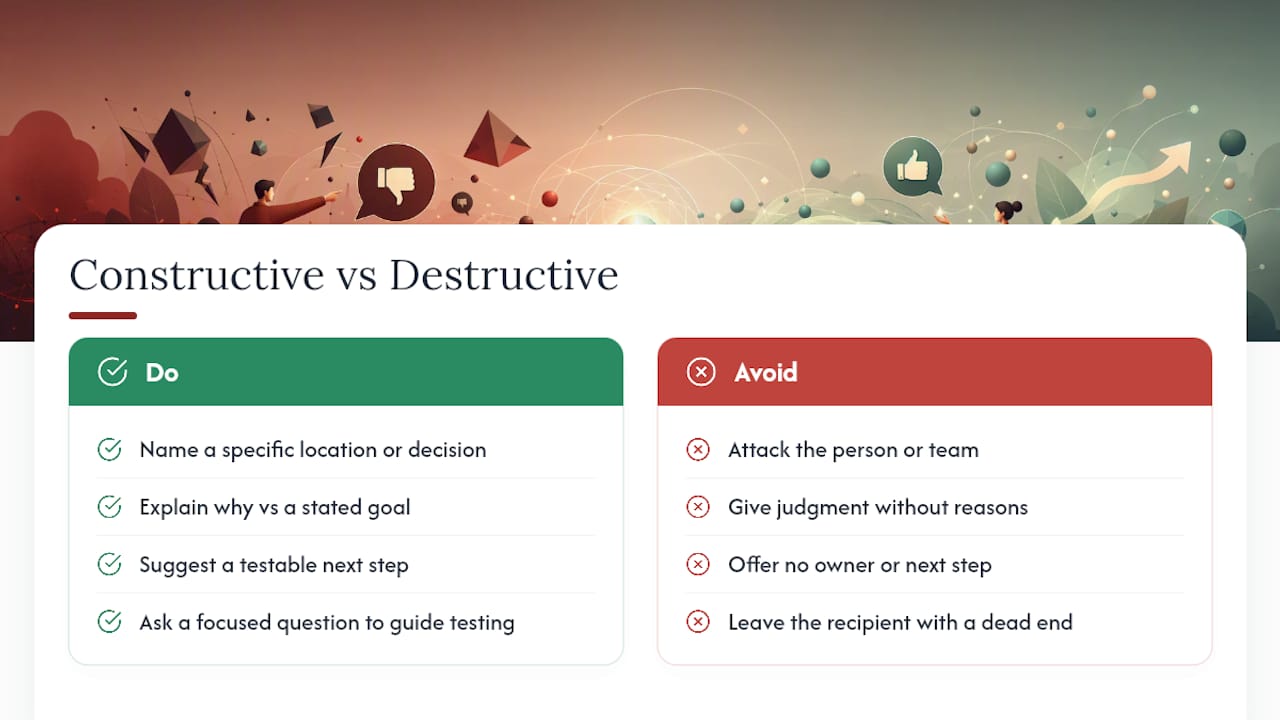
Destructive critique tends to share three traits: it attacks the person instead of the work (“you always miss this”), it offers judgment without reasoning (“this doesn’t work”), and it arrives with no clear owner or next step, so the recipient has nowhere to put the frustration except back at the reviewer.
Constructive critique, even when it’s critical, does the opposite. It names a specific location or decision, explains why it matters against a stated goal (code, budget, client brief, precedent), and either suggests a testable next step or asks a real question. “Have you considered how this reads from the street?” is constructive even though it doesn’t hand over an answer, because it points the designer toward a specific test they can run themselves.
How to Receive Critique Without Getting Defensive
The instinct to explain or defend a decision the moment it’s questioned is normal, and it’s also the fastest way to shut down useful feedback. The better first move is almost always to ask a clarifying question before responding: “Are you flagging the material choice or the way it’s detailed?” That single pause usually surfaces what the reviewer actually meant, which is often narrower than what the designer heard.
Write the comment down verbatim before reacting to it, even if it stings. A comment captured in the moment, in the reviewer’s own words, is more useful later than a paraphrased memory shaped by whatever emotion came up when you heard it.
Separate the tiers before you respond. Not every comment is a must-fix, and treating a “nice-to-have” observation with the same urgency as a code violation burns energy you’ll need later in the project. If a comment feels unclear or unfair, ask for the reasoning behind it rather than the fix itself: “What’s the concern driving this?” That question usually gets you closer to the real issue than arguing about the specific suggestion does.
Common Mistakes Reviewers Make When Giving Critique
The most common failure isn’t harshness. It’s vagueness dressed up as a compliment or a complaint. “I’m not loving this” gives the designer nothing to act on and nothing to defend against, which makes it more frustrating than a sharp, specific critique would be.
A second common mistake: prescribing a solution before naming the problem. “Move the stair to the left” skips past the reasoning, so if the designer moves it and the underlying issue was actually about sightlines, the fix misses entirely. Naming the problem first, then optionally suggesting a direction, keeps the designer in control of the actual solution.
A third mistake is stacking too many comments into one pass without any priority signal. Twenty untiered comments after a single review round tells the designer everything is equally urgent, which is rarely true and usually leads to the wrong things getting fixed first.
Finally, watch for feedback that never references the project’s actual goals. A comment that’s really about personal taste, dressed up as a design principle, is one of the fastest ways to erode trust in the review process. Tying every critique back to a stated goal, whether that’s a code requirement, a budget line, or a client brief, keeps the conversation grounded in something both sides can point to.
Cultural Considerations When Giving or Receiving Critique
Directness reads very differently across teams, regions, and disciplines, and assuming everyone shares your default style is a quiet source of friction. A comment that feels appropriately blunt to one reviewer can land as needlessly harsh to someone raised in a communication culture that favors indirection and face-saving language.
Studio critique culture in design education often leans toward direct, even confrontational, language as a teaching tool. That same style transplanted into a client-facing review, or a cross-cultural team, can damage trust fast. The safer default in mixed settings is to lead with the specific and the factual (what you’re looking at, what the constraint is) and let the tone stay measured, saving sharper language for peer settings where everyone has opted into that register.
Seniority dynamics matter too. Junior designers may hesitate to push back on a senior reviewer’s comment even when they have relevant information the reviewer lacks. Building an explicit norm, such as inviting one clarifying question from the recipient before a comment is finalized, helps surface that information without requiring anyone to contradict a superior outright.
The Psychological Weight of Critique, and How to Manage It
Critique carries emotional weight because design work is personal, even when it’s produced for a client. A pointed comment about a facade can feel like a comment about competence, and that gap between what’s said and what’s heard is where most defensiveness comes from.
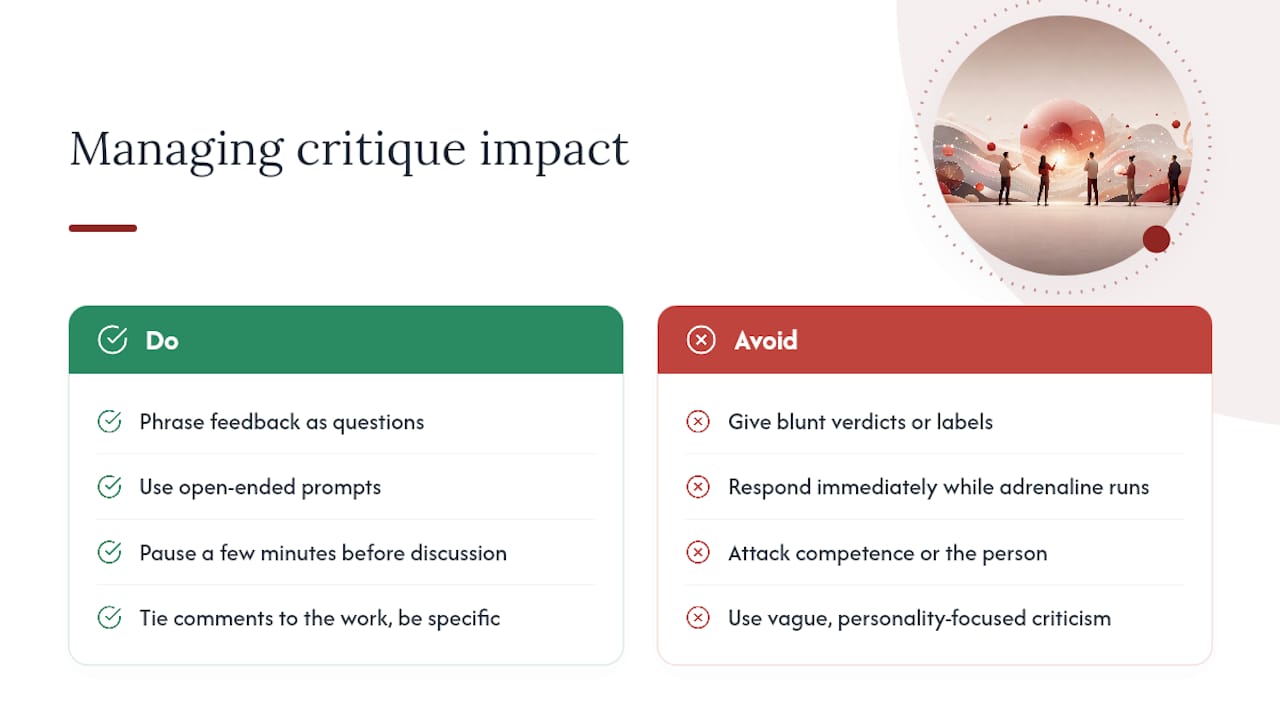
Framing helps close that gap. Comments phrased as questions (“what’s driving this decision?”) tend to trigger less defensiveness than comments phrased as verdicts (“this is wrong”), because they invite explanation instead of demanding correction. That’s part of why open-ended prompts work better as a teaching and review tool than blunt judgments do.
Timing matters just as much as wording. A designer who has just presented work is more receptive a few minutes into open discussion than in the first thirty seconds after finishing, when adrenaline is still running high. Building a short pause into the format, even an informal one, gives people room to hear feedback instead of just absorbing the hit.
Psychological safety isn’t the absence of criticism. It’s the confidence that criticism will be specific, tied to the work rather than the person, and delivered by someone who wants the project to succeed. Reviewers who consistently follow that pattern earn the right to be more direct over time, because the recipient has learned the comment is never really about them.
Critique Feedback Across Design, Writing, and Software Development
The categories hold up outside architecture, too, and seeing the parallels helps clarify what makes any critique comment useful.
In graphic and product design, a strong critique comment reads like: “The primary CTA competes with the hero image for attention. Test a version with more contrast between them.” Same structure as the architecture examples: a named problem, a location, a testable action.
In writing and editorial work, effective critique sounds like: “This paragraph buries the thesis in the third sentence. Move it to the first.” Specific, located, actionable, the same pattern that separates a useful design comment from a vague one.
In software development, code review comments follow an almost identical logic: “This function handles three responsibilities. Consider splitting it before this ships.” The discipline changes, the components change, but the shape of a useful comment (specific, tied to a location, paired with a reason or a next step) stays constant across every field that relies on iterative review.
Why Documented Critique Changes How Projects Actually Run
Undocumented critique doesn’t disappear. It resurfaces three revisions later as a surprise, or as a disagreement about what was actually decided, because nobody wrote down the reasoning at the time. That’s not a discipline problem. It’s a memory problem.
Structured records fix this by tying each comment to its source conversation, so a risk flagged in a pin-up doesn’t quietly vanish by the client review. That traceability is the whole premise behind The Intent Ledger’s blog on decision documentation, and it’s worth reading if any of the templates above felt like something you’d want automated rather than maintained by hand.
, Rajas
Capture Critique as Traceable Records With The Intent Ledger
Some project memory tools turn critique sessions, meeting notes, and client comments into structured ILM Records instead of scattered sticky notes and buried email threads. If you’ve been copying the phrases and templates above into a shared doc, this is what happens when that process gets built into the tool instead of maintained by hand.

Three things it does that a shared doc can’t: it keeps a single source of truth for every comment and its resolution, it links each record to the version or sheet it came from so nothing drifts between rounds, and it preserves a traceable verification trail so anyone can confirm who signed off on a fix and when. If you’re managing more than a couple of active review rounds at once, that traceability is the difference between a comment getting closed and a comment getting lost.
Start by looking at The Intent Ledger to see how ILM Records are structured, then check the pricing page to find the plan that fits your team’s review volume.
Sources
- Center for Teaching and Learning, Critiques
- Architect peer-review circles accelerate progress through critique sessions
- Comment Resolution Sheet (CRS): 7-Step Process + Template
- How to document client feedback for design projects, Visual Soldiers
- PDF markups for architects: The 2026 guide, Bluebeam
FAQ
What’s the difference between critique feedback and general feedback?
Critique feedback is tied to a specific location, version, and purpose (praise, problem, action, constraint, or question), while general feedback is often vague and hard to act on later.
How specific should a critique comment be?
Specific enough that someone reading it weeks later, without being in the room, understands exactly what was flagged, where, and why it mattered.
How do I stop endless revision rounds?
Define review rounds explicitly, consolidate all feedback before revising, and use a Comment Resolution Sheet so every comment closes with a verified status instead of resurfacing later.
Should critique always be phrased as a question?
Not always, but open prompts like “have you considered…” tend to foster ownership and critical thinking better than direct verdicts, especially in studio settings.
How does The Intent Ledger help with critique documentation?
The Intent Ledger converts critique sessions and meeting notes into structured ILM Records, linking each comment to its source conversation, version, and resolution status.