Decision Log Template for Project Teams
Decision Log Template for Project Teams

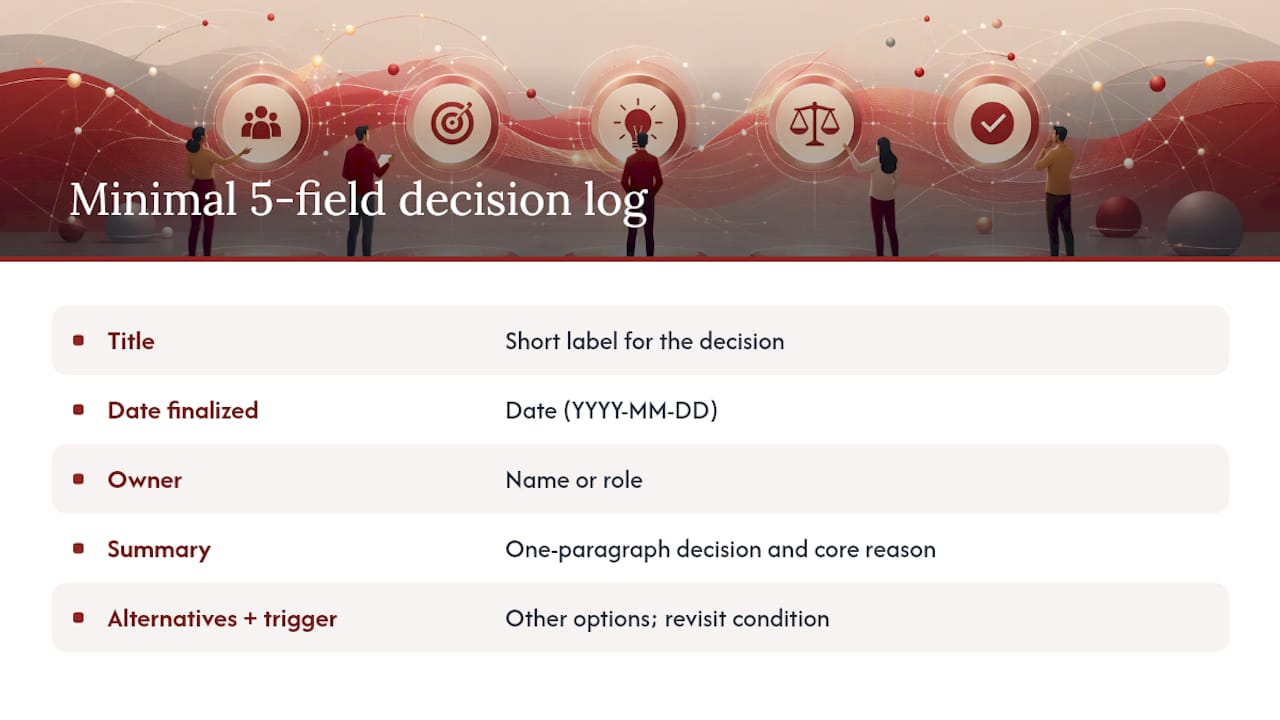
A decision log is a short, structured record of significant project choices: what was decided, why, who owns it, and what would trigger a revisit. The simplest version that teams actually maintain has five fields, and you can copy it right now:
- Title: Short label for the decision
- Date finalized: When the decision was made
- Owner: The person accountable for it
- Summary: One paragraph covering what was decided and why
- Alternatives considered + trigger to revisit: What else was on the table, and what would reopen this
Paste that into a Notion page, a Confluence doc, a Google Sheet row, or a plain text file at the top of your project folder. The format doesn’t matter nearly as much as the habit of filling it in before the meeting ends.
Pro Tip: Set up a blank template entry at the top of your log and duplicate it each time. Friction is the enemy of adoption, and a pre-filled skeleton cuts the time to log a decision to under three minutes.
Key Takeaways
A decision log template works when it’s minimal, owned, and stored where the project lives.
| Point | Details |
|---|---|
| Start with five fields | Title, date, owner, summary, and alternatives plus trigger cover everything a team needs to log in under three minutes. |
| Log in the moment | Fill the entry before the meeting closes; reconstruction the next day loses context and accuracy. |
| Assign one owner | A named person, not “the team,” is accountable for keeping the log complete and prompting entries after decisions. |
| Schedule quarterly reviews | A thirty-minute scan each quarter closes resolved entries and surfaces triggers that have been met. |
| Theintentledger | Purpose-built project memory software that links decision records to original conversations, transcripts, and evidence for design teams. |
Table of Contents
- What a decision log is (and what it isn’t)
- Why your team will thank you for keeping one
- What actually counts as a decision worth logging
- The fields that make a decision log entry actually useful
- The minimal 5-field template you can copy right now
- Where to keep your decision log so people actually find it
- How to make decision logging a team habit
- Pitfalls that kill decision logs (and how to avoid them)
- A realistic filled example you can adapt
- Why minimal, source-backed records are the right default
- Theintentledger turns your project conversations into searchable decision records
- Sources
What a decision log is (and what it isn’t)
A decision log is an outcome-focused record of significant project choices, written for future readers who weren’t in the room. It captures the decision itself, the context that drove it, the alternatives that were rejected, and who made the call.
It is not:
- Meeting notes. Meeting notes capture discussion flow. A decision log captures conclusions, stripped of the back-and-forth.
- A task tracker. Tasks describe what to do next. A decision log describes what was settled and why.
- An audit trail of everything. Logging every micro-choice creates noise that buries the entries that actually matter.
The distinction matters because teams that conflate decision logs with meeting notes end up with documents nobody reads. The log should be scannable in two minutes, not a wall of text.
Why your team will thank you for keeping one
The clearest benefit is accountability. When a decision has a named owner and a recorded rationale, it stops being “something we agreed on in that meeting” and becomes a traceable artifact. That matters when a client pushes back, when a new team member joins, or when a retrospective surfaces a choice that didn’t age well.
Onboarding alone justifies the effort. A new designer or project manager who can read through a project’s decision history in an afternoon arrives at their first meeting with context that would otherwise take weeks of hallway conversations to accumulate.
- Fewer repeated debates. Teams that log decisions stop relitigating settled questions. The log becomes the answer: “We covered this in March, here’s the entry.”
- Retrospective input. A quarterly scan of the log shows which decisions held up and which didn’t, giving retrospectives a concrete starting point instead of vague impressions.
- Auditability. For regulated industries or client-facing projects, a decision log provides a clear record of who approved what and when.
Pro Tip: When a debate resurfaces in a meeting, open the log before the discussion goes five minutes. If the decision is already there, read it aloud. If it isn’t, that’s a signal it should have been logged the first time.
What actually counts as a decision worth logging
A useful rule of thumb: if undoing the decision would cost more than a week of work, log it. That filters out daily micro-choices while capturing the ones that shape the project’s direction.
More specifically, log a decision when it meets any of these criteria:
- It affects more than one team or stakeholder group
- It involves a vendor, tool, platform, or architecture choice
- It changes the scope, timeline, or budget baseline
- It sets a policy or standard that will govern future work
- It was contested, meaning reasonable people disagreed before the call was made
Concrete examples across project types:
- Product team: Choosing to build a feature in-house rather than buy a third-party integration
- Architecture studio: Selecting a structural system after evaluating two alternatives
- Design team: Deciding to drop a user flow based on usability test results
- Operations: Changing the approval threshold for vendor invoices
Architecturally significant requirements are a useful reference point for technical teams: if a choice is driven by a constraint that shapes the whole system, it belongs in the log.
Pro Tip: When in doubt, ask: “Would a new team member need to know this to understand why the project looks the way it does?” If yes, log it.
The fields that make a decision log entry actually useful
Every field in a decision log entry should earn its place. Here’s what a complete entry contains and why each piece matters:
| Field | Required / Optional | Purpose | Target length |
|---|---|---|---|
| ID | Optional | Unique reference for linking | Short code (e.g., DL-001) |
| Title / summary | Required | Scannable label for the decision | 5–10 words |
| Date finalized | Required | Anchors the decision in time | Single date |
| Owner | Required | Accountability; who to ask | One name or role |
| Rationale | Required | Why this choice over others | 2–4 sentences |
| Alternatives considered | Required | What was rejected and why | 1–2 sentences each |
| Trigger to revisit | Required | Condition that reopens the decision | One sentence |
| Linked tasks / tickets | Optional | Connects decision to execution | Task IDs or URLs |
| Status | Optional | Open, decided, superseded | Single word |
| Review date | Optional | Scheduled check-in | Single date |
The trigger to revisit field is the one most teams skip and most regret skipping. Without it, decisions get reopened casually whenever someone new joins or a stakeholder changes their mind.
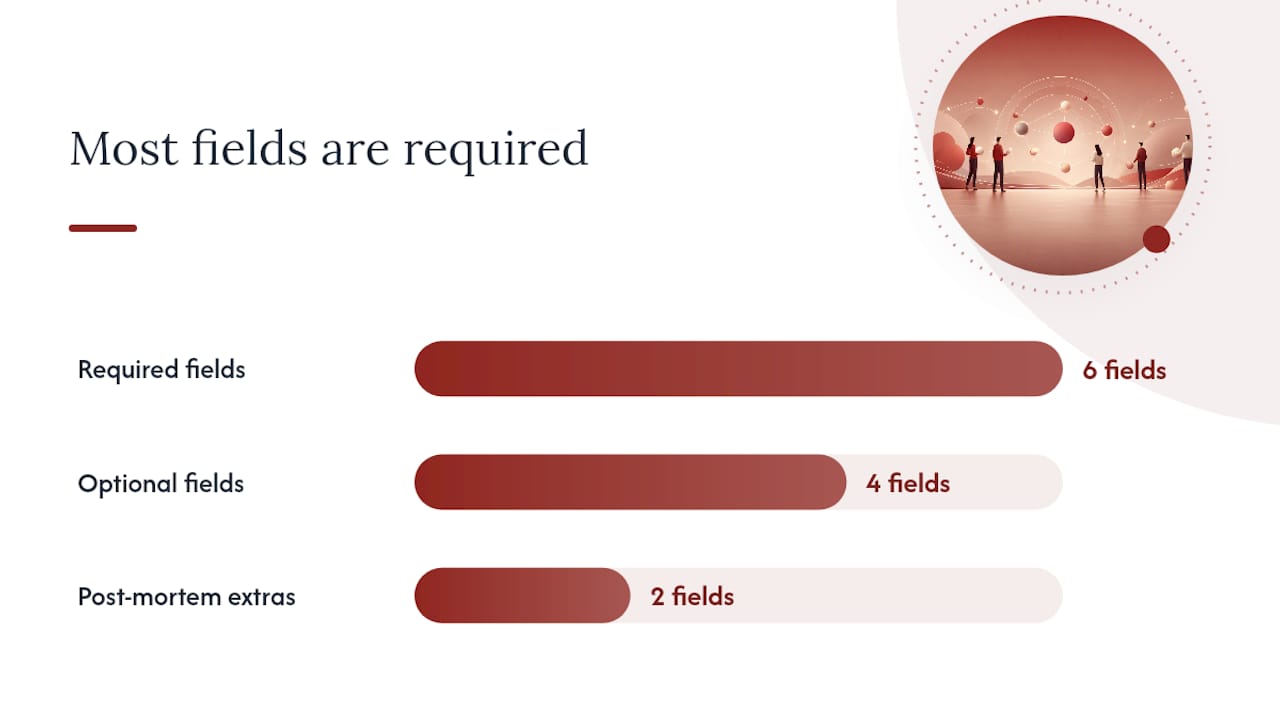
For teams doing post-mortems, a fuller schema that adds expected outcome, confidence level, and review date supports quantitative retrospectives. Those extra fields are worth adding once the basic habit is solid, not before.
An entry skeleton for reference:
- ID: DL-001
- Title: Selected Figma as primary design tool
- Date finalized: March 4, 2025
- Owner: Lead Designer
- Rationale: Team already familiar; real-time collaboration reduces review cycle time.
- Alternatives considered: Sketch (no real-time collab); Adobe XD (licensing cost).
- Trigger to revisit: If Figma pricing increases more than 30% or a team-wide tool audit is scheduled.
- Linked tasks: PROJ-44, PROJ-45
- Status: Decided
- Review date: September 2025
The minimal 5-field template you can copy right now
The highest-adoption format is the one with the fewest fields a team can fill in during the last two minutes of a meeting. Here it is:
Title: [Short label for the decision] Date finalized: [YYYY-MM-DD] Owner: [Name or role] Summary: [One paragraph: what was decided and the core reason why] Alternatives considered + trigger to revisit: [What else was on the table, and what condition would reopen this]
A filled example:
Title: Switched project status updates from weekly email to async Loom videos Date finalized: January 14, 2025 Owner: Project Manager, Sara Chen Summary: The team agreed to replace the weekly written status email with a five-minute Loom video recorded by the PM each Friday. Client feedback indicated the emails were being skimmed; the video format allows the PM to highlight risks visually and gets higher engagement. Alternatives considered + trigger to revisit: Continued written email (rejected: low engagement); live weekly call (rejected: scheduling friction across time zones). Revisit if client requests a return to written format or if video production time exceeds 30 minutes per week.
Why minimal beats exhaustive: a ten-field template feels like a form to fill out. A five-field template feels like a note to write. Structured summaries that capture rationale and alternatives outlast transcripts and long-form documentation because they’re written to be read, not archived.
Pro Tip: Add a “confidence” line to the summary if the decision was made under uncertainty. One sentence (“Confidence: medium, we had limited data on user behavior”) gives future readers the right frame for interpreting the outcome.
Where to keep your decision log so people actually find it
The single most important storage rule: keep the log where the project lives. A decision log in a separate folder nobody navigates to is a log nobody reads.
Common options and their tradeoffs:
- Notion: Strong search, flexible structure, easy to link to tasks. Works well for design and product teams already in Notion. Weakness: permissions can get messy on larger teams.
- Confluence: Native to Jira-based workflows; decisions link directly to tickets. Weakness: page discovery is poor without deliberate tagging.
- Google Docs / Sheets: Low barrier to entry; Sheets work well for a tabular log with one row per decision. Weakness: version history is harder to navigate than purpose-built tools.
- GitHub / GitLab (as Markdown files): Ideal for engineering teams; decisions live in the repo alongside the code they affect. Weakness: non-technical stakeholders rarely look there.
- Project management tools (Asana, Linear, Jira): Decisions can live as pinned notes or custom fields on a project. Weakness: these tools optimize for tasks, not long-lived records.
Linking decisions to tasks is worth the extra thirty seconds. When a developer opens a ticket and sees a link to the decision that created it, they have the rationale without asking anyone. That’s the practical payoff of linking decisions to execution artifacts.
Whatever tool you choose, make the log searchable and give it a stable URL. A decision log that requires three clicks to find will be ignored.
How to make decision logging a team habit
Ownership is the first question to settle. One person should be responsible for the log, usually the project manager or a designated team lead. That doesn’t mean they write every entry; it means they prompt the team and review for completeness.
Three moments to embed logging into existing workflow:
- End-of-meeting prompt. Before closing any meeting where a significant decision was made, the facilitator asks: “Does this need a log entry?” Two minutes to fill in the five fields while the context is fresh beats thirty minutes of reconstruction the next day.
- Pull request or approval checklist. For engineering and design teams, add a checkbox to the PR or design review template: “Does this change reflect a logged decision?” If not, log it before merging.
- Milestone reviews. At each project milestone, scan the log for entries marked “open” or approaching their review date. Close what’s been resolved; flag what needs a fresh look.
A quarterly review cadence works well for most teams. Run it in thirty minutes: scan every entry, mark superseded decisions as closed, and identify any triggers that have been met. The output is a short list of decisions to revisit in the next sprint or planning cycle.
Pro Tip: Assign the quarterly review as a recurring calendar event with the log URL in the description. If it’s not on the calendar, it won’t happen.
Pitfalls that kill decision logs (and how to avoid them)
Most decision logs fail for one of five reasons:
- Entries are too long. A 500-word entry is a mini-essay. Cap summaries at 150 words and enforce it.
- No alternatives recorded. A decision without alternatives looks like a decree. Even “we only considered one option because X” is more useful than silence.
- No owner. “The team decided” is not an owner. One name, one accountability.
- No trigger to revisit. Without a trigger, every new stakeholder becomes a reason to reopen the decision. The trigger closes that loop.
- The log lives in the wrong place. If it’s not where the project lives, it won’t be found. Move it.
The cultural fix is simpler than it sounds: make the log easy to find, reward people who use it, and reference it publicly when it saves the team from a repeated debate. When a team sees the log working, they fill it in without being asked.
A realistic filled example you can adapt
Here’s a complete entry for a cross-functional product decision:
ID: DL-007 Title: Deferred mobile app launch to Q3 Date finalized: February 3, 2025 Owner: Product Manager, James Okafor Summary: The team agreed to push the mobile app launch from Q2 to Q3 after usability testing revealed three critical navigation issues that would require four to six weeks of redesign. Launching with known issues was assessed as higher risk than a delayed launch with a polished experience. Alternatives considered: Launch Q2 with a known-issues disclaimer (rejected: client contract requires a defect-free launch); launch Q2 with reduced feature set (rejected: core features are interdependent). Trigger to revisit: If redesign is completed before May 15, the Q2 date can be reinstated. Linked tasks: PROJ-88 (redesign sprint), PROJ-91 (revised launch plan) Status: Decided Review date: May 15, 2025
The entry is under 150 words in the summary. It names the owner, records two rejected alternatives with reasons, and gives a concrete trigger that could reopen the timeline. A new team member reading this entry understands the decision without asking James.
Downstream traceability matters here. Linking decisions to tasks like PROJ-88 means anyone working on the redesign sprint can trace back to the decision that created it, including the rationale and the alternatives that were ruled out.
Why minimal, source-backed records are the right default
Most teams that fail at decision logging fail because they set the bar too high. They design a twelve-field template, spend a meeting debating the schema, and then fill in three entries before the habit dies. The research on architectural decision records from software engineering is instructive here: the teams that sustain the practice are the ones that keep entries short, link them to the work they affect, and review them on a schedule.
The deeper point is about project memory. A decision log isn’t just documentation; it’s the record of how a project’s thinking evolved. When you can trace a choice back to the conversation that produced it, including the alternatives that were rejected and the conditions that would change the answer, you have something more valuable than a status report. You have the reasoning that explains why the project looks the way it does.
That’s the case for minimal, source-backed records over exhaustive documentation. Completeness is a trap. Traceability is the goal.
Theintentledger turns your project conversations into searchable decision records
Keeping a manual decision log works. Keeping one that’s automatically linked to the meeting transcript, the client comment, or the critique session that produced the decision is a different level of traceability.

Theintentledger is project memory software built for design teams and architecture studios. It converts meeting notes, audio recordings, transcripts, and client feedback into structured ILM Records: source-backed entries that capture decisions, design intent, risks, and open questions, each traceable to the original conversation. Every record is searchable, linked to the evidence behind it, and built for the kind of quarterly review cadence this article describes. You get the habit infrastructure without the manual overhead.
Start building your project’s decision memory at Theintentledger.
Sources
The sources below informed this guide and offer templates, schema variants, and deeper background for teams that want to go further:
- Project Decision Log: The Template Your Team Needs | Quire
- Free Decision Log Template: The Format Used by Investment Teams | Reflect OS
- Decision log: What it is, why teams use it, and template | Plane Blog
- Resources