Design Documentation Template: Capture Decisions, Not Just Tasks
Design Documentation Template: Capture Decisions, Not Just Tasks

A usable design documentation template needs eight essential fields: Decision ID, Summary, Problem, Alternatives Considered, Chosen Decision, Rationale, Scope/Downstream Effects, and Owner + Review Trigger. This forms the minimum viable record. Anything less loses the “why”; anything more and nobody fills it out.
Here’s the starter version to copy right now:
- Decision ID, short code (e.g.,
UI-014) - Summary, one sentence, what was decided
- Problem, what triggered the decision
- Alternatives, what else was considered, briefly
- Rationale, why this option won
- Scope/impact, what systems or people this touches
- Owner, who’s accountable
- Review trigger, what event should force a revisit
Store the first record wherever your team already works, a wiki page, a ticket, or a shared doc, tagged with the project name and date. This structure echoes the viewpoints in ISO/IEC/IEEE 42010, the same pattern the GitLab handbook uses for versioned design docs, and it’s the exact structure The Intent Ledger turns into structured records automatically.
Key Takeaways
A design documentation template works when it captures the decision’s rationale, scope, owner, and review trigger in a format small enough to fill out during the meeting that produced it.
| Point | Details |
|---|---|
| Use eight core fields | Decision ID, summary, problem, alternatives, rationale, scope/impact, owner, and review trigger. |
| Size effort to risk | Low-impact decisions get one line; safety or cross-discipline decisions get the full record plus evidence. |
| Capture at the moment | Write the rationale during the review or critique, not after, to preserve accuracy. |
| Keep one source of truth | Use unique IDs and links to tickets, models, or transcripts instead of scattering notes across tools. |
| Automate the capture | The Intent Ledger turns meeting recordings and critique feedback into structured, source-linked ILM Records automatically. |
Table of Contents
- Why a Design Documentation Template Beats Ad Hoc Notes
- When to Keep It Short and When to Expand
- The Complete Template Field by Field
- Two Filled Examples You Can Copy
- Keeping Documentation Living, Not Archived
- Habits That Keep the Overhead Low
- Teaching Juniors to Document Rationale
- Why This Has to Be a Habit, Not a Deliverable
- A Faster Way to Turn Conversations Into Records
- FAQ: Design Documentation Template Questions
- Sources
Why a Design Documentation Template Beats Ad Hoc Notes
A decision-first record works because it separates the outcome from the thinking that produced it. Meeting notes capture “what we said.” A design documentation template captures “why this and not that,” which is the part every future teammate actually needs. When a contractor questions a cladding tolerance six months later, nobody wants to reconstruct a Slack thread. They want the rationale, already written down.
This isn’t a new idea. The ISO/IEC/IEEE 42010 framework recommends exactly this: Decision Detail, Decision Relationship, Decision Chronology, and Stakeholder Involvement as separate viewpoints, because different people need different slices of the same decision. A regulator wants the constraint. A new hire wants the history. A structured template serves both from one entry.
The payoff shows up downstream: fewer RFIs, less rework, faster onboarding for anyone who joins the project mid-stream.
Pro Tip: Capture the evidence link, the ticket number, the meeting timestamp, the transcript excerpt, at the moment you make the decision. Retrofitting evidence a month later is where most documentation efforts quietly die.
When to Keep It Short and When to Expand
Not every decision deserves the same treatment. Sizing the record to the decision’s actual risk keeps the practice sustainable.
- Low impact (a button color, a minor layout tweak): one line, no alternatives section needed.
- Medium impact (a component pattern, a material substitution): full template, brief rationale, one alternative noted.
- High impact (safety, compliance, structural, or cross-discipline interfaces): full template plus linked evidence, sign-off, and a scheduled review.
Development stage matters too. A concept-phase decision might get reversed next week, so a short note suffices. A production-stage decision is expensive to unwind, and documentation becomes more valuable as products near production, so it earns the full write-up.
Pro Tip: If a decision touches another discipline’s work, structural, electrical, a different pod, expand the record even if the decision itself feels small. Interfaces are where undocumented assumptions cause the most expensive surprises.
The Complete Template Field by Field
Each field below does one job. Skip the temptation to write essays in any of them; the whole point is speed and consistency.
| Field | One-line guidance | Example |
|---|---|---|
| Decision ID | Short, searchable code | ARCH |
| Summary | One sentence, past tense | “Switched to fiber cement cladding on the north facade.” |
| Problem | What triggered this decision | “Original stone spec exceeded budget by 18%.” |
| Alternatives considered | List 2 to 3 options, not a debate transcript | “Stone veneer, metal panel, fiber cement.” |
| Chosen decision | State it plainly | “Fiber cement panels, standard profile.” |
| Rationale | Why this option won | “Meets budget, matches warranty term of adjacent systems.” |
| Scope/downstream effects | What else this touches | “Affects flashing details and insulation thickness.” |
| Owner | Name, not a role title alone | “J. Alvarez, project architect” |
| History/status | Active, superseded, or reversed | “Active as of phase 2 drawings.” |
| Review trigger | The event that forces a revisit | “Revisit if fabricator lead time exceeds 10 weeks.” |
| Evidence/links | Ticket, transcript, or meeting reference | “Link to critique recording, March 3.” |
This maps directly onto the 42010 viewpoints: Decision Detail (summary, rationale), Decision Relationship (scope, downstream effects), Chronology (history/status), and Stakeholder Involvement (owner). Keep the naming convention consistent (project tag + sequential number) so records stay searchable as the log grows.
Two Filled Examples You Can Copy
Short, real examples clarify the format faster than more rules.
UI decision:
- Decision: Replace modal confirmation with inline edit for line items.
- Rationale: Cut task completion time; modal added a click users skipped anyway.
- Impact: Affects three downstream components using the old modal pattern.
- Owner: Priya (design lead)
- Review trigger: Revisit if support tickets about accidental edits increase.
Architectural decision:
- Decision: Set exterior cladding tolerance at ±3mm instead of the standard ±5mm.
- Rationale: Panel joint reveals were visually inconsistent at ±5mm on the mockup.
- Impact: Tighter tolerance requires fabricator sign-off before production run.
- Owner: David (project architect)
- Review trigger: Revisit if fabricator can’t hold tolerance within cost.
Both records took under two minutes to write. That’s the test: if a decision entry takes longer than the meeting that produced it, the template is too heavy.
Keeping Documentation Living, Not Archived
A record nobody can find is worse than no record. The fix is a single source of truth: one repository, consistent tags, unique IDs per decision, and links out to tickets, models, or runbooks rather than duplicating content across tools.
Lightweight tooling, a wiki, an issue tracker, works fine for small teams. Richer tooling earns its cost once a project has many interlocking decisions across disciplines; BIM-based methods that attach explanation tags to model elements show how linking a decision directly to the object it affects keeps drawings, schedules, and specs from drifting apart.
The pattern to build toward is what some call the “intent layer”: decision plus rationale plus evidence plus a review trigger, linked to the actual implementation artifact.
- Assign one owner per record, not a committee.
- Version every update instead of overwriting the original entry.
- Archive superseded decisions instead of deleting them.
- Store records in one place, not scattered across three tools.
- Link every entry to its ticket, model element, or transcript.
- Review and update status at each phase transition.
Habits That Keep the Overhead Low
The template only survives if capturing a decision costs less than skipping it. A few rituals make that true.
- Add “one-line decision capture” as a standing agenda item in design reviews, not a separate meeting.
- Write the entry during the review, not after, while the reasoning is still fresh.
- Attach the evidence link immediately: meeting recording, ticket, or transcript timestamp.
- Assign an owner on the spot; unassigned decisions rarely get followed up.
- Schedule the review trigger before moving to the next agenda item.
Studio-style teams can borrow the chronological, PDCA-style rhythm from LogCal, where capture happens continuously rather than in a single documentation sprint at the end.
Pro Tip: Keep a running shorthand: “decision, evidence, owner, trigger.” Say it out loud at the end of every review until it becomes automatic.
Teaching Juniors to Document Rationale
Students and junior designers learn this fastest through repetition, not lecture.
- Assign one documented decision per critique session, no exceptions, no skipping “small” ones.
- Pair a junior’s draft rationale with a senior’s one-line edit, showing what “too long” looks like versus what’s sufficient.
- Use last semester’s records as case studies: which ones held up, which ones got reversed, and why.
The LogCal chronological format works well in classroom settings because it forces daily entries rather than one retroactive summary at the deadline.
Pro Tip: Grade the rationale, not the polish. A three-word “why” that’s true beats a paragraph that’s vague.
Why This Has to Be a Habit, Not a Deliverable
Documentation fails when teams treat it as a deliverable due at project close instead of a habit practiced during the work itself. The record written during a critique, while the disagreement is still fresh, captures nuance that a retrospective summary always flattens. I’ve seen the reverse happen constantly: teams that “document later” end up reconstructing decisions from memory, and memory edits itself to make everyone look more decisive than they were.
Try the eight-field template for one sprint or one design week. Don’t wait for a perfect system first. The habit matters more than the tool.
A Faster Way to Turn Conversations Into Records
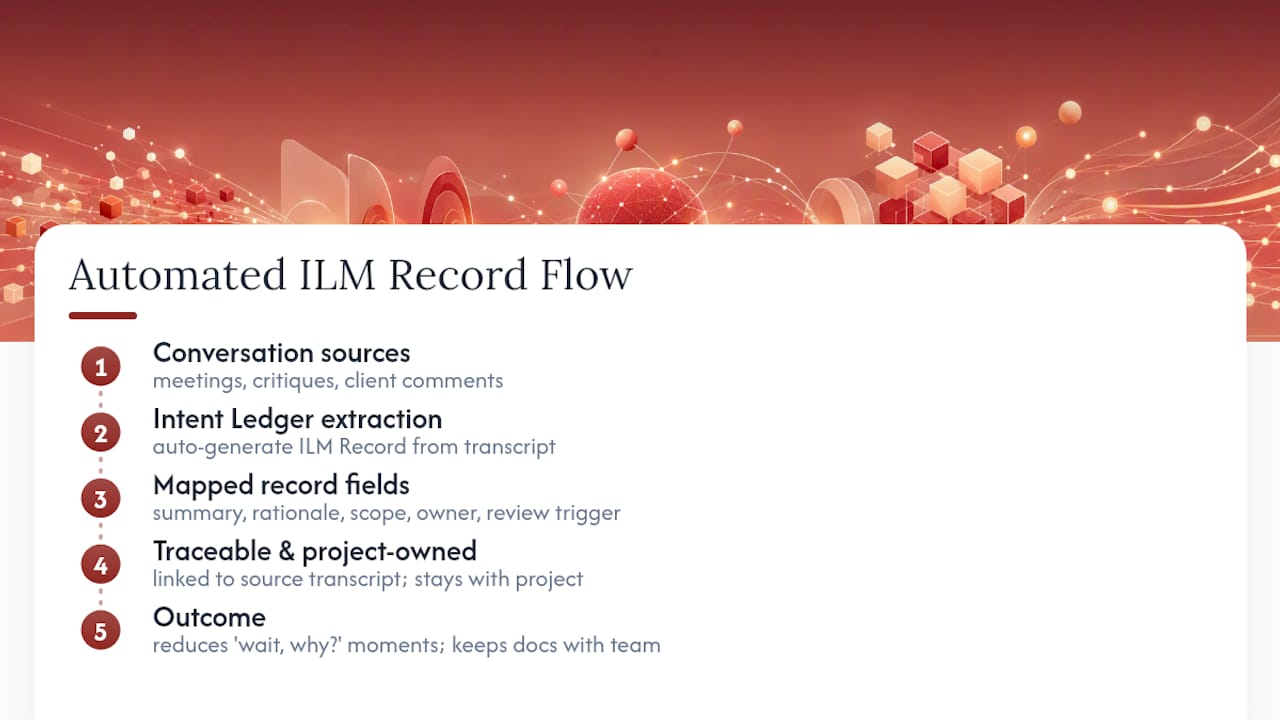
Writing the template by hand works, but most teams lose the habit around week three, right when a deadline hits and the “quick note” gets skipped. The Intent Ledger exists for that exact gap: it turns meeting recordings, critique feedback, and client comments directly into structured ILM Records, so the summary, rationale, evidence, and review trigger get generated from the conversation itself instead of a manual write-up after the fact.

Each ILM Record maps to the same fields covered above: decision summary, rationale, scope and impact, owner, and a review trigger, sourced directly back to the transcript or note it came from. That traceability is the piece manual templates struggle to sustain once a project has dozens of decisions spread across months. Records stay project-owned throughout, so the documentation lives with the team, not locked inside a tool nobody else can access.
If your team is drowning in “wait, why did we decide that?” moments, start a free trial with The Intent Ledger and create your first automated record from your next design review.
FAQ: Design Documentation Template Questions
What’s the minimum a design documentation template should include? At minimum: a decision summary, the rationale behind it, alternatives considered, scope or downstream impact, an owner, and a review trigger. Skip any of these and the record loses its usefulness for future reference.
How is this different from a technical specification document? A specification document template defines requirements and technical parameters for engineering or product teams. A design documentation template, in the sense used here, focuses specifically on capturing decision rationale, the “why,” rather than functional specs.
How often should decision records get reviewed? Review happens at the trigger event you define per record, not on a fixed calendar. Phase transitions (concept to development, development to production) are natural review points, as recommended in architecture intent preservation practices.
Who should own writing the record, the decision-maker or a scribe? The decision-maker or the person most accountable for the outcome should be listed as owner, even if someone else transcribes the entry. Ownership drives follow-through on the review trigger.
Can this template scale to a large architecture firm? Yes, the field count stays the same regardless of project size. What changes is expansion depth for high-impact decisions and the tooling used to store and link records across a larger team.
Sources
These sources shaped the field structure and adoption advice covered throughout this guide.
- A documentation framework for architecture decisions (ISO/IEC/IEEE 42010 viewpoints)
- Introducing the LogCal: template-based documentation support for educational design-thinking projects
- Architecture design documents | The GitLab Handbook
- Is documentation valuable to the design process?