Capture Design Intent with ADR Discipline and Graph Queries for Studios
Capture Design Intent with ADR Discipline and Graph Queries for Studios

Design intent tracking means recording and tracing the reasoning behind design decisions, tying meeting notes, critiques, and client comments to structured records that anyone on the team can find later. The payoff is straightforward: less context loss when someone leaves a project, risks surface before they become rework, and handoffs stop depending on whoever happens to remember the meeting. Approaches like architecture decision records and tools like The Intent Ledger both build on this same idea.
TL;DR:
- Recording design decisions when they are expensive to reverse or involve multiple disciplines prevents repeated debates and rework later.
- A standardized decision record should include context, options considered, the final decision, trade-offs, confidence level, status, and responsible parties, recorded promptly after discussions.
- Larger or regulated projects benefit from a graph-based model that enables quick querying of decision trails, while small teams can suffice with simple, append-only logs.
- Keeping records immutable and linking new decisions to previous ones preserves historical context and ensures reconstructability.
- Consistent practice, a single storage location, and linking decisions to source notes are key for successful, scalable implementation within 90 days.
Table of Contents
- What Design Intent Tracking Includes (and What It Doesn’t)
- What Fields Belong in a Decision Record?
- When and Who Should Log a Design Decision?
- Graph Models vs. Simple Logs: Which Fits Your Team?
- How Do You Preserve Decision History Without Losing Context?
- How to Roll Out Design Intent Tracking in 90 Days
- Common Pitfalls in Design Intent Tracking
- How Design Intent Tracking Improves Team Communication
- What Do Successful Design Intent Tracking Rollouts Look Like?
- Why Recording the “Why” Speeds Projects and Protects Teams
- Why Teams Choose The Intent Ledger for Design Intent Tracking
- Sources
- FAQ
What Design Intent Tracking Includes (and What It Doesn’t)
Design intent tracking covers any moment where a project’s direction gets decided, questioned, or justified. That includes:
- Client meetings where a material, layout, or scope gets approved
- Design critiques where a reviewer pushes back on an option
- Written comments in a shared doc, email thread, or transcript that explain a rejection
- Formal sign offs, whether verbal in a review or logged in a project management tool
Capturing these events well means a decision made in March is still findable and understandable in November, even by someone who joined the project in October. Teams that skip this end up relitigating the same debate twice, because nobody wrote down why the first version got rejected.
One clarification worth making early: this is not the same “design intent” used in parametric CAD where the term describes how a model’s geometry responds to constraints when you change a dimension. That’s a modeling concept. This article is about decision rationale and project memory. Different problem, different audience, easy to confuse if you Google the phrase cold.
What Fields Belong in a Decision Record?
A decision record only works if it captures the same fields every time, so anyone scanning the project can compare entries without guessing what’s missing. Based on standard architecture decision record conventions, a solid template includes:
- Context. What problem forced this decision, and why now?
- Options considered. Every real alternative, plus why it got rejected.
- Decision. A one-sentence statement of what was chosen.
- Trade-offs. What you’re giving up by choosing this option.
- Confidence. How sure the team is, given what’s known today.
- Status. Proposed, accepted, or superseded, with a date.
- Deciders and sources. Who signed off, and links to the meeting notes, transcript, or screenshot that backs it up.
Here’s what that looks like filled in for a façade material choice: Context: client wants lower maintenance cost after year one. Options: fiber cement (rejected, weight concerns on the north elevation), brick veneer (rejected, budget), metal panel (selected). Decision: metal panel system, matte finish. Trade-offs: higher upfront cost, faster install, lower 10 year maintenance. Confidence: medium, pending structural review. Status: accepted, March 14, 2026. Deciders: lead architect, structural engineer. Source: linked to the March 12 client call transcript.
Pro Tip: Write the record while the meeting is still fresh, not at end of day. Rationale you reconstruct from memory two hours later is already thinner than what you’d have captured live. A record of decision template built around these eight fields removes the guesswork of what to include.
When and Who Should Log a Design Decision?
Not every choice needs a record. Log a decision when it’s expensive to reverse, when it touches more than one discipline, when a client formally approves something, or when it responds to a code or regulatory issue. Picking a paint color rarely needs a paper trail, but for more critical steps, follow guidance on contractual risk transfer in construction to link decisions to compliance obligations. Swapping a structural system does.
- Assign an owner per decision, not per project. Whoever led the discussion writes the first draft of the record, usually within the same day.
- Route it through one reviewer. A second set of eyes, often the project lead, confirms the record matches what was actually agreed.
- Store it in a single location tied to the project, not scattered across email, chat, and someone’s personal notebook.
- Record live during the meeting rather than reconstructing it afterward, and link straight to the transcript or notes that captured the moment.
- Use binary approvals in reviews (approved or not) instead of open ended “looks good” comments that are hard to act on later, a habit that improves feedback quality considerably.
Pro Tip: Pin comments to the specific drawing, model view, or line item they refer to during critiques. A pinned comment tied to a wall section is worth ten unpinned comments in a shared doc, a pattern echoed in guidance on structuring client revision workflows.
Graph Models vs. Simple Logs: Which Fits Your Team?
A basic append-only log, one record after another, works fine for small teams and short projects. Once a project grows past a handful of contributors or spans multiple phases, a flat list gets hard to query. That’s where a graph-based model earns its complexity.
In a property-graph approach, each decision is a node (DesignEvent), connected to nodes for Option and Requirement, linked through relationships like PRECEDES, SELECTS, IS_BASED_ON, and JUSTIFIED_BY. Research on design decision traceability shows this kind of structure lets teams query decision trails directly instead of digging through folders.
What that querying actually enables:
- Rebuilding a full timeline for one aspect of the project, like every façade decision, in seconds
- Spotting volatility, meaning which parts of the design got revisited most and why
- Tracing a decision back through the chain of requirements that justified it
A graph-based framework built for building design projects demonstrated exactly this kind of backtracking analysis. Stay with a simple ADR log if you’re a small studio without compliance pressure. Move to a graph model once you’re running large or regulated projects where someone will eventually ask “why did we change this in month four?”
How Do You Preserve Decision History Without Losing Context?
The single most important rule in decision tracking: never edit an accepted record. When circumstances change, write a new record that supersedes the old one and links back to it explicitly. This append-only principle keeps the historical trail intact instead of quietly rewriting what actually happened.
Practically, that means:
- Every record carries a status (proposed, accepted, superseded) and a timestamp
- A superseding record names the record it replaces and explains what changed
- Records live close to the project artifacts they reference, not in a separate silo that nobody checks
Treating past decisions as immutable historical artifacts is what makes a project’s evolution reconstructable months or years later. A design documentation template that bakes in status fields from day one saves you from retrofitting this discipline after the fact.
How to Roll Out Design Intent Tracking in 90 Days
You don’t need new software or a formal policy rollout to start. You need discipline and consistent practice.
- Weeks 1 to 2: Agree on a single template, pick a storage location everyone can reach, and name one owner. Pilot it on the next three decisions that come up, no more, no fewer.
- Weeks 3 to 8: Link every new record to the meeting notes or transcript it came from. Require a status field before any client approval closes. Ask the pilot group what’s clunky and fix it.
- Months 2 to 3: Add searchable metadata (project phase, discipline, decision type). Measure whether rework or “wait, why did we do this?” questions dropped. Decide whether to scale up tooling based on what you learned, not on what sounded good in a meeting.
Pro Tip: Resist the urge to backfill every past decision before starting. Start with what’s next on the calendar. A perfect archive of old decisions is worth less than a clean habit going forward.
Before you call the pilot done, check four things: one feedback source per project, binary approvals instead of vague ones, pinned comments tied to specific artifacts, and a named owner for every record. Linking decisions to concrete tasks, the way a connect notes to tasks workflow does, closes the loop between what got decided and what actually gets built.
Common Pitfalls in Design Intent Tracking
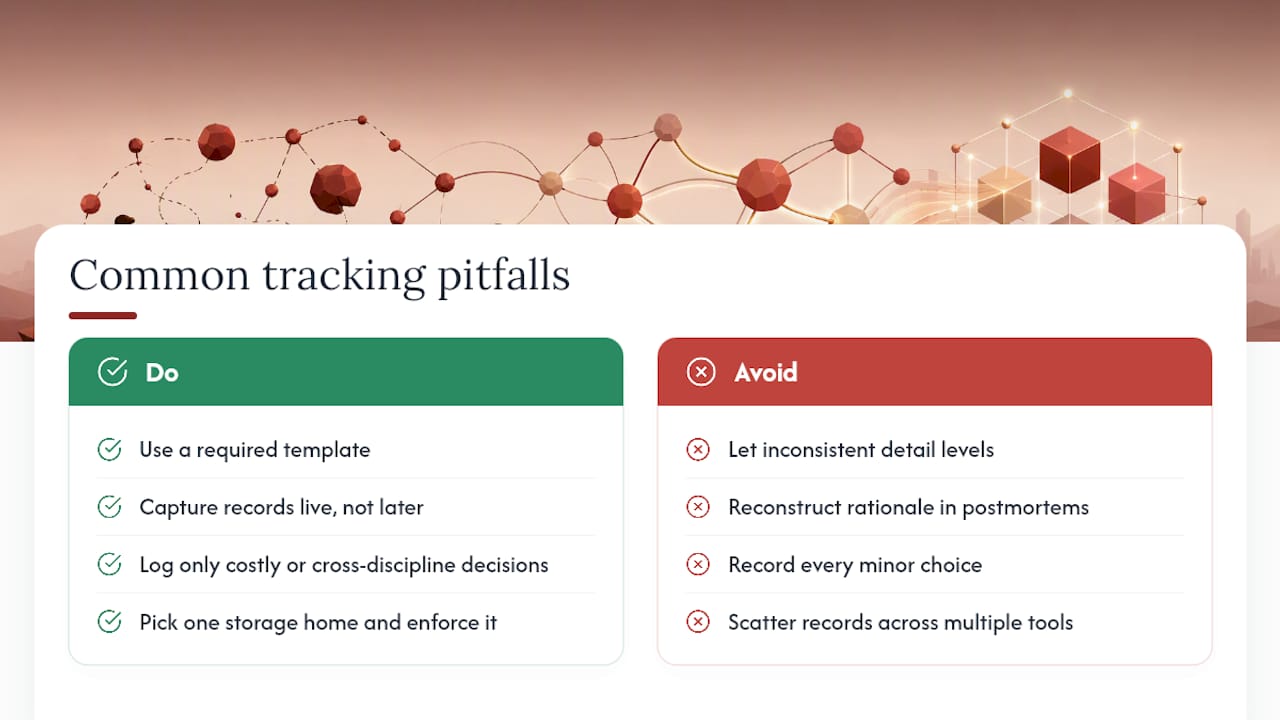
The most common failure isn’t a lack of tools. It’s inconsistency: one team member writes detailed records, another jots a single line, and within a month nobody trusts the archive enough to rely on it. The fix is a template with required fields, enforced at the review gate, not left to individual habit.
A second pitfall is treating tracking as an end of project chore. Teams that try to reconstruct rationale during a postmortem, weeks after the fact, get thin, half remembered summaries instead of real records. A design project postmortem works far better as a moment to formalize records that were already captured live, not to invent them retroactively.
A third issue is scope creep in the records themselves. Teams that try to log every minor choice, down to font sizes and hex codes, burn out on the process within weeks. Reserve records for decisions that are expensive to reverse or that cross disciplines. Everything else can live in ordinary notes.
Storage fragmentation causes its own damage. If records live in four different tools depending on who’s writing them, nobody can search across the project reliably. Pick one home for records and enforce it, even if that home is unglamorous.
Finally, teams underestimate how much resistance comes from “this feels like extra work.” The honest answer is that it is extra work, for about two weeks, until writing a five-field record becomes as automatic as sending a follow-up email. Studios that push through that window rarely go back.
How Design Intent Tracking Improves Team Communication
The clearest benefit shows up during handoffs. When a junior designer picks up a project mid-stream, a searchable record of why the client rejected the first floor plan means they don’t waste a week proposing the same layout again. That single saved week is the most common return teams report once records are in place.
Cross-discipline coordination improves too. An engineer reviewing a structural change can see the design rationale that led to it, rather than guessing at intent from a drawing alone. Requirement-linked records, the kind supported by structured decision documentation, make it possible to trace a late-stage change back to the client requirement that actually drove it, which cuts down on the “why are we even doing this” friction that slows down reviews.
Client communication benefits in a quieter way. When a client asks “didn’t we already discuss this?”, a project manager with a linked record can answer in thirty seconds instead of scheduling a call to reconstruct memory. That responsiveness builds a kind of trust that’s hard to manufacture any other way.
Records also reduce the emotional weight of disagreement. When a decision is documented with its trade-offs and confidence level laid out plainly, a disagreement six weeks later reads as “here’s new information that changes the calculus,” not “you were wrong before.” That framing keeps critique sessions focused on the work instead of on defending past choices.
What Do Successful Design Intent Tracking Rollouts Look Like?
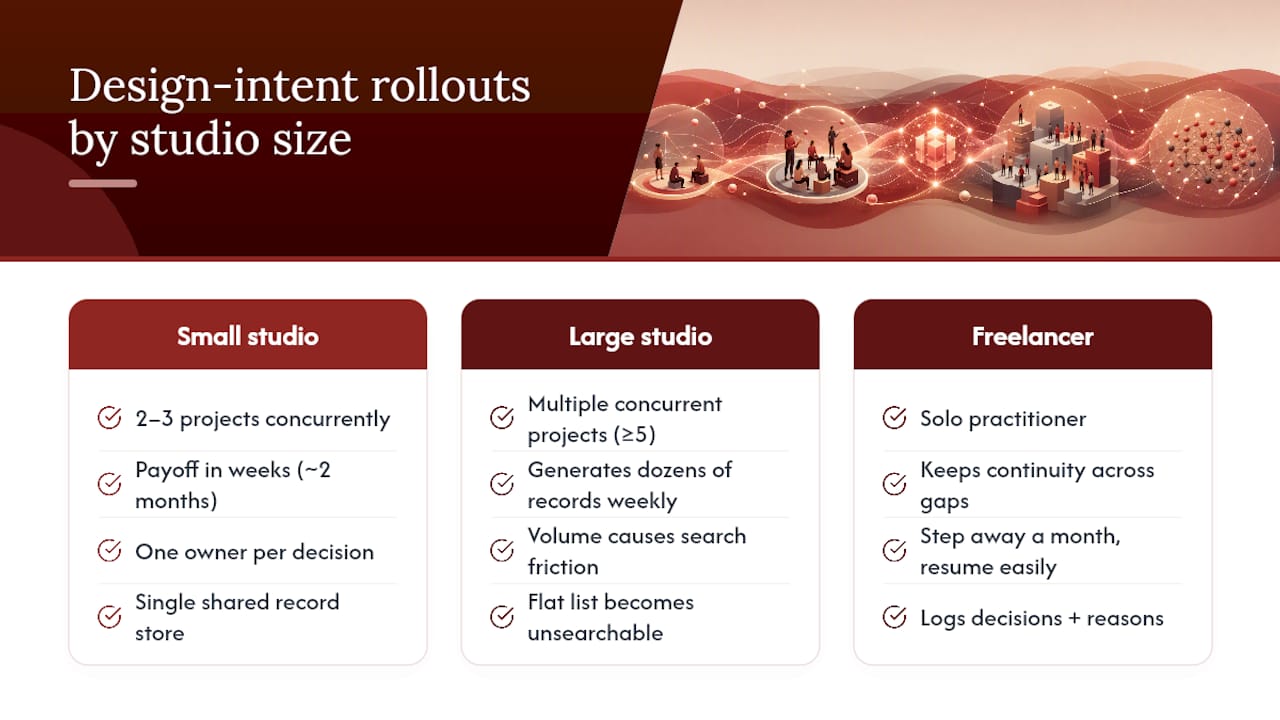
A small residential studio running two to three projects at a time typically sees the fastest payoff, because the pilot touches every active project within weeks. One owner per decision, a shared document as the single record store, and a rule that nothing gets marked “accepted” without a linked source. Within two months, the studio stops re-debating finish selections that were already settled, because anyone can pull up the record instead of relying on memory.
Larger studios running multiple concurrent projects across disciplines tend to hit friction first around volume. A firm juggling five active commercial projects can generate dozens of decision records a week once the habit sticks. At that scale, a flat list stops being searchable, and teams that adopted graph-style tagging, linking decisions to the requirements and options that justified them, report being able to answer “why did the mechanical layout change in phase two” without pulling three people into a call.
Freelance architects working solo see a different kind of value: continuity across gaps. A freelancer who logs decisions consistently can step away from a project for a month and step back in without re-reading every email thread, because the record already states what was decided and why. That’s a smaller team, but the underlying discipline, context, options, decision, trade-offs, confidence, status, doesn’t change with headcount. It scales down as cleanly as it scales up.
Why Recording the “Why” Speeds Projects and Protects Teams
Writing a decision down forces you to name the trade-off you’re actually making, not just the outcome you picked. That clarity alone prevents a lot of repeated arguments. In practice, one recorded rationale, “we chose the cheaper cladding because the budget review flagged cost, not because anyone loved it,” can stop a client from reopening the same debate three months later. Start with your next decision, not the backlog of old ones.
, Rajas
Why Teams Choose The Intent Ledger for Design Intent Tracking
Most teams lose design rationale the same way: it lives in someone’s memory, a Slack thread, or a meeting nobody recorded. The Intent Ledger turns those conversations, transcripts, critique notes, and client comments into structured ILM Records that link straight back to the source they came from, so no one has to reconstruct a decision from a vague recollection months later.

Every ILM Record follows the append-only discipline this article walks through: accepted decisions stay untouched, and changes get logged as new records that supersede and link to the original. Risks and unresolved questions get flagged as they come up instead of surfacing during a postmortem when it’s too late to act on them. If you’re ready to see how it handles a real project’s meeting notes, visit The Intent Ledger or check pricing plans to start a trial.
Sources
- Architecture decision record (Microsoft Well-Architected docs)
- Architecture Decision Record (Martin Fowler)
- Design decision traceability research (MDPI)
FAQ
What Triggers a Design Decision Record?
Log a record when a choice is expensive to reverse, crosses disciplines, gets formal client approval, or responds to a code or regulatory requirement.
Who Should Own a Decision Record?
Whoever led the discussion writes the first draft, usually the same day, with a project lead or reviewer confirming it matches what was agreed.
Should I Use an ADR Log or a Graph Model?
Small teams and short projects do fine with a simple append-only ADR log; larger or regulated projects benefit from a graph-based model that supports querying across decisions.
Can I Edit an Accepted Decision Record?
No. Write a new record that supersedes the old one and links back to it, keeping the original intact as an immutable historical artifact.
Does The Intent Ledger Support This Kind of Tracking?
Yes. The Intent Ledger generates structured ILM Records from meeting notes and transcripts, linking each decision back to its source and enforcing append-only history.