Design Iteration Log: What to Record Each Round
Design Iteration Log: What to Record Each Round
A design iteration log is a running record of each round of change in a design: what changed, why it changed, what prompted it and what comes next. The “why” is the part that matters. Dates and versions can usually be reconstructed from files, but the reasoning lives in meetings, critiques and client calls, and it fades within days. The Intent Ledger turns those conversations into ILM Records, structured records of decisions, design intent, risks, actions and open questions, each traceable to the conversation it came from. That means the log writes its own “why” instead of relying on someone’s memory.
TL;DR
- A useful iteration log entry records the change and the reason for it. Everything else is optional detail.
- Write the entry at the moment of the decision, not at the end of the project.
- Link each entry to its evidence: a test result, a critique comment, a client email, a meeting.
- Record failed and rejected iterations too, so nobody repeats them.
- Keep unresolved questions and next steps in the same entry so follow-up does not get lost.
Table of Contents
- What a design iteration log is
- Log, changelog and meeting notes are different things
- The minimum entry: one line per change
- A fuller entry for formal rounds
- Recording the source and the rationale
- Logging critique and client comments across versions
- For students and junior designers
- Keeping the log alive
- Where The Intent Ledger fits
- Our perspective
- FAQ
- Sources
What a design iteration log is
Iteration means repeating a cycle of design, review and revision until you reach the outcome you want. The international standard for human-centered design, ISO 9241-210:2019, says the most appropriate design for an interactive system cannot typically be achieved without iteration, and that iteration should progressively remove uncertainty as new information arrives.
The log is where that process leaves a trail. The UK government’s design history guidance describes the idea as a permanent record of how a service developed over time, similar to a blog with a post for each feature, iteration or round of research. Teams there reported using it to re-evaluate decisions, see how features changed, give new team members context and show assessors why choices were made.
The same logic applies to a studio. A floor plan goes through six rounds, a facade goes through three client reviews, a student board goes through two desk critiques. Without a log, the final drawing shows the result and hides every reason behind it.
Log, changelog and meeting notes are different things
Three documents get confused.
| Document | What it captures | What it misses |
|---|---|---|
| Version history or changelog | The result: which file changed, when | Why it changed |
| Meeting notes | Everything said, in order | Which statements became decisions |
| Design iteration log | Decision points: change, reason, evidence, next step | Nothing, if kept at the time of the decision |
This distinction comes from Andrew Woods’ write-up on project design logs: a changelog records the outcome of the work, while a design log records the decision points along the way. He also suggests an objective tone, at least the year and month of each decision, and a log everyone on the project can read and maintain, rather than one scribe.
Meeting notes fail for a different reason. They are chronological, so a decision made in minute 14 of a one-hour call is buried between a scheduling comment and a coffee order. Six weeks later nobody can find it.
The minimum entry: one line per change
If you remember one rule, make it this one. The Innovate Engineer wiki describes the surviving version of an iteration log as one line per change: what, why, when, written when the decision is made. Its example is a lid seal switched to silicone because the first foam gasket let warm air leak. The author’s point is that the “why” line earns its keep, because the what and when can usually be rebuilt later and the why cannot.
The UK Department for Education’s digital team agrees on the minimum. In a post on documenting iterations, the author says every record should include the design iteration made and the reason for the change. Linking it to research insight, a regulation change or a technical constraint ties the change to concrete evidence.
In architecture, a minimum entry looks like this:
14 Oct. Moved the stair from the north core to the east bay. Why: the client’s fire consultant flagged the travel distance on the 12 Oct call. Source: call recording, 12 Oct. Open: structural engineer to confirm the slab opening.
Four facts, thirty seconds to write, and a stranger can understand it a year later.
A fuller entry for formal rounds
Some rounds deserve more: a user test, a design review, a jury critique. Two published structures are worth borrowing.
The Department for Education’s how to document iterations guide builds an entry from five parts:
- Background, with links to the previous entries.
- Why we iterated, with evidence (its example is 4 out of 6 users struggling with one task).
- What we changed, with screenshots or a before-and-after comparison.
- What we found, meaning the tested outcome.
- Next steps.
Its best-practice advice is short and practical: link backwards to earlier entries rather than forwards, be specific about what changed, show before and after, and document unsuccessful iterations because they help others avoid the same approach.
Phasio’s design iteration guide proposes six fields per cycle: the question you are investigating, the version tested, the method, the evidence, the decision (keep, change, retest or investigate further) and the next step with an owner. It also advises writing down the decision and its rationale after analysis so a later team does not reverse a change without understanding why it was made.
A university tool takes a spreadsheet approach. The TechSAge design iterations template uses columns for date, category, question or comment, response, a traffic-light code (red for rejected, green for applied, yellow for in progress) and a completed marker. The traffic-light status is a good idea for any log, because it answers “what’s still open?” at a glance.
Recording the source and the rationale
Most logs fail at the same point: the entry says “changed the window to a corner window” but not who asked or why. A research team studying remote collaborative design found that design content is often disconnected from discussion records, so people must search long transcripts to find the rationale behind a change. They also note that undocumented reasons can disrupt the logic of later designs and lead to misreadings, repeated work or reversal of important decisions.
A tracker proposed in a paper on tracking design decisions shows the fix in table form. For each decision it records the source of influence, a written justification, what worked and what did not, and what further evidence is needed. The authors argue that the thought process loses nuance unless it is written down.
For your own entries, always capture:
- The source: a client email, a critique session, a consultant call, a test result.
- The reason in a sentence: a constraint, a preference, a risk or a piece of evidence.
- The state: applied, rejected, on hold or pending.
- Open questions: what must be confirmed, and by whom.
Tying changes to user or stakeholder evidence also helps downstream. If you work on public-facing material, the same habit applies to incorporating user feedback into each revision and noting what prompted it.
Logging critique and client comments across versions
Feedback is where logs get messy, because comments arrive in volume and not all of them lead to change.
Log the comment, then the response. The comment is the evidence, and the response is the decision. Applied, rejected and deferred are all valid responses, and each needs a reason.
Record decisions to wait. The DfE Digital author notes that not every change needs direct research evidence, and that holding off on a change until more evidence arrives is a valid decision that should be documented as well.
Keep the version reference. A comment on version 3 means nothing if the log does not say which version it addressed. Keep the result connected to the version that produced it.
Separate scope changes. When a client comment changes the brief and not just the design, it belongs in a scope record as well. Our guide to a scope change log covers what to capture there, and our piece on the design change log covers the overlap with iteration logs.
For students and junior designers
If you are a student, a log turns critiques into a record you can use. Zoe Sadokierski’s critical documentation guidelines from the University of Technology Sydney recommend a dated experiment log for each iteration, archived in order, with prompts before (aims and precedents), during (methods and data captured) and after (reflection that starts the next log). She advises planning what, how and when you will capture before each experiment, not documenting after the fact.
If you are a junior designer, the log answers a question you will ask often: “Why am I being asked to do this?” The DfE Digital post lists smoother onboarding and knowledge preservation among the benefits of documenting iterations, and describes a mock assessment where detailed notes let a designer who had not been part of the design present its rationale. A log with sources lets you trace a task back to the conversation it started in, instead of interrupting a senior colleague.
Keeping the log alive
The usual failure is a template too heavy to maintain. The Innovate Engineer author warns that a 14-field template last touched in week two is the version that rots. A few habits prevent it:
- Start with four fields. Change, reason, source, status. Add more only when a project needs them.
- Write at the decision. Ten minutes after a call, the reasoning is still sharp. A week later it is a guess.
- Make one place the source of truth. Not a folder of notes, a chat thread and a spreadsheet.
- Review at each milestone. Scan for open questions and entries still marked pending.
- Share it. A log only one person can read does not survive that person leaving.
Our design documentation template shows one way to structure decisions and not just tasks.
Where The Intent Ledger fits
The hard part of every method above is the discipline: someone has to stop after the call and write down the reason. The Intent Ledger takes the conversations you already have, including meeting notes, transcripts, audio recordings, critique feedback and client comments, and turns them into ILM Records. Each record captures decisions, design intent, risks, actions, commitments and unresolved questions, and each is source-backed, so you can trace it back to the conversation it came from.
Pricing is published on the pricing page. One-off packs run from Working Set at $12 to Project Record at $29, Practice Memory at $59 and Studio Ledger at $119. Monthly plans are Working Memory at $29 per month, Living Record at $79 per month and Shared Ledger at $149 per month.
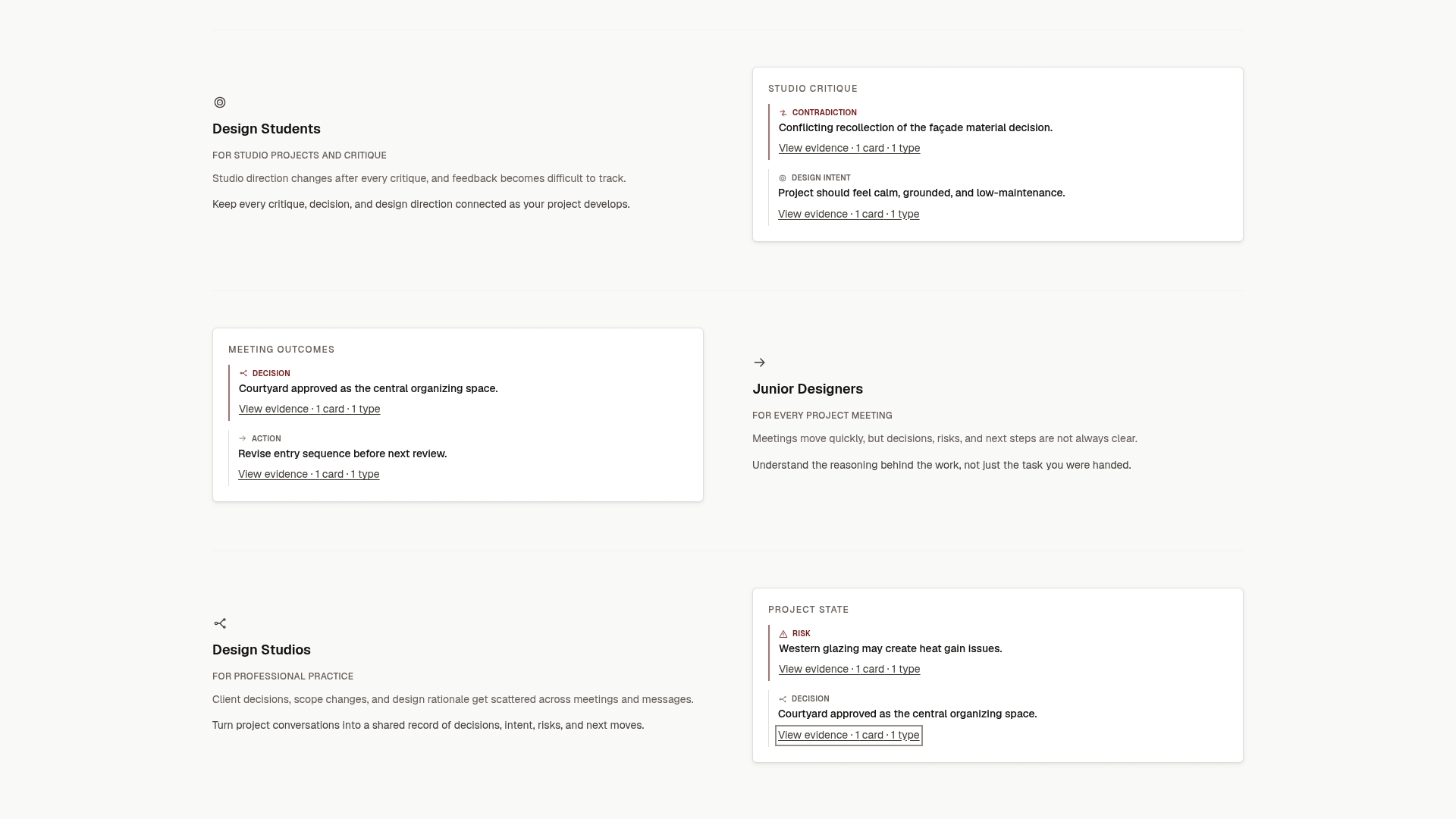
A freelancer with one project might start with a single pack. A studio that keeps many projects running can use a monthly plan for continued record creation. You can see all of it on The Intent Ledger.
Our perspective
We built The Intent Ledger around one belief: a design iteration log is only as good as its “why,” and the why is spoken, not typed. It happens in a critique, a site call, a client’s offhand remark.
Most tools capture what was decided. Our approach is to preserve the reasoning behind it, so a decision stays connected to the conversation that produced it. That is what an ILM Record is for: a structured, source-backed record of the decision, the intent, the risks, the actions, the commitments and the questions still open.
The published guidance points the same way. Teams that document the reason for each change onboard newcomers faster, defend their choices more clearly and avoid reversing decisions they no longer understand. We think that discipline should not depend on someone finding the time to write it up. When the record comes straight from the conversation, the log stays current, and the project memory grows with the work.
Rajas
FAQ
What should a design iteration log include?
At minimum, the change and the reason for it. Add the source of the reason (a test, a critique, a client comment), the version it applies to, the status and the next step. The more formal your round, the more you can add, such as before-and-after images and test results.
How often should I update it?
At each decision, while the reasoning is fresh. Updating weekly or at project end loses the nuance, because the what and when can be rebuilt from files but the why usually cannot.
Should I log changes that were rejected or didn’t work?
Yes. The DfE guidance recommends documenting unsuccessful iterations because they help others avoid the same approach. A rejected option with its reason also stops the same idea being proposed again in three months.
Is a version history enough?
No. A version history shows that a file changed and when. An iteration log shows the decision point: what was decided, why, and on what evidence. You need both, but only the log explains the reasoning.
Sources
- What is a design history? GOV.UK Design History
- ISO 9241-210:2019
- Project Design Logs, Andrew Woods
- Record iterations and developments, Innovate Engineer Wiki
- Mastering design iterations: The power of documentation, DfE Digital
- How to document iterations, Becoming a teacher design history
- The Design Iteration Process, Phasio
- TechSAge Tool: Design Iterations
- DesignMemo: Integrating Discussion Context into Online Collaborative Design
- Why did we do that? A Systematic Approach to Tracking Design Decisions
- Critical documentation guidelines, University of Technology Sydney
- User Feedback Incorporation for SEO Success