Design Teams: One Sentence Decisions for Design Project Documentation
Design Teams: One Sentence Decisions for Design Project Documentation

Design project documentation is the set of living records that capture decisions, rationale, and requirements so anyone on a team can act without hunting down the person who was in the meeting. If you’re staring at a blank page right now, skip the twelve-tab template and write one thing: the last decision your team made, in one sentence, with a link to where it came from. Everything else builds from there.
TL;DR:
- Regularly updating decision logs with linked conversations ensures traceability and helps verify that reasoning still applies over time.
- Keeping critical sections like decision statements and open questions current prevents documentation from becoming inaccurate or stale.
- Using targeted templates for different document types helps avoid bloat and keeps records concise and actionable.
- Assigning clear ownership, both for daily updates and structural consistency, ensures accountability and prevents drift.
- Embedding documentation within existing workflows and linking to source conversations accelerates decision retrieval and fosters trust.
Table of Contents
- What Design Project Documentation Is (And When to Write It)
- Core Sections Every Design Project Document Should Include
- Templates and Example Structures You Can Copy Today
- Where to Keep Design Documentation (Tools and Integrations)
- Who Owns the Document, and When It Gets Updated
- How to Write Documentation That Actually Drives Decisions
- How ILM Records Close the Gaps in Traditional Documentation
- How to Handle Sensitive or Proprietary Information
- Common Pitfalls and How to Get Past Them
- Measuring Whether Your Documentation Is Working
- Author Perspective: Make Documentation a Habit, Not a Project
- The Intent Ledger: A Practical Way to Keep Decisions Traceable
- Sources
- FAQ
What Design Project Documentation Is (And When to Write It)
Design documentation exists to close the gap between what a team discussed and what actually gets built. Yale’s usability team frames it plainly: it turns abstract research and conversation into something concrete enough for a developer to implement without guessing. That’s the whole job. Not to impress a stakeholder, not to cover yourself in a postmortem. Just to move a decision from someone’s head onto a page someone else can use.
Most teams already produce several kinds of design documents without labeling them as such, similar to how construction teams use field tickets, pay apps, and compliance documents to track progress and approvals. Recognizing which one you’re actually writing saves you from cramming everything into a single bloated file.
- PRD (product requirements document): what you’re building and why, tied to success metrics, not a spec sheet.
- RFC (request for comments): a proposal circulated before a decision is locked, meant to be argued with.
- Decision log: a running record of choices made, one entry per decision, timestamped.
- Handoff readme: the short file a designer leaves for engineering with links, assets, and notes on what’s still open.
- Design system docs: component-level rules, tokens, and usage patterns that outlive any single project.
The distinction that trips people up is living versus archival. A decision log and a handoff readme are living documents. They change as the project changes, and they should look a little different every week. A finalized RFC or a shipped PRD becomes archival the moment the feature ships. It’s a historical record, not a workspace. Treating an archival doc like it needs constant updates wastes effort; treating a living doc like it’s finished is how documentation goes stale within a month.
Core Sections Every Design Project Document Should Include
Every design document, regardless of type, needs the same skeleton. Purdue’s EPICS program lists explicit required sections for exactly this reason: consistency lets reviewers find what they need in seconds instead of reading the whole thing.
- Project overview. Title, owner, one-line goal, and the success criteria that define “done.” Three sentences, not three paragraphs.
- Decision statement. State the decision first, then the rationale, then the alternatives considered and why they lost. This ordering matters more than people think. A reviewer scanning the doc gets the answer before the argument.
- Requirements and constraints. Acceptance criteria, any data that shaped the decision, and hard limits (budget, platform, legal).
- Deliverables and access. Links to the Figma file, the prototype, the relevant repo. Not a description of where things live. The actual link.
- Implementation notes and owners. Who’s responsible for what, and any detail an engineer would otherwise have to ask about in Slack.
- Open questions, risks, and version history. What’s still unresolved, what could go wrong, and a changelog showing what changed and when.
Microsoft’s guidance on functional and technical design documents treats the document as an execution artifact, something that has to stay aligned with what’s actually being built, not a one-time deliverable filed away after a kickoff meeting. That’s the mindset shift most teams need: the doc isn’t proof you planned. It’s the plan, kept current.
Pro Tip: Write the decision statement before you write anything else in the document. If you can’t state the decision in one sentence, you haven’t actually made a decision yet. You’ve had a discussion.
The section people skip most often is open questions and risks, usually because admitting something is unresolved feels like a weakness. It’s the opposite. A document with zero open questions six weeks into a project is either lying or hasn’t been touched since kickoff. Flagging what’s unresolved is what makes the next reviewer trust the rest of the document.
Templates and Example Structures You Can Copy Today
Templates fail when they try to cover every possible field a project might ever need. The better approach, echoed in Smashing Magazine’s guidance on design documentation, is to start small and add sections only when a real need shows up. Here’s what that looks like in practice.
Handoff readme (short version): A one-page file with the project name, a link to the live design file, a link to the prototype, a list of assets and where to find them, and a section titled “what’s not finished yet.” Nothing more. An open-source handoff readme pattern on GitHub treats the document as a menu of optional sections rather than a mandatory checklist, and that’s the right instinct. You pick what your handoff actually needs, not what a generic template assumes every project needs.
Minimal PRD: Goal, target user, success metric, the top three decisions already made, and a link to the design file. Skip the exhaustive feature-by-feature spec. If someone needs that level of detail, it belongs in a linked technical design doc, not bolted onto the PRD.
RFC and decision-log entry: An RFC needs a proposal statement, the problem it solves, at least two alternatives with trade-offs, and a deadline for feedback. A decision-log entry, once the RFC resolves, can be as short as: “Decision: switched to a single-column checkout flow. Alternatives considered: tabbed checkout, accordion checkout. Owner: [name]. Source: [link to meeting recording or Figma comment thread].”
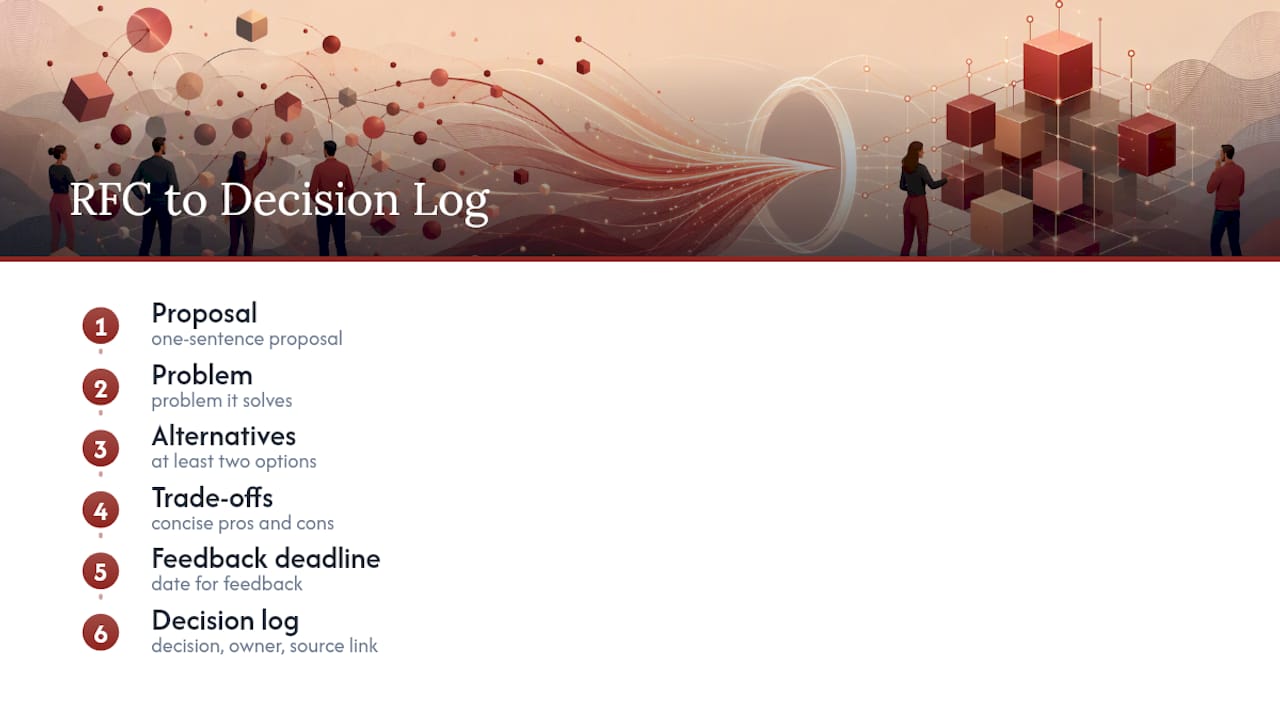
Not every project needs every field filled in. Here’s a rough guide to what’s mandatory versus optional depending on project size.
A decision log template built around these fields tends to outlast heavier PRD formats simply because nobody dreads opening it.
Where to Keep Design Documentation (Tools and Integrations)
The right tool depends on what kind of decision you’re documenting, not on picking a single source of truth for everything. Trying to force all documentation into one platform is usually what kills adoption.
- Figma works best for notes tied directly to visual context, comments pinned to the frame they describe, and quick rationale that doesn’t need its own page.
- Storybook is the right home for component-level specs, since design system documentation performs best when structural rules and task-based examples live together, not scattered across slide decks.
- Notion or Confluence suit process documentation, PRDs, and decision logs that need to be searchable and linked across projects.
- Repo markdown fits infrastructure and ops-adjacent design docs that engineers will read alongside code, where a separate tool just adds friction.
Whatever combination you choose, embed rather than duplicate. Link the Figma file from the PRD instead of pasting screenshots that go stale the moment the design changes. Sync Storybook snippets into component docs instead of retyping prop tables by hand.
Access control matters more than most teams admit until it causes a problem. A document editable by everyone on the workspace tends to drift, since five people “fixing” the same paragraph in slightly different ways is how you end up with contradictory versions. Lock structural sections (the decision statement, the acceptance criteria) to a named owner, and leave comments open for everyone else.
Who Owns the Document, and When It Gets Updated
Two people should own every design document, and their jobs are different. The day-to-day owner, usually the designer on the project, keeps the content accurate as work progresses. The structural owner, usually a design manager or PM, makes sure the document’s format and required fields stay consistent across the team. Without that second role, every document eventually turns into its own dialect.
- Set the update trigger before the document even exists. The rule is simple: any design change that affects an already-documented decision requires an update to that decision entry, plus a version number bump and a changelog line. Not a rewrite of the whole document. One line: “v1.3, March 4, changed checkout flow from tabbed to single-column, see decision log.”
- Run a quarterly documentation audit. A quarterly, thirty-minute audit where the structural owner checks version currency and closes out stale open questions catches drift before it compounds. Thirty minutes, four times a year, against the hours lost re-explaining a decision that was already made twice.
- Treat version history as institutional memory, not bureaucracy. Purdue’s EPICS guidance ties version control directly to approval processes for exactly this reason. When someone new joins the project, the changelog answers “why does it work this way” faster than any onboarding call.
Pro Tip: If nobody can name the structural owner of a document without checking, it doesn’t have one. Assign it explicitly, in writing, the same day the document is created.
How to Write Documentation That Actually Drives Decisions
Capture the decision the moment it happens, not the next morning when half the reasoning has already left your memory. Write the decision line first. Explain it second. This single ordering change fixes most of what makes documentation unreadable.
- Write the decision statement before the rationale. “We’re moving to a single-column checkout” comes before the paragraph explaining why.
- Run every entry through a fixed checklist: what was decided, who decided it, why, what alternatives were considered, the acceptance criteria, the owner, the metric that will validate it, and a link back to the source.
- Turn raw meeting notes into a structured record, not a transcript dump. A useful format includes a timestamp, the source (meeting, Slack thread, client email), the participant list, and a line for unresolved questions. A structured decision record built around eight fields tends to get referenced far more often than a long-form narrative PRD, because someone can scan it in under a minute.
- Cut anything that doesn’t drive a decision. Detail earns its place only when a dependency or a second team actually needs it, a standard worth holding onto since it keeps documents from ballooning into unreadable archives.
The most common failure isn’t a missing template. It’s a document that has all the right sections but none of the right discipline: links that point to a deleted Figma frame, an owner field that says “TBD” six months after launch, requirements copied from a spec that changed twice since. Bloat is the second most common failure, usually from a well-meaning attempt to document everything instead of what matters for the next decision.
Pro Tip: If a decision entry takes longer than five minutes to write, you’re probably documenting the discussion, not the decision. Strip it back to the one sentence that actually needs to survive.
How ILM Records Close the Gaps in Traditional Documentation
The gap most documentation systems never solve is traceability. A decision log entry might say what was decided, but rarely says exactly which conversation produced it, which means six months later nobody can verify whether the reasoning still holds. Structured decision records built around eight required fields exist specifically to close that gap, and it’s the same problem Theintentledger’s ILM Records are built to solve.
An ILM Record takes a project conversation, whether that’s a meeting transcript, a critique session, or a client email thread, and turns it into a structured entry that links a decision, its rationale, and any unresolved questions directly back to the source it came from. The practical workflow looks like this:
- A design review happens and gets recorded or transcribed.
- The conversation becomes an ILM Record: decision, rationale, alternatives, risks, and a direct link to the original source.
- That record feeds into a decision-log entry, which then updates the relevant section of the PRD or handoff readme.
- Anyone reviewing the PRD months later can trace the reasoning back to the exact meeting it came from, instead of trusting a paraphrase.
For teams that already use automated meeting-notes workflows, ILM Records fill the step those tools usually skip: turning a transcript into something structured enough to actually govern implementation, not just a summary that gets skimmed once and forgotten.
How to Handle Sensitive or Proprietary Information
Client contracts, unreleased feature names, and pricing strategy don’t belong in the same document that gets shared with a contractor or posted to a public design system site. The fix isn’t avoiding documentation of sensitive decisions. It’s separating access tiers before you write anything.
Keep a clear line between what’s client-confidential, what’s internal-only, and what’s safe to share externally, and decide that classification at the moment you create the document, not after someone forwards it to the wrong person. A practical pattern: strip proprietary business terms (contract values, unannounced partnerships, unreleased roadmap items) into a separate, access-restricted addendum, and keep the main decision log focused on design rationale that’s safe for a broader audience, including future hires or outside collaborators.
Redact rather than omit when a decision’s reasoning depends on confidential context. Writing “decision withheld pending NDA review” preserves the fact that a decision exists, which matters for continuity, without exposing the sensitive detail itself. And when documentation lives in a shared tool like Notion or Confluence, permission settings need the same update-trigger discipline as content. A contractor who rolled off the project six months ago shouldn’t still have edit access to a decision log that now discusses a new client’s pricing structure.
Common Pitfalls and How to Get Past Them
The most damaging pitfall isn’t a badly written document. It’s a well-written one that nobody trusts anymore because it went stale. A PRD that still says a feature launches in Q2 when it shipped in Q4 teaches the whole team to stop reading PRDs.
Bloat is the second-biggest offender, and it usually comes from good intentions. Someone tries to document every edge case up front, and the result is a forty-page file nobody opens past the first two pages. Practitioner guidance on this is consistent: start with the minimum viable structure and expand only when a real gap shows up, not preemptively.
Ownership gaps cause the third major failure. A document with no named owner slowly becomes everyone’s responsibility and therefore nobody’s. The fix is assigning both a day-to-day owner and a structural owner at creation, not after the document has already drifted for a quarter.
The fourth pitfall is documentation that exists outside the team’s actual workflow, a separate wiki nobody visits because it’s not part of the design review or sprint ritual. Documentation that isn’t woven into existing ceremonies, sprint planning, design critique, standups, gets treated as optional homework and dies quietly.
Measuring Whether Your Documentation Is Working
The clearest signal that documentation is working isn’t a satisfaction survey. It’s how often someone asks a question in Slack that the document should have already answered. Track that, informally or formally, and you’ll know within a sprint or two whether your documents are pulling their weight.
A second useful signal: how quickly a new team member can answer “why did we build it this way” without pinging the original designer. If onboarding still requires a thirty-minute walkthrough of decisions that are supposedly written down, the documentation isn’t doing its job, regardless of how polished it looks.
Version history itself becomes a measurement tool over time. A changelog with steady, small updates suggests the document is actually being maintained alongside the work. A changelog with one entry from launch day and nothing since is a document that stopped being trusted the moment reality diverged from what it says. Watching how often a document gets referenced, edited, or linked from a new conversation tells you more about its effectiveness than any format audit ever will.
Author Perspective: Make Documentation a Habit, Not a Project
Most documentation advice tells you to build a complete system before you start. Skip that. Pick one template, the decision log is the highest-leverage choice, and pick one update trigger: a documented change to a decision gets a new entry within 24 hours. That’s the whole system for week one.
Teams with stale docs today don’t need a rewrite. They need one live decision captured this week, linked to wherever it actually came from. That’s the habit that compounds. A perfect template used once a quarter does less for a team than a rough one used every sprint.
If you take one thing from this article, take this: the next decision your team makes, write it down in one sentence, note who made it and why, and link it to the conversation it came from. Do that today, before the reasoning fades.
, Rajas
The Intent Ledger: A Practical Way to Keep Decisions Traceable
There are tools that turn conversations, critiques, client calls, and standups into structured records that trace back to the source, providing an alternative to rebuilding your documentation process from scratch. The immediate benefit is traceability without extra writing. A designer doesn’t draft a decision log entry from memory; the record gets pulled from the actual meeting where the decision happened, cutting the lost-context problem that kills most documentation efforts within a few months.

A reasonable pilot: capture three ILM Records for your next sprint’s design reviews, then link each one into your existing PRD or decision log. See whether that closes the “why did we decide this” question faster than your current process does. Plans start with Working Set at $12 one-off for a single project, scaling up to monthly options like Living Record for teams that want continuous capture. Check the full breakdown on the pricing page, or look at the product overview to see how ILM Records fit into a workflow you’re already running.
Sources
For structural guidance on required sections and approval processes, Purdue’s EPICS program offers an academic framework built for accountability. Microsoft’s functional and technical design document guidance covers execution-oriented documentation. Smashing Magazine and Yale’s usability team both offer practitioner-level thinking on documentation philosophy, and Netguru’s design system guide covers component-level documentation practices in more depth.
- Design documentation | Usability & Digital Accessibility (Yale)
- Create a functional and technical design document (Microsoft)
- Designing web design documentation (Smashing Magazine)
- Design Documents - EPICS - Purdue University
- How to create design system documentation: A step-by-step guide (Netguru)
FAQ
What Is a Project Design Document?
A project design document is a structured record of a design decision or set of decisions, including the rationale, alternatives considered, requirements, and links to source material, meant to guide implementation rather than just describe an idea.
What Are Some Examples of Design Project Documentation?
Common examples include a PRD, an RFC, a decision log, a handoff readme, and design system documentation. Structured decision records built from meeting transcripts are a newer format gaining traction because they trace directly back to the conversation that produced them.
How Do You Write Design Documentation?
State the decision first, then the rationale and alternatives, then requirements and access links. Keep each entry focused on driving a decision rather than covering every possible detail, and update it whenever the underlying decision changes.
What Should Be Included in Design Documentation?
At minimum: a project overview, the decision statement with rationale and alternatives, requirements and acceptance criteria, deliverables and access links, and a version history with open questions and risks noted.
How Much Does The Intent Ledger Cost?
Pricing starts at $12 one-off for the Working Set product line, with monthly plans like Working Memory at $29 per month for ongoing ILM Record creation. Full details are on the pricing page.