Make Design Team Retrospectives Preserve Decisions with Project Memory
Make Design Team Retrospectives Preserve Decisions with Project Memory

A design retrospective is a recurring meeting where a design team reflects on recent work and decides how to change its process, not just talk about what happened. The single most reliable agenda is five steps in roughly 60 to 90 minutes: set expectations, gather what went well, surface what needs improvement, decide 1 to 3 owned actions, and follow up next time. Send a pre-read 24 hours ahead, and name a facilitator and a scribe before the meeting starts.
TL;DR:
- Conduct retrospectives regularly after launches or project phases with no more than eight participants, including cross-functional members if needed.
- Prepare a targeted pre-read 24 hours in advance, covering problem statements, constraints, decisions, and discussion questions to maximize insight.
- Use a strict five-step agenda with time limits, focusing on data gathering, theme clustering, and actionable outcomes, while capping data collection at 30 minutes.
- Record decisions with clear problem statements, constraints, owners, and rationales immediately after each retro and link them to project documentation.
- Track action item completion, revisit decisions in the next retro, and use project memory software to preserve the rationale behind design choices over time.
Table of Contents
- What Is a Design Retrospective, and Why Design Teams Need One
- How to Prepare for a Design Retrospective That Doesn’t Waste Time
- The Five-Step Agenda for Running a Design Retrospective
- Retrospective Formats and Two Templates for Design Teams
- Facilitation Techniques That Get Quiet Voices Talking
- How to Tell If Your Retrospectives Are Actually Working
- Why Retrospectives Fail Without a Record of What Was Decided
- What Actually Changes When Teams Document Their Decisions
- Make Retrospective Decisions Stick with Project Memory Software
- Sources
What Is a Design Retrospective, and Why Design Teams Need One
A design retrospective is a facilitated session where a team looks back at a sprint, project phase, or launch and asks what to change going forward, rather than simply what happened. That distinction, between narrating events and deciding on process changes, is what separates a real retrospective from a status update. The Nielsen Norman Group frames UX retrospectives this way: a regular, structured conversation focused on improving how the team works, not just recapping deliverables.
Design teams need a version of this that general agile retros don’t cover well. Engineering retros ask about velocity and blockers. Design retros need to ask about handoff friction, design system consistency, feedback loops with product and engineering, and whether critique sessions actually changed anything. A design review process focused only on the artifact misses the collaboration patterns that made the artifact good or bad in the first place.
The other reason design retrospectives matter more than teams give them credit for: design decisions get relitigated constantly. Someone questions a color choice made three months ago, or a navigation pattern gets challenged again in a new project, and nobody remembers why the original call was made. A structured design feedback session, paired with a written record of decisions, stops that cycle. Without it, teams burn meeting time re-explaining context that should have been settled once.
How to Prepare for a Design Retrospective That Doesn’t Waste Time
Preparation determines whether a retrospective produces insight or just recaps a sprint everyone already remembers. Cadence should match the size of the change you’re reflecting on:
- End of sprint or design cycle: short, focused retros (30 to 45 minutes) that catch process friction early.
- Post-launch: a deeper session (60 to 90 minutes) once real user or stakeholder feedback exists.
- Quarterly health check: a broader look at design system health, cross-team friction, and repeated issues across multiple projects.
Invite the people who did the work, not everyone tangentially involved. Five to eight participants is the sweet spot for a design team retro. Beyond that, quieter voices disappear and the session runs long. Include at least one person from outside design, usually a product manager or engineering lead, if the retro covers a cross-functional handoff.
The pre-read is the highest-leverage piece of preparation available, and most teams skip it. Send it at least 24 hours before the meeting with four things: the problem statement for the cycle being reviewed, known constraints (timeline, budget, technical limits), a short list of decisions worth revisiting, and two or three specific discussion questions. Naming the type of session and giving people a targeted pre-read sharply cuts down on vague, unfocused reactions once the meeting starts.
Assign three roles before the meeting: a facilitator to run the agenda and keep time, a scribe to document decisions and action items in real time, and a timekeeper if the facilitator has too much else to track. Set one ground rule out loud at the start: assume good intent, and no blaming individuals for decisions made under the constraints they had at the time.
The Five-Step Agenda for Running a Design Retrospective
Here’s a timed agenda you can copy for a 60 to 90 minute session, adjustable based on group size and how much happened since the last retro.
- Set the stage (2 to 10 minutes). State the objective, recap the pre-read in two sentences, and repeat the ground rules. If this is the group’s first retro, explain that the goal is process improvement, not performance review.
- Gather data (15 to 30 minutes). Ask specific prompts tied to design phases: What slowed down the handoff to engineering? Where did critique feedback conflict or contradict earlier direction? Did the design system cover what we needed, or did we improvise? Use silent brainstorming on sticky notes (physical or digital) for the first five minutes so early speakers don’t anchor everyone else’s answers.
- Generate insights (15 to 25 minutes). Cluster the sticky notes into themes as a group, then use quick dot voting to surface which two or three themes matter most. This step turns a pile of individual complaints into shared patterns worth acting on.
- Decide actions (10 to 20 minutes). Convert the top themes into 1 to 3 action items, each with a named owner and a deadline. If an item is too large to finish in one cycle (“fix our handoff process”), break it into a smaller experiment (“try a shared handoff checklist for the next two projects”).
- After the retro. The scribe writes up outcomes and actions within 24 hours, ownership gets tracked somewhere visible, and the group revisits status at the start of the next retrospective before generating new insights.
Pro Tip: Cap the “gather data” step at 30 minutes even if the conversation is good. The best insight in a retro usually comes from the voting and clustering step, not from letting one topic run long.
Retrospective Formats and Two Templates for Design Teams
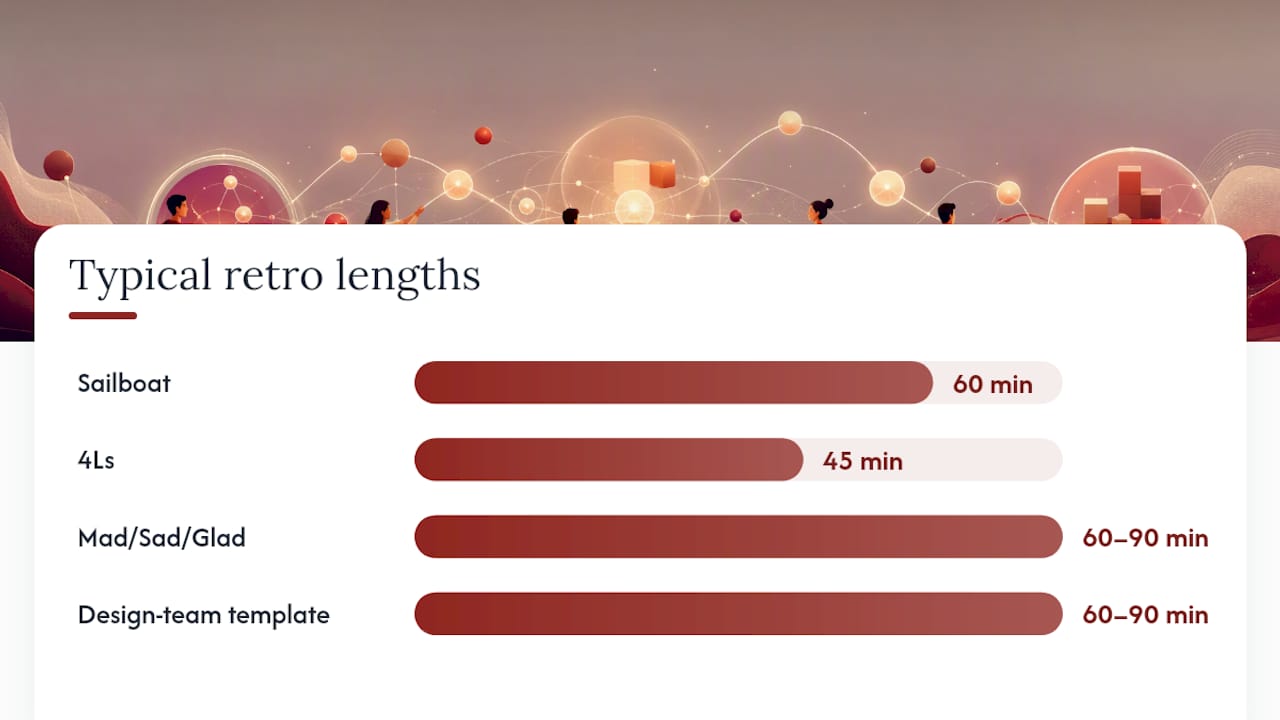
Different formats fit different moods and time constraints. The Sailboat retrospective (wind pushing the boat forward, anchors holding it back, rocks ahead) works well when a team feels stuck and needs a metaphor to unlock honest talk. 4Ls (Liked, Learned, Lacked, Longed For) suits a team that wants a gentler, less confrontational structure. Mad/Sad/Glad works for emotionally charged projects, like a launch that went sideways, where naming feelings first helps the group get to useful feedback faster. A design-team-specific template centers on design wins, handoff friction, and design system quality instead of generic sprint questions, which tends to surface more relevant issues for this audience.
| Format | Best for | Typical length |
|---|---|---|
| Sailboat | Teams that feel stuck or blocked | 60 minutes |
| 4Ls | Lower-stakes, routine sprint reviews | 45 minutes |
| Mad/Sad/Glad | Emotionally charged launches or conflicts | 60 to 90 minutes |
| Design-team template | Handoff friction, design system gaps | 60 to 90 minutes |
Template A: 90-minute design retrospective. 10 minutes set the stage, 25 minutes gather data on handoff and critique friction, 25 minutes cluster and vote, 20 minutes decide actions, 10 minutes close and confirm owners.
Template B: 30-minute design-health check. 5 minutes framing, 10 minutes rapid-fire sticky notes on one question (“What’s one thing slowing design work down right now?”), 10 minutes vote and pick the top issue, 5 minutes assign one owner.
For remote teams, replace sticky notes with a shared digital board, use anonymous voting tools so rank doesn’t influence the outcome, and record the session so absent teammates can review it asynchronously before the next retro.
Facilitation Techniques That Get Quiet Voices Talking
The biggest failure mode in a design feedback session isn’t hostility, it’s silence from everyone except the two most confident people in the room. Facilitators should build in structure that doesn’t rely on people volunteering.
- Silent brainstorming first. Give everyone five minutes to write ideas alone before anyone speaks, so junior designers aren’t just echoing whoever talks first.
- Anonymous input for sensitive topics. Use anonymous digital boards when the topic involves critiquing a senior team member’s decision or naming interpersonal friction.
- Round-robin instead of open floor. Go person by person for one contribution each before opening it up, which gives quieter participants a guaranteed turn.
- Timeboxed speaking turns. Two minutes per person on a topic keeps one strong personality from dominating the whole session.
Handling a dominant voice takes a direct but non-confrontational move: “Thanks, let’s hear from a couple of people who haven’t spoken yet.” If someone gets defensive about a critique of their design decision, redirect to the process, not the person: “What made that constraint hard to see at the time?” Facilitators should treat the room as a safe space, and techniques like silent brainstorming and anonymous input exist specifically to protect that safety.
For remote sessions, breakout rooms of three or four work better than a single video call for the gather data phase, since people talk more freely in smaller groups. Digital voting tools remove the awkwardness of raising hands on camera.
Pro Tip: Before the meeting ends, the facilitator should read the action items out loud and ask, “Does everyone agree this is what we decided?” That single check prevents half the disputes that show up at the next retro.
How to Tell If Your Retrospectives Are Actually Working
An action item without a due date is a suggestion, not a commitment. Every action item needs three things: an owner, a due date, and a success criterion, meaning a specific, checkable condition for “done.” “Improve handoff docs” isn’t verifiable. “Add a handoff checklist to the Figma file template by Friday, confirmed by engineering lead sign-off” is.
A few signals tell you whether the retro itself is working, not just the individual actions:
- Action completion rate: what percentage of items from the last retro actually got done before this one.
- Time to first file diff: how quickly a decided change shows up in actual design files after the retro.
- Repeat issue frequency: whether the same complaint (slow handoffs, inconsistent components) keeps resurfacing across retros.
- Presenter satisfaction: a quick one-question pulse check on whether the person whose work was discussed found it useful.
Rework’s design critique research points to exactly these action-item metrics as the clearest signal of whether a critique or retro practice is actually improving the work, rather than just producing a pleasant conversation. Store retro notes somewhere linked to the project itself, not a disconnected doc, so anyone checking the status of a decision six weeks later can trace it back without asking around.
Why Retrospectives Fail Without a Record of What Was Decided
Most design retrospectives lose their value not in the meeting but in the four weeks after it. Teams debate the same handoff problem twice, three cycles apart, because nobody wrote down what was decided the first time or why. Smashing Magazine’s research on project retrospectives points to exactly this pattern: without structured records of past decisions, teams re-litigate settled choices and waste retro time on rediscovery instead of new insight.
A useful decision record needs a handful of fields, not a full report:
- The problem or question being decided
- Constraints in play at the time (budget, timeline, technical limits)
- The choice made
- The evidence or reasoning behind it
- Who owns the decision
- The date
Whoever facilitates or scribes the retro should be the one who writes the record, right after the meeting, while context is fresh. It should live somewhere linked to the retro notes and the project’s action items, not buried in a separate wiki nobody checks. A design documentation template built around these fields turns a one-line decision like “moved to a card-based layout” into something a new team member can trace back to the actual tradeoff discussion, months later, without pinging three people on Slack.
What Actually Changes When Teams Document Their Decisions
Retrospectives get better the moment a team stops treating each one as a blank slate. Before adopting a consistent pre-read and decision log, most design retros spend the first 15 minutes re-establishing context that should already be settled, which cuts real discussion time by roughly a third in any 60-minute session. After adding a scribe role and a simple decision log linked to the retro notes, that reconstruction time mostly disappears. The conversation moves straight to new friction instead of old arguments.
The pitfall teams hit early: they over-invest in the meeting format and under-invest in what happens the week after. A gorgeous retrospective template does nothing if action items sit untracked and decisions live only in someone’s memory. The fix isn’t a better icebreaker question. It’s writing down the choice, the reason, and the owner, every time, so the next retro builds on the last one instead of repeating it.
, Rajas
Make Retrospective Decisions Stick with Project Memory Software
Most of what gets decided in a design retrospective evaporates within a month, not because the meeting was unproductive, but because nobody captured the reasoning behind the decisions made. Project memory software turns retro notes, meeting transcripts, and critique feedback into structured records that preserve the why behind a choice, not just the choice itself, and trace it back to the conversation it came from.

That matters most in the weeks after the retro, when someone questions a decision and nobody can remember the constraints that shaped it. Instead of scrolling through old Slack threads, your team pulls up the record: the problem, the tradeoff, the owner, the date. It plugs directly into the follow-up habits that make retrospectives actually work, linking decisions to action items so the next retro starts from where the last one left off, not from scratch. If you’re ready to stop re-explaining the same decisions every quarter, check the pricing plans and see which tier fits your team’s retro cadence.
Sources
- UX Retrospectives, Nielsen Norman Group
- The importance of project retrospectives, Smashing Magazine
- Iteration retrospective facilitation, PMI
- Design Team Retrospective Template (Free), TeamRetro
- How to Run a Design Review (Step-by-Step, 2026), Storyflow