3 Copyable Templates for Design Review Notes That Teams Will Actually Use
3 Copyable Templates for Design Review Notes That Teams Will Actually Use

Every useful design review note captures the same five things: the decision made, the rationale behind it, who owns the next step, when it’s due, and which open questions remain unresolved. Skip any one of these and you get a meeting summary nobody trusts six weeks later. The fastest way to get this right is to link each decision back to the conversation that produced it, then use a copy-paste template so nobody has to reinvent the format mid-meeting.
TL;DR:
- A comprehensive design review note must link each decision to the conversation that produced it and include the decision, rationale, owner, due date, and open questions.
- Using structured templates for feedback, decisions, and follow-up actions ensures clarity and makes tracking progress easier across the project lifecycle.
- Assigning roles and preparing pre-reads before the meeting, along with silent reading periods, improves the quality of feedback and decision accuracy.
- After a review, sorting feedback into Must Fix, Investigate, or Archive within 15 minutes helps prioritize and turn vague comments into actionable tasks.
- Maintaining a living record that links decisions to source conversations enhances transparency, onboarding, and consistency, especially across staff changes.
Table of Contents
- What to Include in a Design Review Checklist
- Ready-to-Copy Templates for Critique Feedback Notes
- How Do You Capture Notes During the Review?
- What Happens to Notes After the Review Ends?
- Keeping Design Review Notes Findable Later
- Why Linking Decisions to Their Source Conversation Matters
- Small Process Habits That Actually Change Outcomes
- A Living Record Beats a Meeting Summary
- Primary Sources and Templates Referenced
- Sources
- FAQ
What to Include in a Design Review Checklist
A design review checklist works best as five stacked layers, each answering a different question about what happened and why.
Start with meeting metadata: date, participants, who presented, and the review type (direction, craft, or decision review). That last part matters more than people think. Naming the review type up front, in the invitation itself, reduces circular feedback because reviewers know whether they’re judging concept or pixel spacing.
Next comes the problem statement: the constraints the design had to satisfy and the specific questions the team wanted answered. Without this, feedback drifts toward personal taste instead of whether the work solves the stated problem.
Then the actual feedback capture, which needs four fields per comment: the raw quote, a translated diagnosis (what the comment actually means as a design problem), where on the artifact it applies, and a rough priority. After that comes the decision record: decision text, a short rationale excerpt, an owner, a due date, and links to affected files. Finally, log open questions and risks separately, with a pointer to wherever follow-up work lives, whether that’s a ticket, a board, or a shared doc.
- Meeting metadata: date, attendees, presenter, review type
- Problem statement, constraints, and the questions asked of reviewers
- Feedback: raw comment, translated diagnosis, artifact location, priority
- Decisions: text, rationale, owner, due date, linked files
- Open questions, risks, and a link to where follow-up lives
Pro Tip: Keep discovery findings and stated project goals visible on screen during the review itself. Reviewers who can see the original brief give more grounded feedback and fewer preference-driven comments, according to research on structured design review templates.
Ready-to-Copy Templates for Critique Feedback Notes
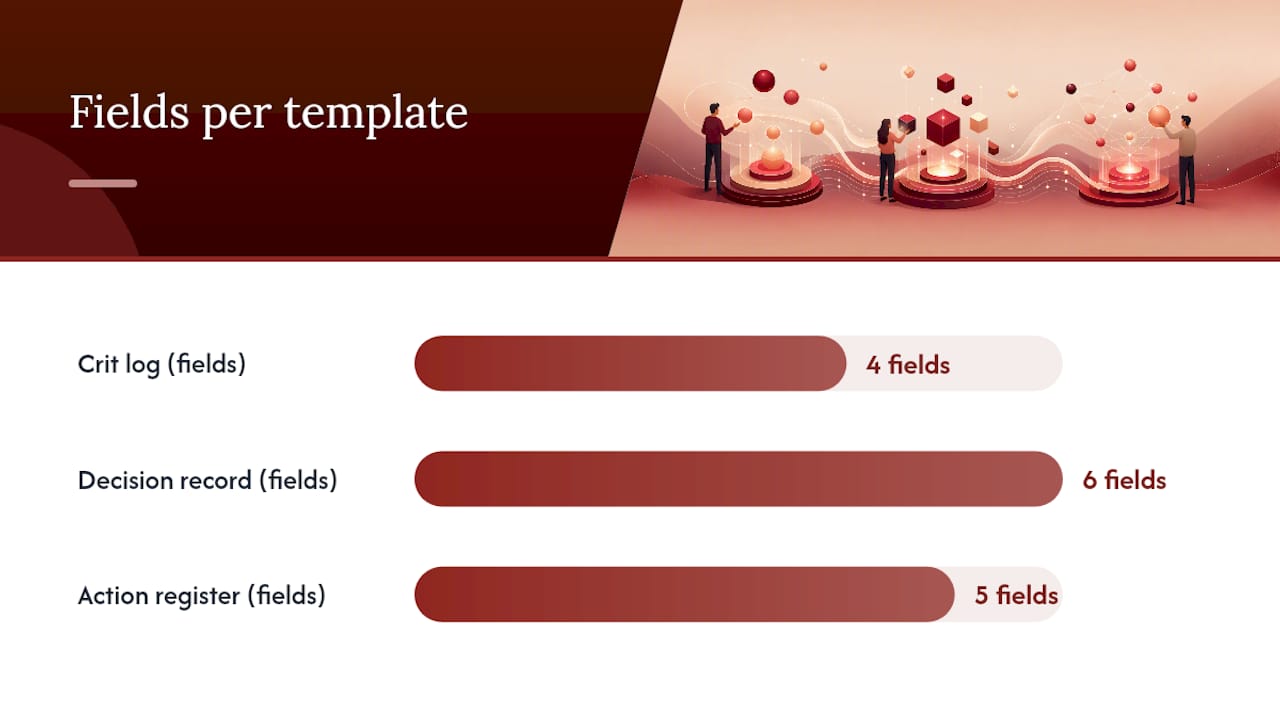
You don’t need custom software to run a tight review. Three templates cover almost every note-taking situation: a crit log for raw feedback, a decision record for outcomes, and an action register for follow-up. Structured templates turn scattered comments into organized conversation, which is the whole point of documenting a review in the first place.
The crit log captures feedback in real time, one row per comment:
| Raw comment | Translation | Location | Priority |
|---|---|---|---|
| “Feels flat” | Header lacks visual hierarchy | Homepage hero | High |
| “Too much white space” | Content density unclear at this breakpoint | Tablet layout | Medium |
| “Not sure this reads as clickable” | Button styling lacks affordance | Primary CTA | High |
The decision record captures what the team actually agreed to:
| Decision | Rationale | Source | Owner | Due date | Status |
|---|---|---|---|---|---|
| Increase hero heading size to 48px | Improves scan pattern per crit feedback | Transcript, 14:22 | Priya | March 20 | Open |
The action register links each task back to the decision that spawned it:
- Action: rebuild hero hierarchy. Owner: Priya. Due: March 20. Ticket: DES-104. Status: in progress.
- Action: run readability check on tablet layout. Owner: Marcus. Due: March 22. Ticket: DES-105. Status: not started.
Put these three templates in one place, ideally the project doc or ticket the review is tied to, not scattered across chat threads. If you’re building a design documentation template from scratch, capture decisions and their rationale as separate fields from the start. Retrofitting that structure later is far more painful than starting with it.
How Do You Capture Notes During the Review?
Good capture depends on roles being assigned before the meeting starts, not improvised once feedback starts flowing.
- Assign three roles. The presenter walks through the work. The note-taker captures feedback verbatim first, translating it into a diagnosis only after the meeting. A facilitator keeps the room on scope and stops tangents from eating the clock.
- Send a pre-read. Include the problem statement and your specific questions at least a day ahead. Reviewers who arrive cold give shallower feedback.
- Open with two minutes of framing, then give the room five minutes of silent reading before anyone talks. Silent reading time produces higher-quality feedback than a live walkthrough, because reviewers process the work at their own pace instead of reacting to whatever the presenter emphasizes.
- Run timed feedback rounds, tagging each comment to one of the pre-read questions where possible.
- Close by recording decisions and owners before anyone leaves the room. A review that produces discussion but no decision has wasted everyone’s time.
For remote or asynchronous reviews, record the session and reference specific timestamps in your decision record rather than paraphrasing from memory. A transcript link beats a note-taker’s summary every time someone later asks “wait, why did we decide that?”
Pro Tip: Use short location markers (“top nav,” “card 3,” “0:14 in the walkthrough”) instead of long descriptions. They’re faster to write during the meeting and easier to search later.
What Happens to Notes After the Review Ends?
The first 15 minutes after a review matter more than anything you write during it. Write down every criticism you remember, verbatim if possible, within that window, then sort each item into one of three buckets: Must Fix, Investigate, or Archive. Waiting even an hour costs you detail, and vague memory tends to smooth over the sharp, useful parts of feedback.
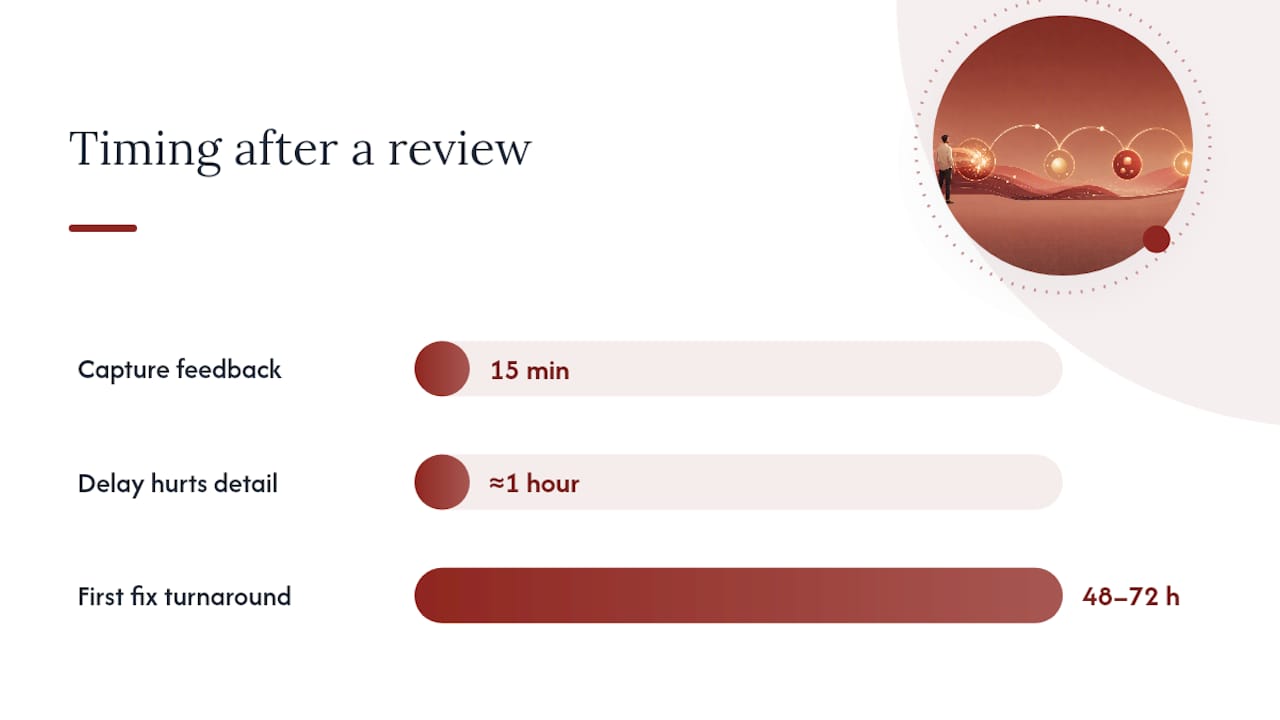
From there, translate vague comments into testable changes. “Needs more presence” isn’t actionable on its own, but “build a hierarchy diagram and test whether clarity improves” is. Pick one change to try first rather than attempting to fix everything at once. A 48 to 72 hour turnaround on that first fix keeps momentum without rushing the work.
Once you’ve picked the fix, assign an owner and a due date, create the ticket, and send a short summary to stakeholders with links to the decision record and any updated files. This is also where a system for tracking action items pays off, since half-finished follow-ups are where most review value gets lost.
- Sort feedback into Must Fix / Investigate / Archive within 15 minutes
- Convert vague comments into one testable change
- Assign owner, due date, and ticket before moving on
- Run quick verification: the 8-word test, the one-page test, or a walkthrough test
A crit log that tracks raw comment, translation, location, and test outcome stops teams from overreacting to whichever comment was loudest in the room, and it gives you a record of whether a fix actually worked.
Keeping Design Review Notes Findable Later
A note nobody can find in three months isn’t documentation, it’s clutter. Fix that with three habits.
- Storage: keep notes in a shared doc with version history, attach the decision record to its project ticket, or use a living project memory format that stores decision, rationale, owner, and source link as structured fields rather than free text.
- Naming convention: use a consistent pattern like
YYYY-MM-DD_Project_ReviewType_Presenter. Six months from now, searching by date or review type beats scrolling through a folder of “Notes (2)” files. - Linking: reference recording timestamps and transcript excerpts rather than paraphrasing them, and link to stable artboard permalinks instead of a specific file version that will eventually get replaced.
None of this requires new software. It requires deciding on a format once and sticking to it, which is exactly where most teams fall down.
Why Linking Decisions to Their Source Conversation Matters
The biggest failure mode in design documentation isn’t missing notes, it’s notes that record what was decided without why. Six weeks later someone reopens a settled question because nobody can point to the reasoning that closed it the first time.
Linking each decision to the conversation that produced it solves this directly. When a decision record points to a transcript timestamp or a specific meeting thread, anyone questioning it later can trace the logic instead of relitigating from scratch. That’s the core idea behind Theintentledger’s approach to project memory, and it’s worth reading the Record of Decision breakdown for the eight fields worth capturing on every logged decision. The blog has more templates if you want to build this habit into a recurring practice rather than a one-off exercise.
Small Process Habits That Actually Change Outcomes
Most teams over-document meetings and under-verify fixes. What works better: insist on one clearly recorded decision per review, test a single change before touching anything else, and keep a running crit log instead of scattered files. Write notes within 15 minutes, name an owner immediately, and send a one-paragraph summary before you forget what mattered.
, Rajas
A Living Record Beats a Meeting Summary
Theintentledger is the alternative to the meeting notes doc that nobody reopens. It turns transcripts, critique feedback, and client comments into ILM Records, structured entries that link each decision back to the exact conversation that produced it, along with rationale, owner, risks, and open questions attached.

For a design team, that means faster onboarding for anyone joining mid-project, fewer arguments about why a call was made, and a record that survives staff turnover instead of living in one person’s memory. Plans start with Working Set at $12 one-off for a single project, up through monthly subscriptions like Living Record for teams running reviews every week. Check the pricing page and see which plan matches how often your team meets.
Primary Sources and Templates Referenced
For deeper reading on running structured reviews, see Storyflow’s step-by-step design review guide, Redrafted’s post-crit feedback routine, and Spreo’s design review template. For managing client-facing follow-up, Signal Engine’s feedback loop playbook is worth bookmarking.
Sources
- How to Run a Design Review (Step-by-Step, 2026) | Storyflow
- How to survive architecture crit and use feedback after | Redrafted
- Design Review Template | Spreo
FAQ
What Should You Include in a Design Review?
At minimum: meeting metadata, the problem statement and constraints, raw feedback with a translated diagnosis, and a decision record with owner and due date. Every decision should link back to the conversation or transcript where it was made so it can be verified later.
What Is the Difference Between a PDR and a CDR?
A Preliminary Design Review (PDR) checks whether the overall approach and concept meet requirements before detailed work begins, while a Critical Design Review (CDR) checks whether the completed detailed design is ready to move into production or build. Both need the same core note fields: decision, rationale, owner, and open questions, just applied at different project stages.
What Belongs on a Design Evaluation Checklist?
A solid checklist covers meeting metadata, the stated problem and review questions, structured feedback fields (comment, diagnosis, location, priority), and a decision log with owners and due dates. Design review templates that keep discovery findings visible also tend to produce more grounded, less preference-driven feedback.
How Do You Describe Good Design Feedback in Notes?
Good feedback notes separate the raw comment from its translated meaning, for example turning “feels flat” into “header lacks visual hierarchy.” That translation step is what makes a comment testable rather than just a subjective reaction.
Does Theintentledger Replace a Design Review Meeting?
No. Theintentledger doesn’t replace the review itself, it captures what happens during and after it. It turns transcripts and notes into structured ILM Records that link decisions to their source conversation, so the reasoning stays traceable long after the meeting ends.