Meeting Summary Examples That Actually Get Read
Meeting Summary Examples That Actually Get Read

Every usable meeting summary needs five things: the purpose of the meeting, the decisions made, the action items with an owner and due date attached to each, the next steps, and any open questions still hanging. Skip one of those and someone downstream ends up guessing.
Here’s a one-line template you can paste into an email or Slack message right now:
Subject: [Meeting name] recap, [date]. Purpose: [one line]. Decisions: [bullet]. Actions: [task, owner, due date]. Next steps: [bullet]. Open questions: [bullet].
That structure covers the essentials because a quality meeting summary needs at least these five elements to be useful to someone who wasn’t in the room:
- Purpose, why the meeting happened
- Decisions, what got locked in
- Action items, task, owner, deadline
- Next steps, what happens before the next check-in
- Open questions, what’s still unresolved
Key Takeaways
A meeting summary works because it leads with outcomes, decisions, and owned action items, and gets distributed within hours while context is still fresh.
| Point | Details |
|---|---|
| Five core elements | Every summary needs purpose, decisions, action items with owners and dates, next steps, and open questions. |
| Format by meeting type | Stand-ups stay short and action-focused; retrospectives emphasize insights over task lists. |
| Action items need structure | Write task, owner, and due date in that exact order every time, with no exceptions. |
| Send it fast | Distribute within a few hours of the meeting to keep context accurate and useful. |
| Preserve decision context | Theintentledger converts meeting notes and transcripts into structured records that trace decisions back to their original conversation. |
Table of Contents
- What Is a Meeting Summary, and When Should You Write One?
- Meeting Summary vs. Meeting Minutes: Which One Do You Need?
- How Do You Write a Meeting Summary Step by Step?
- Meeting Summary Templates and Examples You Can Copy Right Now
- What Makes a Meeting Summary Clear and Easy to Act On?
- Common Mistakes That Undermine a Good Meeting Summary
- Why Structured Project Memory Preserves the Reasoning Behind Decisions
- What Actually Makes a Summary Stick
- Turn Meeting Notes Into a Searchable Decision Record
- Sources
What Is a Meeting Summary, and When Should You Write One?
A meeting summary is a short, curated recap built for people who weren’t in the room, not a record of everything that was said. It answers three questions fast: what happened, what got decided, and who’s doing what next.
You’ll want one for recurring team check-ins, client calls, sales calls, and planning sessions, basically anywhere the outcome matters more than the play-by-play. A weekly design review doesn’t need a transcript. It needs three bullets and a deadline.
Who actually reads these? Mostly the people who couldn’t make it, the manager tracking progress, and future-you trying to remember why a decision got made. Send it within a few hours of the meeting ending, while the context is still fresh in your head and everyone else’s inbox.
- Project teams use summaries to keep momentum between meetings
- Managers use them to track accountability without sitting in every call
- Stakeholders use them to stay informed without attending
Meeting Summary vs. Meeting Minutes: Which One Do You Need?
A summary captures outcomes. Minutes capture the record. That’s the whole distinction, but it changes everything about format, length, and who signs off on it.
Minutes are formal, often required for governance, audits, or board-level documentation, and they typically need approval before distribution. Summaries are informal, fast, and meant to be read in under a minute.
Pick minutes when the discussion itself needs preserving verbatim, or when compliance requires an official record. Pick a summary for everything else: internal syncs, client updates, project check-ins.
- Audience: Regulators or auditors → minutes. Team or stakeholders → summary.
- Compliance: Legal or governance requirement → minutes.
- Detail: Need the exact wording of a motion → minutes. Need the outcome → summary.
How Do You Write a Meeting Summary Step by Step?
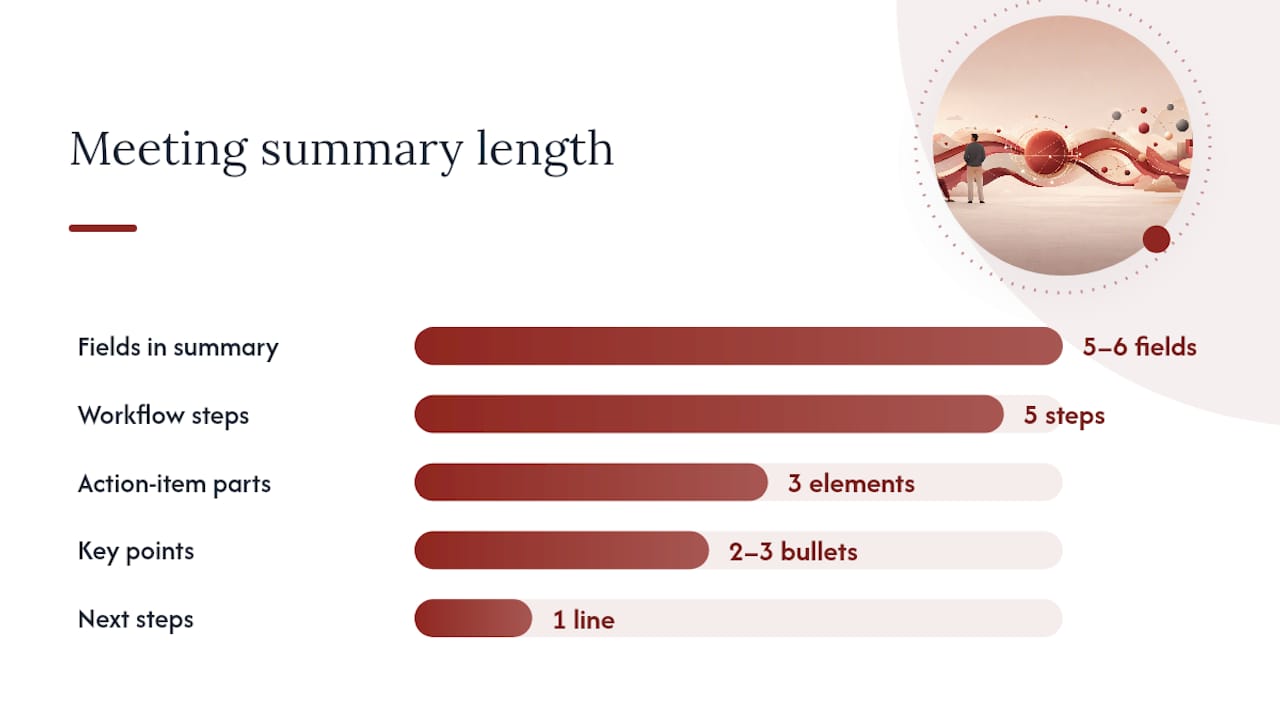
Most people overcomplicate this. The actual workflow is five steps, and once you’ve done it a few times, it takes less time than making coffee.
- Prepare before the meeting. Glance at the agenda so you know what to listen for. If you’re not sure what “done” looks like for this meeting, ask before it starts.
- Capture during the meeting. Jot down decisions, names attached to tasks, and dates the moment they’re said, not paraphrased later from memory.
- Organize immediately after. Strip your raw notes down to what matters: decisions and actions. Everything else is discussion, and discussion doesn’t belong in the summary.
- Write for someone who wasn’t there. Structure it with clear labels: Purpose, Key points, Decisions, Action items, Next steps.
- Review and send. Read it back once, cut anything vague, and send it within a couple hours.
That structure holds up because a strong summary leads with outcomes rather than a chronological account of who said what when. Nobody wants the play-by-play. They want to know what changed.
Here’s the exact wording to use as section labels, since consistency across summaries makes them easier to scan:
- Purpose: one sentence
- Key points: two or three bullets, max
- Decisions: what was actually agreed
- Action items: task, owner, due date
- Next steps: what happens before the next meeting
The action-item line deserves its own attention because it’s where most summaries fail. “Follow up on the vendor contract” tells nobody anything. “Vendor contract review, Priya, Friday” tells everyone everything. Task, owner, deadline, in that exact order, every time. If you drop the owner or the date, you’ve written a to-do list for no one in particular, and no one in particular never does anything.
Pro Tip: When a decision doesn’t have a clear owner in the room, don’t leave it blank and hope someone claims it later. Write “Owner: TBD, confirm with [name] by [date]” instead. That single line converts an ambiguous gap into its own trackable action item, which means the ambiguity itself gets assigned to someone.
Career-advice guidance backs this same structure: meeting basics, a one-line purpose, key points, decisions, and action items with owners and due dates, followed by a next-steps line. It’s not a coincidence that every credible source converges on the same five or six fields. That’s the format that survives contact with a busy inbox.
Meeting Summary Templates and Examples You Can Copy Right Now
There’s no single template that works for every meeting, because a stand-up and a client call demand completely different shapes. What follows are three ready-to-use structures plus a before/after example so you can see the transformation in action.
Template 1: Quick internal recap
Subject: [Team] sync, [date] Purpose: Weekly check-in on [project] Key points: [1-2 bullets] Decisions: [bullet] Action items: [task, owner, due date] Next steps: [one line]
Template 2: Action-item-focused summary
Subject: [Project] action items, [date] Decisions made: [bullet] Actions:
- [task], [owner], [due date]
- [task], [owner], [due date] Open questions: [bullet]
Template 3: Catch-up note for absentees
Subject: You missed [meeting], here’s what happened TL;DR: [one sentence] Decisions: [bullet] What’s changing for you: [bullet] Anything you owe: [task, due date, if applicable]
Before and after: raw notes to clean summary
Raw notes from a project update meeting often look like this: “Discussed timeline, Jake mentioned the API might slip, talked about budget for a while, decided to push launch back two weeks, need to tell client, Sarah will draft the email, also discussed hiring a contractor maybe, no decision on that yet.”
Cleaned up, that becomes:
Purpose: Project timeline check-in Decisions: Launch pushed back two weeks due to API delays. Action items: Draft client email, Sarah, Wednesday. Open questions: Contractor hire still undecided; revisit next sync.
That’s the entire transformation: cut the narration, keep the outcome. A well-built summary fits on one screen and takes roughly ten minutes to write once you stop trying to capture the conversation itself.
Adjusting the format by meeting type
- Stand-up: Shorter is better. Blockers and today’s priorities only.
- 1:1: Focus on commitments made by each person, not general discussion.
- Client call: Lead with what the client needs to see or approve.
- Project update: Emphasize what changed since last update and why.
- Retrospective: Emphasize insights and process improvements over task lists, since retrospectives need a different emphasis than status meetings.
Action-item table example
For teams pasting directly into Asana, Sheets, or Slack:
| Task | Owner | Due Date |
|---|---|---|
| Draft client email | Sarah | Wednesday |
| Confirm API delay scope | Jake | Friday |
| Revisit contractor decision | Team | Next sync |
What Makes a Meeting Summary Clear and Easy to Act On?
Run through this before you hit send:
- Does it lead with purpose, not preamble?
- Are decisions stated as outcomes, not discussion points?
- Does every action item have both an owner and a due date?
- Is it three to five bullets, not a wall of text?
- Did you attach or link the full notes if someone needs the detail?
A few formatting habits make a bigger difference than people expect; see the top Asana alternatives for task tracking if you want tools that integrate smoothly with your workflow. Bolding owners and dates, or using a simple table, measurably improves scannability and makes it easier for someone to copy an action straight into their own task tracker.
Copy the direct owners and stakeholders, not the whole department. And set a quick expectation for follow-up, something as simple as “Reply here if I got anything wrong.”
Pro Tip: Put the single most important decision in the subject line, not “Meeting recap.” A subject like “Launch delayed 2 weeks, details inside” gets opened and acted on faster than a generic label ever will.
Common Mistakes That Undermine a Good Meeting Summary
- Writing a transcript instead of a summary. Fix: cut everything that isn’t a decision or action.
- Vague action items with no owner or date. Fix: task, owner, deadline, always in that order.
- Burying decisions in long discussion. Fix: put decisions in their own labeled section, not paragraph three.
- Sending it two days late. Fix: send within a few hours, while it still matters.
Why Structured Project Memory Preserves the Reasoning Behind Decisions
A summary tells you what got decided. It rarely tells you why, and six months later, “why” is exactly what someone needs. That’s the gap structured project-memory tools are built to close: they capture the decision, the reasoning behind it, and the original conversation it came from, all linked together instead of scattered across email threads and old chat logs.
A record like this typically stores:
- The decision itself
- The rationale or context behind it
- The source meeting or conversation
- The owner and deadline
- Dependencies on other decisions
- Unresolved or open questions
When a design decision from three months ago gets questioned in a client review, the difference between “I think we discussed that” and a traceable record showing exactly when, why, and who agreed is the difference between a confident answer and a scramble through old notes.
Theintentledger builds this kind of structured decision record directly from meeting notes, transcripts, and critique feedback, so design teams stop losing the reasoning behind their own work.
What Actually Makes a Summary Stick
The best summaries answer three questions in under thirty seconds: what happened, what changed, and what do I owe. Everything else is optional. Consistent format matters more than clever writing, and speed of distribution matters more than polish. If someone can’t answer those three questions fast, rewrite it. That’s the whole bar.

Turn Meeting Notes Into a Searchable Decision Record
Writing a clean summary solves today’s problem. It doesn’t solve the problem of finding that decision again in four months when someone asks why the timeline shifted.

Theintentledger turns your meeting conversations, transcripts, and critique notes into structured, source-backed records, so every decision stays traceable back to the exact conversation it came from instead of buried in an old email chain. For design teams juggling client feedback, revisions, and shifting scope, that traceability saves the rework that comes from re-litigating decisions nobody can quite remember making. If your team is tired of digging through old Slack threads to answer “wait, why did we decide that,” start with The Intent Ledger and see how your next project meeting turns into a permanent, searchable record.
Sources
- How to write a meeting summary (with tips, template, and example) | Zoom
- How to Summarize a Meeting: 5 Steps + 3 Templates 2026 | notemeeting
- How to write a meeting summary (with template and …) | Indeed UK