6 Steps to a Traceable Open Questions Log for Design Teams
6 Steps to a Traceable Open Questions Log for Design Teams

An open questions log is a one-line tracker you build during or right after a meeting to capture every unresolved question raised. The moment you spot one, write it down, assign an owner, and set a due date tied to whatever the answer unblocks. Keep the log in a shared doc or a project memory tool, not scattered across chat threads and sticky notes.
TL;DR:
- Questions should be specific, tied to a real dependency, and linked to a clear source to ensure they are actionable and traceable.
- Regular, same-day reviews and follow-ups are crucial to prevent questions from losing urgency and to keep the log current.
- Prioritization should be based on a scoring system like impact and urgency, or curiosity and intrusiveness, to focus on critical questions first.
- Maintaining disciplined status updates and linking answers back to their original context prevent the log from becoming noise or outdated debris.
- For effective project memory, use tools that connect questions to the source conversation rather than simple spreadsheets to support traceability across multiple projects.
Table of Contents
- What Goes in an Open Questions Log Template
- How to Build a Questions Log from Meetings and Transcripts
- Getting Questions Back Into Meetings and Follow-Ups
- How to Decide What to Answer First
- Keeping the Log Honest: Status Rules That Prevent Rot
- Spreadsheet, Ticket Tracker, or Project Memory Tool?
- Example Rows and a Template You Can Start Using Today
- Why Unresolved Questions Are a Design Risk, Not Just an Admin Task
- Try The Intent Ledger for Traceable Question Tracking
- Sources
What Goes in an Open Questions Log Template
A good open questions log lives or dies on its fields. Too few, and the log becomes a graveyard of vague worries. Too many, and nobody bothers filling it out after the third meeting. The Open Questions Register Template from GoTranscript lands on five minimum fields, and that number holds up in practice.
Minimum fields:
- Question: A single, specific sentence. Not “budget concerns” but “Does the client’s budget include furniture procurement, or is that a separate line item?”
- Owner: One person, by name, never a team or department. Shared ownership is how questions die quietly.
- Due date: Tied to a real dependency, not a generic “end of week.”
- Impact: What breaks or stalls if the question stays open. This is what lets you triage later.
- Source/timestamp: A link to the transcript moment, meeting recording, or note where the question surfaced.
That last field does more work than it looks like it should. Nobody has to reconstruct context from memory three weeks later.
Optional fields worth adding, depending on your project:
- Status: If you’re not using a separate lifecycle tracker (more on that below).
- Related decision: A link to the decision record the question eventually feeds into.
- Priority score: Useful once your log passes 15 to 20 open items and you need a sorting mechanism.
- Stakeholder: Who cares about the answer, if it’s not the owner.
Phrasing matters more than most teams give it credit for. “What about the HVAC?” is not a question, it’s a shrug in text form. Rewrite it as “Does the client want ducted or ductless HVAC before we finalize ceiling heights?” A question someone can actually say yes or no to, or point to a document for, is a question that gets answered.
Example row:
How to Build a Questions Log from Meetings and Transcripts
Most unresolved questions get raised out loud and then evaporate the second the call ends. Building a reliable log means turning that spoken moment into a written record before anyone’s memory of it degrades.
- Get timestamped notes or a transcript. If you’re not recording meetings, at minimum jot the time next to anything flagged as unresolved. A tool that auto-transcribes saves you from doing this by hand every session.
- Scan for question markers. Phrases like “we still need to figure out,” “not sure yet,” “let’s circle back on,” and actual question marks are your search targets. Read once for content, then again specifically hunting these markers.
- Confirm it’s actually unresolved. Sometimes a question gets answered thirty seconds later in the same conversation and just sounds open in isolation. Check the surrounding minute of dialogue before logging it.
- Edit into a concise, answerable statement. Strip out the hedging and rambling. Turn “I guess we’re not totally sure if, like, the client wants exposed brick or if that’s just something someone mentioned” into “Does the client want exposed brick left visible in the lobby?”
- Assign an owner and a due date tied to the next dependency. Don’t default to “end of project.” Ask what downstream task can’t start until this question closes, and set the date against that.
- Record impact and the source timestamp. One line on what happens if this stays open past the due date, plus a link or timestamp back to where it came from.
Pro Tip: Run through this six-step pass within the same day as the meeting, not the next morning. Unresolved questions lose their edge fast. Something that felt urgent on a Tuesday call reads as vague and low-priority by Thursday, and it quietly slides to the bottom of everyone’s list.
Teams running frequent client interviews or workshops in multiple languages face an extra wrinkle here. Facilitation guidance from Oralingo on cross-language brainstorming sessions points out that unresolved questions surface differently when a session runs across language boundaries. A question that sounds settled in translation might still be genuinely open in the original phrasing, so a second pass with a native speaker on the transcript is worth the extra ten minutes.
If you’re transcribing manually, this whole process eats real time. Automating that first step, so you’re working from a clean transcript instead of raw audio, is often the highest leverage change a team can make. It’s the difference between spending fifteen minutes extracting questions and spending an hour re-listening to a recording.
Getting Questions Back Into Meetings and Follow-Ups
A logged question that nobody revisits is functionally the same as a question nobody wrote down. The log only works if it has a pulse, a rhythm that pulls items back into view before they go stale.
Send a same-day follow-up message after any meeting where new questions surfaced. Keep it short: name the question, name the owner, name the due date. That’s it. This does two things. It confirms the owner actually saw the assignment, and it creates a paper trail if the due date slips.
Build a five to ten minute “open questions review” block into your recurring meeting agenda. Not buried at the end when everyone’s already checking out, put it early, right after status updates. Walk through items due this week and anything overdue. Skip items that aren’t due yet unless someone flags a blocker.
Sample agenda bullet: “Open questions review (7 min): 3 items due this week, Priya’s HVAC question overdue by 2 days, need decision from client by Thursday.”
Sample follow-up message template: “Logged from today’s call: [question]. Owner: [name]. Due: [date]. Flag me if that timeline doesn’t work.”
When you hit the review block, each item gets one of four outcomes:
- Close it. The answer arrived, done, move it to answered status.
- Reassign it. The original owner can’t get an answer; someone else needs to own it now.
- Convert it to a decision. The question sparked a real choice that needs its own decision record, not just a closed log entry.
- Park it. Not urgent, not dead, but not worth a due date this week. Revisit at a set future point.
The mistake most teams make is treating the review as optional when the agenda gets tight. It’s usually the first thing cut, which is exactly backwards. A crowded agenda is the reason questions pile up in the first place.
How to Decide What to Answer First
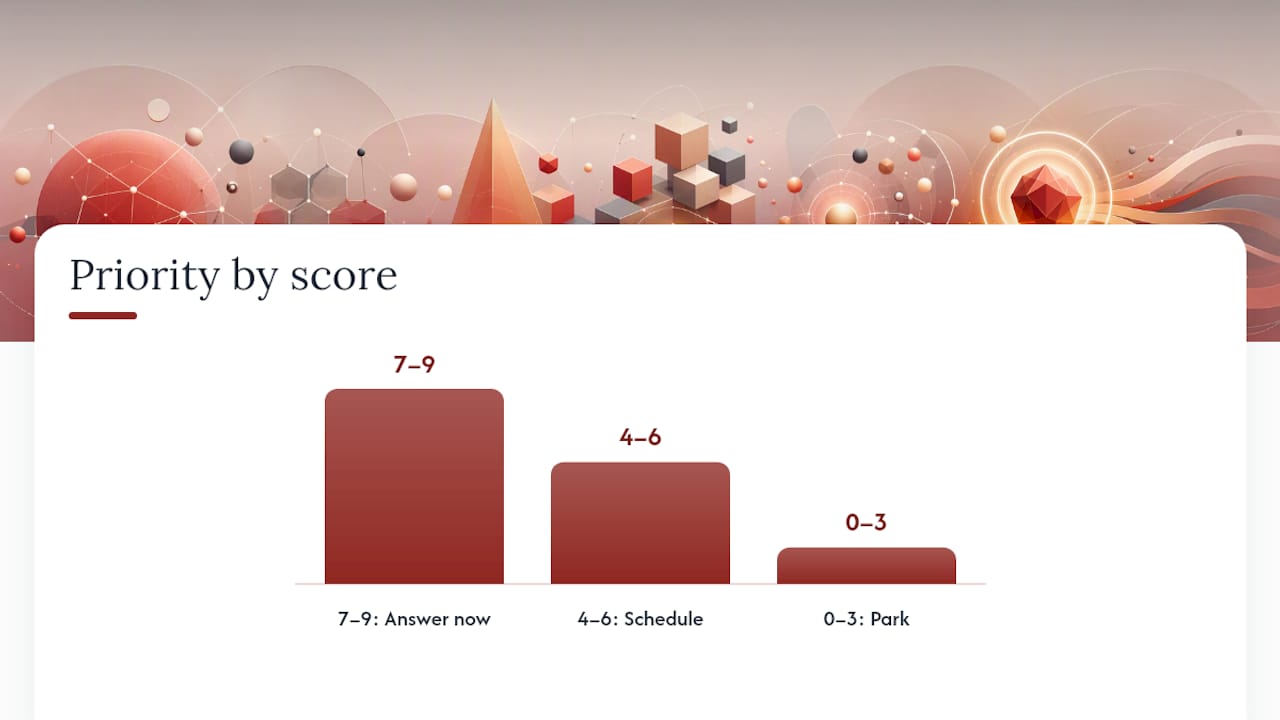
Not every open question deserves the same urgency, and treating them all as equally important is one of the fastest ways to burn out a team on a log nobody trusts anymore. The common failure mode is letting the loudest voice in the room set priority instead of an actual method.
Two scoring approaches work well depending on your context:
- Impact × Urgency. Score each on a simple 1 to 3 scale. Multiply. A question that blocks three other tasks (impact 3) and is due this week (urgency 3) scores a 9. A nice-to-know question with no deadline scores a 1 or 2.
- Curiosity × Intrusiveness. Borrowed from research on maintaining append-only ledgers of unresolved items, this pairing ranks entries by how interesting the answer would be against how disruptive it would be to chase it down right now. It works especially well for research and discovery-phase questions where “impact” is fuzzy but curiosity and intrusiveness still separates the worth-chasing from the can-wait.
Set rough thresholds so triage doesn’t require a meeting every time: a combined score of 7 or higher means answer now, 4 to 6 means schedule it within the sprint, and anything under 4 gets parked with a revisit date.
Worked example, three questions logged from the same client kickoff:
- Does the lease allow rooftop equipment? Impact 3, urgency 3. Score 9. Answer now.
- Should the reception desk face east or south? Impact 2, urgency 1. Score 2. Park it.
- Is the client open to a phased occupancy schedule? Impact 3, urgency 2. Score 6. Schedule this sprint.
That ranking alone tells the team where to spend Thursday’s review time, instead of debating it fresh every week.
Keeping the Log Honest: Status Rules That Prevent Rot
An open questions log that never gets cleaned up turns into noise fast, and noise is exactly what causes teams to abandon it after month two. The fix is a small, disciplined status set applied consistently.
- Open. Logged, owner assigned, no work started on the answer yet.
- In progress. Someone’s actively chasing the answer, whether that’s a client email or internal research.
- Answered. The answer exists and is recorded, but the entry hasn’t been formally closed out.
- Closed / converted to decision. Either fully resolved with no further action, or the answer produced a decision that now lives in its own record.
- Parked. Deliberately deferred, with a revisit date attached so it doesn’t vanish silently.
The rule that matters most here: mark answered items as answered immediately, don’t let them sit labeled “open” once you know the answer. Decision logs rot specifically because answered items don’t get re-labeled, and “resolved” needs to be a state you can search for, not something buried in a comment thread. When “resolved” is greppable, anyone on the team can audit the log in thirty seconds instead of reading every row.
Count unmarked answers as a form of debt. If you review the log and find five items that clearly have answers sitting in someone’s inbox but never got updated in the tracker, that’s five entries of accumulated log debt. Track that number monthly. A short maintenance checklist: sweep for anything past due, confirm answered items are relabeled, verify parked items still have a revisit date, and check that closed items link to their decision record if one exists.
Spreadsheet, Ticket Tracker, or Project Memory Tool?
The right home for your log depends on team size and how much context you need to preserve alongside the question itself.
A shared spreadsheet or a Markdown table works fine for small teams. It’s fast to set up, everyone already knows how to use it, and a lightweight persistent Q&A ledger can survive between sessions without any special software. The downside shows up as the project grows: spreadsheets don’t link back to source conversations, and ownership sync across a growing team gets messy fast.
Ticket trackers built for engineering work (the kind meant for bugs and features) can technically hold open questions too, but they’re built around task completion, not around preserving why a question mattered or what conversation it came from. You lose the narrative thread.
Before picking a tool, run through a short integration checklist: Can you attach a timestamp to each entry? Can you link directly to the source note or recording? Does ownership sync automatically when someone’s reassigned? Can you export the log for a client report or audit?
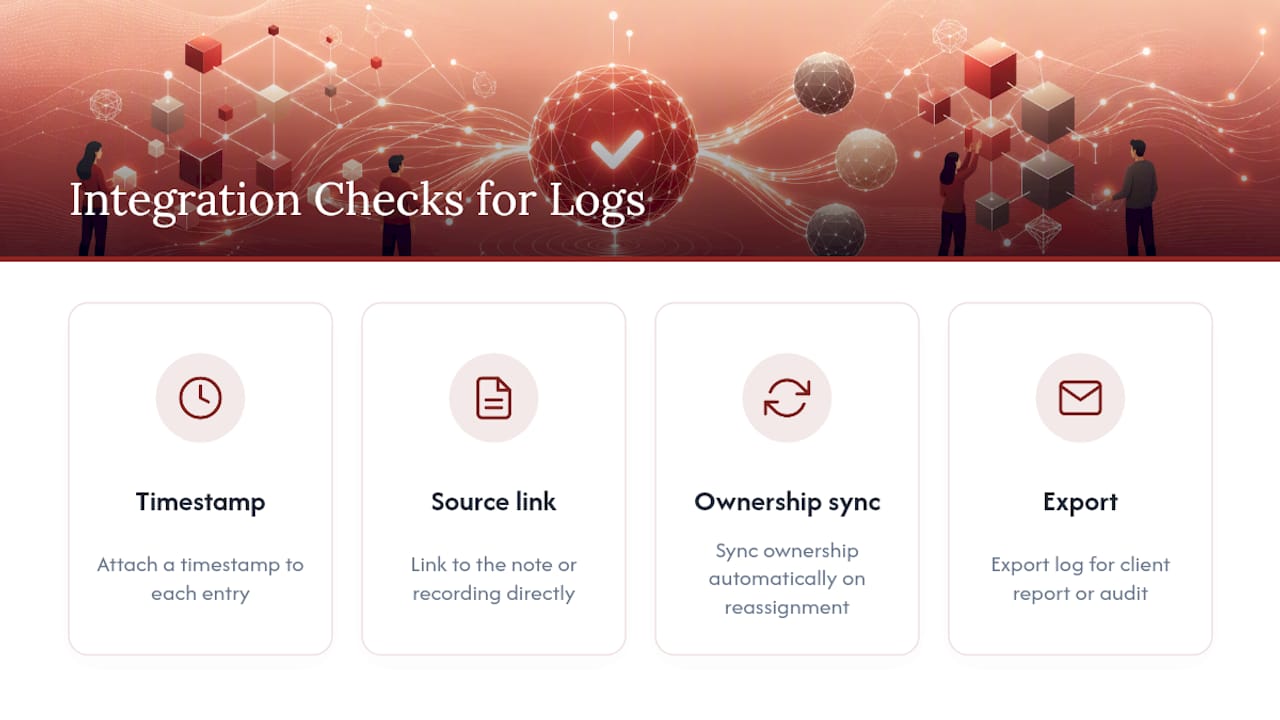
A project memory tool approaches this differently by turning each unresolved question into a structured record traceable back to the original meeting note, transcript, or client comment. Instead of a flat row in a sheet, the question stays connected to the conversation that raised it, which matters most in design work where the “why” behind a question often carries as much weight as the answer itself.
Pro Tip: Upgrade from a spreadsheet the moment you catch yourself scrolling back through old meeting notes to figure out why a question was even asked. That’s the signal your log has outgrown flat rows and needs linked source context.
Example Rows and a Template You Can Start Using Today
Seeing a few real-world rows makes the fields click faster than any field-by-field explanation:
- Discovery session: “Does the client’s data retention policy require on-premise storage?” Owner: Marcus. Due: 5 days. Impact: Blocks architecture decision.
- Client interview: “Is the March launch date firm or flexible if scope grows?” Owner: Dana. Due: Next check-in call. Impact: Affects resourcing plan.
- Design critique: “Should the navigation collapse on mobile or stay persistent?” Owner: Theo. Due: Before next sprint review. Impact: Blocks front-end build.
Keep one master file, owned by the project lead or PM, never duplicated across personal folders. Small teams can run this as a single tab in an existing project sheet, similar to a decision log template. Larger teams or studios juggling multiple active projects usually benefit from a dedicated tool where each question links back to its own design documentation and decision trail.
Why Unresolved Questions Are a Design Risk, Not Just an Admin Task
Most teams treat an open question as a to-do item. It’s closer to a fork in the road that hasn’t been marked yet. Every unanswered question about materials, scope, or client intent is a place where someone downstream will guess, and guesses drift from what was actually meant in that original conversation. Question logs matter because they’re one of the few tools that trace an answer back to the exact moment it was raised, which is the whole premise behind treating project memory as something worth protecting.
The failure mode I keep seeing: a question gets answered verbally in a hallway conversation, never makes it back into any record, and three months later two team members are working from contradictory assumptions about the same wall assembly. Neither is wrong. Neither has the memory that would have prevented it.
, Rajas
Try The Intent Ledger for Traceable Question Tracking
A shared spreadsheet gets you started, but it can’t tell you which conversation a question came from once your project passes month three. Some project memory software closes that gap by turning meeting notes, transcripts, and client comments into structured records, so every open question stays linked to the exact moment it was raised, with an owner attached and a trail back to the original decision.

That link back to source is the whole point. Instead of a flat row that says “confirm HVAC placement,” you get a record that shows the client comment that raised it, who owns the answer, and what decision it eventually fed into. For design teams juggling dozens of open items across multiple active projects, that traceability is what keeps questions from turning into guesses six weeks later.
Start with a look at The Intent Ledger’s project memory features to see how ILM Records connect to your existing meeting workflow, or check the pricing page to find the plan that fits your team size.
Sources
- Open Questions Register Template (Track Unresolved Items from Transcripts) | GoTranscript
- Open-Question Tension Store, Agent Patterns Catalog
- An “open question” that’s already decided is worse than…