Project Memory in 7 Steps for Design Teams Using AI and ILM Templates
Project Memory in 7 Steps for Design Teams Using AI and ILM Templates

Project memory is the structured record of a project’s decisions, failed attempts, and context that lets teams pick up work weeks later without re-litigating settled questions. Its core value is continuity: fewer repeated mistakes, faster onboarding, less time spent reconstructing why a choice was made. Design teams, architecture studios, and anyone managing distributed collaborators benefit most because their work depends on preserving intent, not just output.
TL;DR:
- Storing project memory as linked decisions, failed attempts, and source-backed notes enables faster onboarding and reduces repeated mistakes across teams.
- Automating regular capture and review of memory entries, with simple templates and fixed cadences, prevents systems from becoming cluttered or ignored over time.
- Using local-first, version-controlled storage or cloud solutions depends on control preferences, but both should employ event-sourced logs and clear tagging for efficiency.
- Building a structured ILM record from meetings, critiques, and client feedback ensures traceability and clarifies decision reasoning to prevent miscommunication.
- Assigning clear ownership and integrating memory entry into routine workflows, with recognition for quality entries, is essential to sustaining an effective project memory system.
Table of Contents
- What Makes Up Project Memory?
- How Do Teams Capture Project Memory Day to Day?
- What Formatting and Review Habits Keep Project Memory Useful?
- Local-First Storage or Cloud Memory: Which Setup Fits?
- How Design Teams Turn Conversations Into Records
- Who Owns Project Memory and How Is It Maintained?
- Quick Start: Adopting Project Memory in a Week
- Why Do Project Memory Initiatives Stall?
- How Do You Measure Whether Project Memory Is Working?
- What Are the Privacy and Security Risks of Storing Project Memory?
- Getting Teams to Actually Use Project Memory
- How The Intent Ledger Turns Conversations Into Lasting Records
- Sources
What Makes Up Project Memory?
Project memory isn’t one document. It’s a set of distinct record types, each answering a different question about the work. Most teams that try to cram everything into a single running notes file end up with something nobody reads, because decisions get buried under status updates and stray comments.
Break it into five components, and each one earns its place by answering something the others can’t.
- Decisions capture what was chosen and why, often modeled loosely on an Architecture Decision Record (ADR): a title, the options considered, the choice made, and the reasoning. A decision entry might read: “Switched navigation pattern from tabs to a sidebar because usability testing showed users missed the fourth tab entirely.”
- Issues and failed attempts log what didn’t work and why, so nobody burns another afternoon retesting a dead end. This is the component teams skip most often, and it’s the one that saves the most time later.
- Sessions and notes record what happened in a specific meeting, critique, or work block: who was there, what was discussed, what shifted.
- Tasks and actions track concrete next steps tied back to a decision or session, ideally with an owner and a due date.
- Key facts hold the stable reference information that doesn’t change often: client constraints, brand guidelines, technical limits, budget ceilings.
Each entry needs light metadata to stay useful: a date, an author, a status (open, resolved, superseded), and a link back to the source conversation. Without that link, a decision reads as an assertion with no evidence behind it.
The component that separates a functioning memory system from a glorified changelog is the failed-attempts log. Teams that only document what they built end up rebuilding the same rejected idea a year later, because nothing on record explains why it was rejected. Capturing the “why” behind a dead end is worth more than capturing the “what” of a finished feature, because the what is usually visible in the final deliverable anyway. The reasoning is the part that disappears.

How Do Teams Capture Project Memory Day to Day?
Memory capture fails when it’s treated as a separate task bolted onto the end of a project. It works when it’s built into the natural rhythm of starting and closing sessions, so writing it down takes less effort than not writing it down.
A workable rhythm looks like this:
- Open the session by pulling context, not by starting cold. A short summary or an index of open decisions and unresolved questions should load automatically, whether that’s a quick scan of a decision log or a
get_summarystyle call in an AI-assisted workflow. - Log attempts and notes as they happen, not from memory at the end of the day. A one-line entry written in the moment beats a reconstructed paragraph written three days later.
- Link every substantive note back to its source conversation. A decision without a source is a claim nobody can verify; a decision with a link to the transcript or meeting notes is evidence.
- Close the session with a short summary, not a transcript dump. Three to five lines covering what was decided, what’s still open, and what happens next is more useful than a full recap nobody will reread.
- Run automation at the seams, not in the middle of the work. A git pre-commit hook that reminds a developer to update the decision log, or a script that generates a session-summary draft from raw notes, catches the moments people are most likely to skip.
This pattern echoes how Claude’s memory system works for AI-assisted coding: a CLAUDE.md file holds persistent instructions, and a MEMORY.md file indexes long-term project knowledge that gets loaded at the start of each session. The lifecycle is the same whether the “agent” reading the memory is a person returning to a project or an AI model picking up context. Session start pulls a summary, the middle of the work generates raw entries, and session end compresses those entries into something the next reader can scan in under a minute.
What Formatting and Review Habits Keep Project Memory Useful?
Format decisions determine whether memory gets read six months from now or ignored after the second week. The habits that matter most are boring on purpose: short entries, consistent dates, and a review cadence nobody has to be reminded about.
Stick to these defaults:
- Keep index entries to one to three lines, and prefer bulleted lists over prose paragraphs or dense tables, since concise, scannable formatting is easier for both a human skimming a backlog and an AI model working within a limited context window.
- Use the
YYYY-MM-DDdate format everywhere. It sorts correctly, it’s unambiguous across regions, and it avoids the “03/04” confusion that trips up international teams. - Attach a small metadata checklist to every entry: author, a link to the source conversation, one or two tags, and a status flag (open, resolved, superseded).
- Set a fixed review cadence, monthly is a reasonable default, where someone actually reads through recent entries rather than just adding new ones.
- Decide upfront whether stale entries get archived or deleted. Archiving preserves the record for future audits; deleting should be reserved for genuine errors, not for decisions that simply got superseded.
Pro Tip: Resist the urge to log everything. A memory file that captures every minor comment turns into noise nobody trusts. Reserve entries for things that change a decision, resolve a question, or explain a reversal, not for routine status updates that belong in a task tracker.
The instinct to write more feels productive, but a bloated memory file trains people to stop reading it. Ten sharp entries beat eighty vague ones. A good test: if you can’t imagine someone searching for this entry six months from now, it probably belongs in a chat log instead of the permanent record.
Local-First Storage or Cloud Memory: Which Setup Fits?
The tooling decision comes down to one trade-off: how much control you want over where the data lives versus how much convenience you get from a hosted service. Neither option is universally correct, but the trade-offs are concrete enough to reason through quickly.
Local-first patterns, where memory lives in plain files inside the project’s own repository, offer full auditability through git history and no dependency on a third party’s uptime. Open-source implementations like projectmem demonstrate this directly: memory is stored in versioned files, with a command-line interface and hooks that capture events and check proposed actions against history before they happen. The trade-off is that local-first setups require more setup discipline and don’t automatically sync across a distributed team’s devices.
Cloud-hosted memory trades some of that control for shared access and less manual upkeep. A hosted platform can push updates to every team member instantly and doesn’t require anyone to configure git remotes correctly, but it introduces a dependency on the vendor’s infrastructure and data-handling practices.
A few patterns show up across both approaches:
- Model Context Protocol (MCP) style tool primitives give an AI agent structured functions to call:
get_contextfor the current state,get_summaryfor a compressed history, andprecheck_fileto flag whether a proposed change touches an area with known problems. - Markdown-first patterns,
CLAUDE.mdfor persistent instructions andMEMORY.mdas an index, keep memory readable by both humans and AI models without a database layer. .ai-memoryfolders, often organized per feature rather than as one giant file, keep context localized so an agent working on navigation doesn’t have to wade through notes about the billing system.- Event-sourced, append-only logs record typed events (issues, attempts, fixes, decisions) rather than overwriting a single mutable state, then use a deterministic process to fold those events into a compact summary.
That last pattern deserves a closer look. Research on event-sourced memory for AI coding agents found that reconstructing project context from scratch can consume thousands of tokens per session, a real cost when an AI model is billed by token usage. Storing memory as an append-only log of events, then deterministically projecting those events into a summary.md file, keeps that cost predictable and lets the system generate pre-action warnings before an agent repeats something that already failed.
How Design Teams Turn Conversations Into Records
Design work generates its highest-value information inside meetings that mostly evaporate: critiques, client calls, stakeholder pushback. Theintentledger builds around a structure meant to catch that information before it disappears, called an ILM Record, short for a source-backed record of Intent, Logic, and Memory tied to the conversation it came from.
An ILM Record typically holds:
- Design intent: what the team was trying to achieve with a specific choice, not just the choice itself.
- The decision: the concrete call that was made, stated plainly enough to act on.
- Risk: what could go wrong if the decision holds, or what assumption it depends on.
- Action: the concrete next step, ideally with an owner.
- Unresolved questions: what’s still open, so it doesn’t quietly disappear from the conversation.
- Source link: a trace back to the original meeting, transcript, or client comment the record came from.
Picture a critique session where a client pushes back on a color palette, citing brand guideline concerns. Without a structured record, that feedback lives in someone’s memory of the call and maybe a scribbled note. An ILM Record turns it into a decision entry: the palette shift, the risk (brand consistency across existing collateral), the action (revise mockups and circulate for sign-off by Friday), and a link straight back to the transcript where the client raised the concern. Anyone who joins the project later can trace the palette change to its source instead of taking it on faith.
That traceability is the actual payoff. When a decision links directly to the conversation that produced it, disagreements later get resolved by checking the record instead of relying on whoever has the strongest memory of the meeting. Risks surface earlier too, because writing “risk” as a required field forces someone to name the thing that could go wrong instead of letting it stay unspoken. A decision log template built around this same structure works whether or not a team uses dedicated software, though the software automates the linking that otherwise falls to someone typing timestamps by hand.
Who Owns Project Memory and How Is It Maintained?
Memory that nobody owns degrades fast. Someone needs to be responsible for curating entries, and someone needs authority to mark old decisions as superseded rather than letting contradictory records pile up side by side.
A workable ownership model assigns one person, usually a project lead or design lead, as the curator who reviews new entries for clarity and flags anything that’s gone stale. That doesn’t mean the curator writes every entry; it means they’re accountable for the file staying trustworthy. A short review checklist keeps this from becoming a vague responsibility: does the entry link to a source, does it explain reasoning rather than just outcome, and is the status field accurate.
Automation carries part of the load that pure discipline can’t sustain, with support from the best AI governance software for UK enterprises:
- Stale-memory detection flags entries that haven’t been touched or referenced in a set window, prompting a check on whether they’re still accurate.
- Cross-project gotchas surface patterns that recur across multiple projects, catching mistakes that would otherwise repeat in isolation on each one.
- Pre-action gates, the same mechanism behind
precheck_filewarnings in event-sourced systems, block or flag actions that touch an area with a documented history of failure.
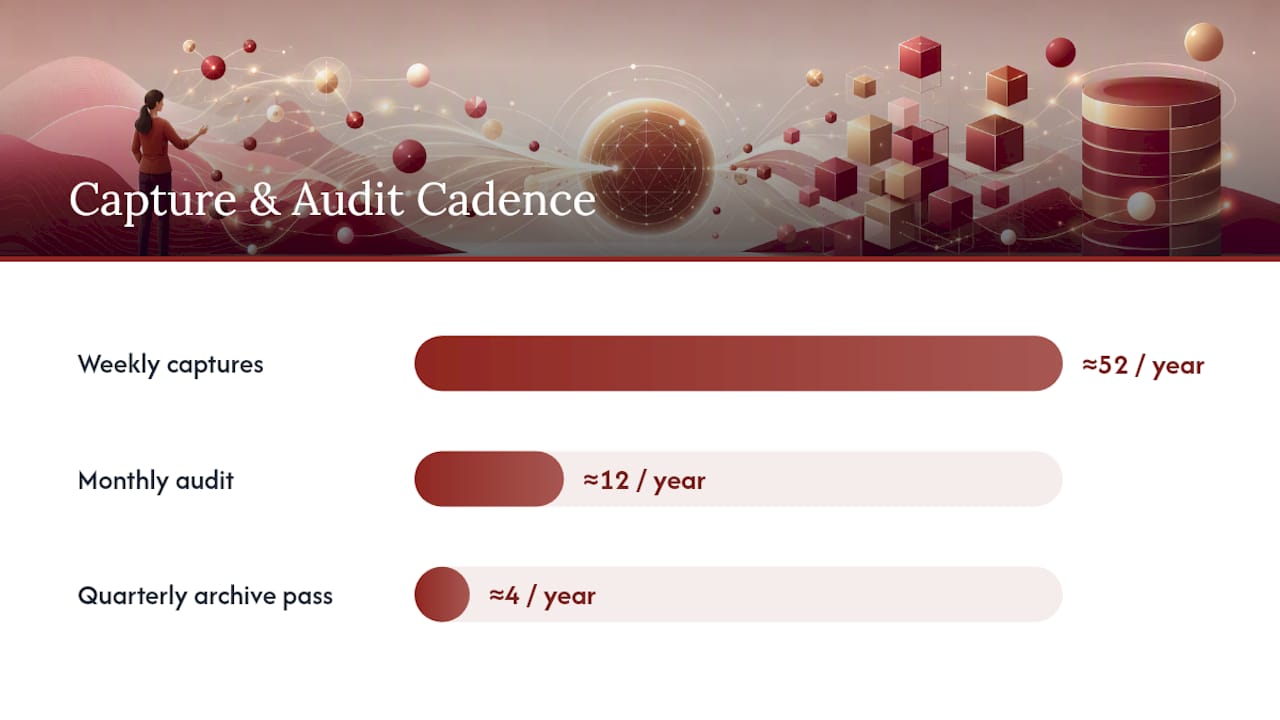
On cadence, practitioner guidance generally converges on a simple rhythm: weekly captures during active sessions, a monthly audit where someone actually reads through recent entries and consolidates anything redundant, and a quarterly pass to archive completed project sections rather than letting the active file grow indefinitely. That structure keeps the memory file from turning into an unreadable archive of everything that’s ever happened, which is the single most common way these systems quietly die.
Quick Start: Adopting Project Memory in a Week
- Pick a storage pattern. Decide between a single memory file, a per-feature
.ai-memoryfolder structure, or a dedicated tool, based on team size and how distributed the work is. - Create four starter templates: a decision log, an issues/failed-attempts log, a session summary format, and a one-page project overview.
- Add one piece of minimal automation, a git pre-commit reminder or a simple script that drafts a session summary from raw notes.
- Capture your first real entries from whatever is happening this week: a recent decision, an open risk, a meeting that just wrapped.
- Run a first review at the end of week one, even if it only takes ten minutes, to catch obvious gaps in format or missing links.
- Onboard the rest of the team with a short walkthrough of where memory lives and what belongs in it, using the design documentation template as a reference if the team needs a concrete starting shape.
- Set the recurring review date on the calendar now, before momentum fades, so the monthly audit isn’t something someone has to remember to schedule.
Why Do Project Memory Initiatives Stall?
Most project memory efforts don’t fail because the concept is wrong. They fail because of predictable, specific friction points that show up in the first month.
The most common one is treating memory capture as an extra task rather than folding it into existing work. If writing a decision entry means opening a separate tool, finding the right file, and formatting it correctly, most people will skip it under deadline pressure. The fix is friction reduction: templates that take thirty seconds to fill in, not five minutes.
A second failure mode is capturing outcomes without reasoning. A memory file full of “changed the button color to blue” entries with no explanation of why is barely better than no memory at all, because the next person who questions that choice has nothing to work from.
Inconsistent ownership causes a third kind of breakdown. When everyone is nominally responsible for updating memory, nobody actually is, and the file drifts out of sync with reality within a few weeks. A single named curator, even an informal one, tends to keep quality far more stable than a shared responsibility that belongs to no one in particular.
Finally, teams often build memory systems too complicated for their actual size. A five-person studio doesn’t need an elaborate tagging taxonomy and a multi-tier folder structure. Overengineering the system before anyone trusts the habit is a reliable way to make sure the habit never forms.
How Do You Measure Whether Project Memory Is Working?
Project memory doesn’t produce a clean revenue number, but it leaves measurable traces if you know where to look.
Track onboarding time for anyone joining a project midstream. If a new team member can answer “why was this decided” by reading the record instead of scheduling a call to ask, that’s a direct, countable win. Time-to-context is one of the more honest proxies available, because it’s easy to compare before and after adoption.
Watch for repeated mistakes. A team that keeps retesting the same rejected design direction or rebuilding a feature that was already tried and abandoned is a team whose failed-attempts log isn’t being read, or isn’t being written. Counting how often a documented dead end resurfaces as a “new” idea gives a rough signal of whether the memory is actually influencing decisions.
Client-facing teams can also track how often disputes over “what did we agree to” get resolved by pointing to a record versus relying on someone’s recollection. That’s a soft metric, but it shows up quickly once a team starts using traceable records, because disagreements that used to take a back-and-forth email thread get settled by a single link.
None of these numbers arrive instantly. The honest expectation is a few project cycles before patterns are clear enough to call a genuine trend rather than noise.
What Are the Privacy and Security Risks of Storing Project Memory?
Project memory files often contain client-sensitive material: budget figures, unreleased design concepts, internal disagreements that were never meant to leave the room. Treating that record with the same care as any other confidential business document isn’t optional.
Access control matters most in shared or cloud-hosted setups. Decide upfront who can read the full memory file versus a redacted summary, particularly on projects involving multiple client stakeholders who shouldn’t see each other’s feedback.
Local-first storage has a real advantage here: keeping memory in files inside a private repository, auditable through git history and free of external network calls, removes a category of risk entirely, since there’s no third-party server holding the data.
If a cloud tool is part of the workflow, check what happens to source transcripts and recordings once a record is generated from them. Retention policy matters as much as access control, since a stale recording sitting in storage for years is a bigger liability than the structured summary it produced.
Finally, be deliberate about what actually needs to be recorded. A risk entry that says “budget concerns raised by client” is useful; one that quotes a client’s exact financial figures verbatim inside a shared team file may not need to be, depending on who has access. Matching the sensitivity of the content to the access level of the storage is a basic discipline that’s easy to skip under deadline pressure and expensive to fix after the fact.
Getting Teams to Actually Use Project Memory
The technical part of project memory is the easy part. The hard part is cultural: getting people to write entries when the deadline is close and nobody’s checking. Habits and perceived overhead beat good intentions almost every time, and any system that ignores that will collect dust by month two.
Leaders who get adoption right tend to do one specific thing: they make a decision entry part of what “done” means, not an optional extra tacked onto the end. If closing out a critique session requires a linked summary before the task is marked complete, the habit forms because it’s structural, not because people remembered to be diligent.
The other lever is recognition. Praising a well-written decision entry in front of the team, the kind that explains a rejected option and why, does more for adoption than any policy memo. It signals that capturing the “why” is real work, not paperwork bolted onto real work. That’s the whole point of a memory system in the first place: the outcome is visible in the deliverable, but the reasoning behind it is the part that vanishes unless somebody insists on writing it down.
, Rajas
How The Intent Ledger Turns Conversations Into Lasting Records
For a design team, the gap is rarely deciding to keep better records, it’s finding time to turn scattered meeting notes and critique feedback into something structured before the context fades. Theintentledger closes that gap by converting project conversations, transcripts, and client comments directly into ILM Records: source-backed entries covering design intent, decisions, risks, actions, and unresolved questions, each traceable back to the exact conversation it came from.

That traceability is the part generic meeting-notes tools skip. Theintentledger is built specifically for design teams and architecture studios, including junior designers, project managers, and freelance architects who need a reliable record of how project thinking evolved, not just a log of what got shipped. If you’re managing critique feedback across multiple stakeholders or trying to give a new team member real context on why a design direction was chosen, check the pricing page to see which plan fits your team’s volume of records, and start turning your next project conversation into a record you can actually trace back to.
Sources
- PROJECTMEM: A Local-First, Event-Sourced Memory and Judgment Layer for AI Coding Agents
- How Claude remembers your project
- riponcm/projectmem README