RFI Log Template for Design Teams: Track Intent and Decisions
RFI Log Template for Design Teams: Track Intent and Decisions

An RFI log template is a single, shareable record, an ILM Record in project memory terms, that captures a design question or unresolved issue, links it to the drawings or model objects that prompted it, and preserves the decision path from open question to closed status. It replaces the scattered mix of Slack threads, email chains, and sticky notes that most studios use to track information requests, and it gives every entry a source, an owner, and a paper trail that survives staff turnover.
You can grab the template in three formats: Excel for teams that already live in spreadsheets, CSV for anyone piping data into a project management tool, and Markdown for teams that keep documentation in a Git repository next to their model files. Each format holds the same fourteen fields, so switching between them costs nothing.
Two things make this different from a plain issue tracker:
- Searchable project memory. Every entry is written so a teammate can find it six months later without asking “wait, why did we do that?”
- Traceable links to artifacts. Each question or decision points back to the drawing, model snapshot, or meeting transcript that generated it, not just a vague description of it.
| Format | Best for | Notes |
|---|---|---|
| Excel (.xlsx) | Studios tracking status with filters and conditional formatting | Supports dropdown validation for Status and Priority columns |
| CSV | Teams importing into a PM tool or database | Plain text, no formatting, easiest to script against |
| Markdown (.md) | Teams versioning docs alongside model files in a repo | Reads cleanly in GitHub/GitLab and plays well with plain-text diffs |
Key Takeaways
A source-backed RFI log works because it links every decision to the artifact that prompted it, preventing rationale from drifting once memory fades.
| Point | Details |
|---|---|
| Download the template | Grab it in Excel, CSV, or Markdown and pick the format that matches your existing workspace. |
| Run a 30-day cadence | Log every open question for a month and review the full list together once a week. |
| Link every artifact | Point entries to exact model object IDs, file versions, or transcript excerpts, not vague descriptions. |
| Assign one owner per entry | Shared ownership is the most common reason items sit unresolved for weeks. |
| Consider The Intent Ledger | It automates source linking, artifact tracing, and audit trails that manual logs require by hand. |
Table of Contents
- What does the template layout actually look like?
- Why does each field on the log matter?
- How do you move an entry from open to closed?
- What do filled-in examples look like in practice?
- Where should the log live and what should it connect to?
- Who owns the log and how long do records last?
- What separates a living log from a dead one?
- How does The Intent Ledger automate this template?
- Why does a design lead actually need this log?
- Ready to automate the log you’re already keeping?
- Where can you read more on project memory and decision records?
- Sources
What does the template layout actually look like?
Before adopting any log, most design leads want to see the columns laid out and confirm it matches how their team already thinks. The RFI log template uses fourteen columns, each mapped to a stage in the life of a question or decision.
The layout runs left to right in roughly the order information becomes available: identification and source first, then the substance of the question, then routing and resolution, then the record of what happened.
- ID, a unique reference number or code
- Source, where the question originated (meeting, email, client call, site visit)
- Context, a short description of the situation prompting the entry
- Linked artifacts, file paths, object IDs, or snapshot names tied to the entry
- Question/Issue, the actual question or unresolved problem, stated plainly
- Priority, urgency level (low, medium, high, blocking)
- Impact, what happens to the project if this stays unresolved
- Assignee/Owner, who is responsible for driving it to closure
- Due date/SLA, the target date for a decision or response
- Status, current stage in the workflow
- Decision, what was decided, once resolved
- Rationale, why that decision was made
- Attachments, supporting files, screenshots, or transcript excerpts
- Audit trail, a running log of changes, edits, and who made them
Here is one filled row to show the shape of a real entry:
| Field | Example value |
|---|---|
| ID | RFI-022 |
| Source | Design review, Feb 10 |
| Context | Curtain wall mullion spacing conflicts with structural grid |
| Linked artifacts | model_v14.3dm, Grasshopper script “facade_grid_v3” |
| Question/Issue | Can mullion spacing shift to 1,200 mm without triggering a structural redesign? |
| Priority | High |
| Assignee | J. Alvarez (structural lead) |
| Status | Under review |
Why does each field on the log matter?
A field only earns its place on the log if someone downstream actually uses it. Here is what each one is for, and how to fill it out without turning the log into busywork.
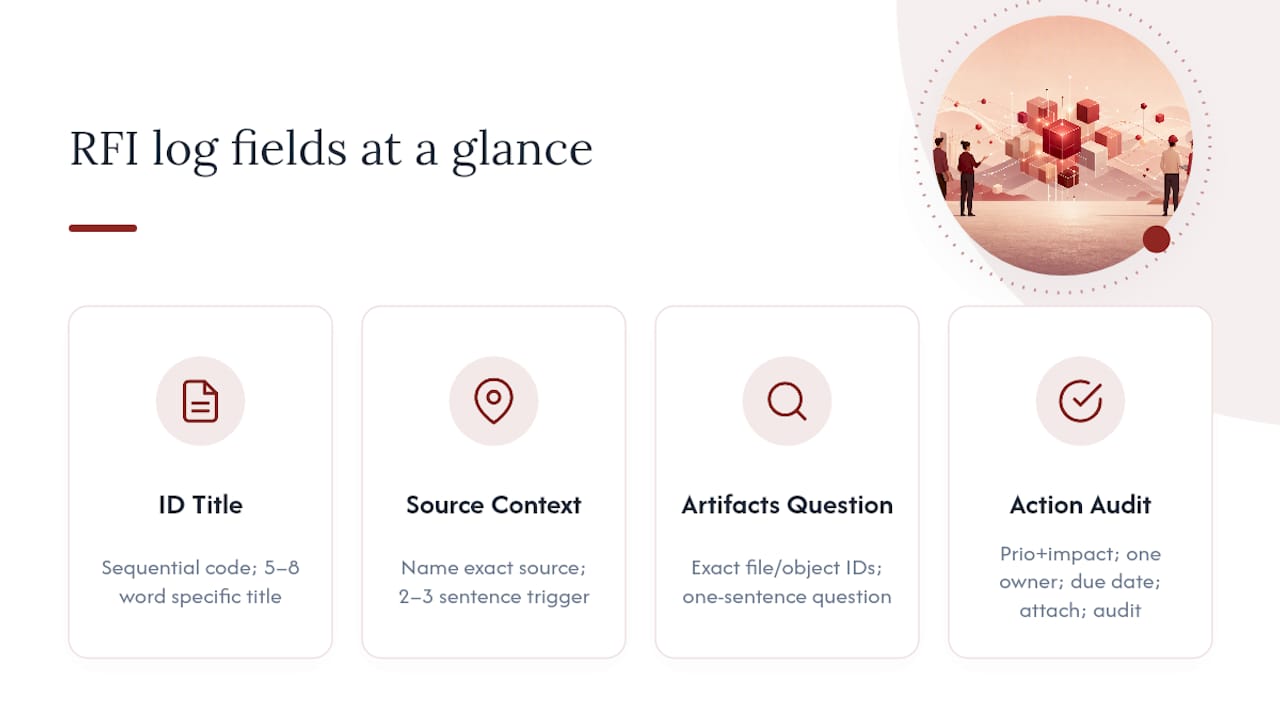
ID. A simple sequential code (RFI-001, RFI-002) so entries can be referenced in emails, meeting notes, or drawing revisions without ambiguity.
Title. A five-to-eight-word label. Skip vague titles like “Facade question” and write “Mullion spacing vs. structural grid conflict” instead.
Source. Name the exact meeting, call, or document the question came from. If it came from a site visit or client email, say so directly, don’t just write “client.”
Context. Two or three sentences on what triggered the entry. Whoever attended the meeting or took the call writes this, not whoever happens to log it later. A record written by someone who wasn’t in the room tends to drift from what was actually said.
Linked artifacts. This is the field most logs get wrong. Point to something concrete: a model file name, an object ID from Rhino3D, a Grasshopper script name, or a specific drawing sheet number. “See model” is not a link. “model_v14.3dm, object ID 2847” is.
Question/Issue. State the actual open question in one sentence. If there isn’t a clean single sentence, the issue probably needs to be split into two entries.
Priority and Impact. Priority is urgency; impact is consequence. A low-priority item can still carry high impact if it’s scheduled for later but will be expensive to unwind.
Assignee/Owner. One name, not a team. Shared ownership is how items sit untouched for weeks.
Due date/SLA. A real date, not “ASAP.”
Status, Decision, Rationale. Covered in the workflow section below. Rationale is the field teams skip most often, and it’s the one most worth fighting for. Decisions linked directly to the artifacts that prompted them hold their context; decisions written up after the fact tend to lose it.
Attachments and Audit trail. Attachments hold the evidence (screenshots, transcript excerpts, redlines). The audit trail is a timestamped log of edits, so nobody has to guess whether a decision was changed after the fact.
Pro Tip: When you link a model object, use its exact object ID or file name, not a description like “the tricky column.” Descriptions drift with memory. IDs don’t.
How do you move an entry from open to closed?
The value of an RFI log comes from a workflow disciplined enough to actually move items through it, not just add new rows.
- Capture. Whoever hears the question writes it down within 24 hours, at minimum filling ID, Source, Context, and Question/Issue. Waiting until end of week is how details get lost.
- Assign. The design lead or PM routes it to one owner within one business day, based on who has the authority to answer, not just who’s available.
- Review. The owner gathers input, links relevant artifacts, and flags it for the next design review or a standing async decision meeting if it’s urgent.
- Decide. The decision gets written into the Decision and Rationale fields the same day it’s made, ideally by the person who made the call.
- Close. Status moves to Closed once downstream teams have been notified. If a later decision overrides this one, it moves to Superseded instead of being deleted.
Suggested status values and transitions: Open → Under review → Action required → Decided → Closed → Superseded. An item can only move backward from Decided to Action required if new information surfaces, never silently.
For SLAs, treat these as starting ranges rather than fixed rules: blocking items need a response within 1 to 2 business days, high-priority items within a week, and low-priority items within two weeks. Anything sitting open past its SLA should surface automatically in a weekly review rather than waiting for someone to notice.
Pro Tip: A log that isn’t reviewed weekly turns into a graveyard. Fifteen minutes at the start of each design review, scanning anything overdue, keeps the whole system honest.
What do filled-in examples look like in practice?
Three short entries show how this plays out across the situations design teams hit most often.
Design question. RFI-022 asks whether a cantilevered stair can shed 200 mm of depth without violating code clearance. Source: structural coordination call. Linked artifact: stair_detail_v6.3dm, object ID 1103. Decision: reduced by 150 mm, approved by structural lead, rationale logged directly under the entry. Downstream handoff: detailer needs the revised dimension before shop drawings.
Unresolved risk. RFI-031 flags that a specified stone finish may not meet the client’s budget once actual quotes come back. Source: budget review meeting. Linked artifact: an IntraNote-style session excerpt tagging the moment the concern was raised, timestamped against the model view being discussed. Status stays Open, flagged high impact, owner is the project manager. Downstream handoff: client-facing team needs this before the next presentation.
Client clarification. RFI-045 records a client’s verbal preference for warmer interior lighting temperature, given during a site walkthrough. Source: site visit notes. Context written by whoever attended. Decision: confirmed via follow-up email, attached as evidence. Downstream handoff: lighting consultant and interior designer.

Each of these gets closed only after the person who needs the answer has actually seen it, not just after someone marks the row complete.
Where should the log live and what should it connect to?
A log stored only on one person’s laptop is not project memory, it’s a private file. Three storage patterns work: a shared workspace inside your existing project management tool, a Git or documentation repository (if your team already versions files that way), or a dedicated project-memory product built for this purpose.
Whatever you choose, the log needs to link outward, not just describe things in text:
- BIM views and Rhino3D snapshots. Reference the exact
.3dmfile and object ID, not a general description of the model. - Grasshopper scripts. Name the script version, since parametric logic changes fast and an old script reference can point to the wrong logic entirely.
- Meeting transcripts. Link to the specific timestamp or excerpt, not the whole recording.
On the automation side, a prototype called IntraNote demonstrates synchronizing spoken dialogue with 3D object interactions, using large language models to generate semantic annotations that tie what was said to exactly what was changed in the model. That kind of time-aligned, searchable record is the direction this whole category is heading, and it’s a preview of what manual logs are trying to approximate by hand.
Pro Tip: Agree on naming conventions before you start logging, not after. “model_v14” versus “model_final_v2_USE_THIS” is how searchability dies.
Who owns the log and how long do records last?
Governance is what keeps a log from becoming twelve people’s personal to-do list.
- Owner (usually the design lead or PM): accountable for the log’s overall health, resolves disputes about status.
- Steward (can rotate weekly or by project phase): responsible for flagging overdue items and running the weekly scan.
- Reviewers (whoever’s assigned to individual entries): responsible for their own rows, not the whole log.
Review cadence should include a weekly capture check and a phase-gate review at each major project milestone, where open items get triaged before the team moves forward. Closed entries should be retained for the life of the project plus a reasonable buffer afterward, since disputes and post-mortems often surface months after handoff.
For naming and versioning, keep artifact references locked to a specific file version at the time the entry was logged. If the file changes later, add a new linked artifact rather than editing the old reference, so the audit trail stays intact.
Access control is simple in most studios: assignees and the log owner can edit; everyone else on the project can comment and view. That single rule prevents the two most common failure modes, a log nobody trusts because anyone could have changed it, and a log nobody reads because only one person can see it.
What separates a living log from a dead one?
Do this:
- Keep the log live, updated as decisions happen, not reconstructed from memory weeks later.
- Link every entry to the artifact that prompted it.
- Write down the outcome you were actually trying to preserve, not just the final answer.
Avoid this:
- Post-hoc rationalization, writing a tidy justification for a decision after the fact tends to smooth over the messy reasoning that actually mattered.
- Burying the log in a private folder only one person checks.
- Overbuilding the template with fields nobody fills in consistently.
For the first 30 days, keep it simple: log every open question that comes up in a design review, assign an owner within a day, and review the whole log together once a week. Teams that skip the weekly review in month one almost never build the habit afterward.
Pro Tip: Tie log review to a meeting that already exists, like your weekly design review, instead of scheduling a new one. New meetings die. Piggybacked agenda items survive.
How does The Intent Ledger automate this template?
The template above works as a manual spreadsheet, but most of its friction lives in the fields that take the longest to fill by hand: context, linked artifacts, and audit trail.
- Automated source links. Rather than someone typing “structural coordination call, Feb 10” from memory, conversations and meeting transcripts get captured and linked automatically, so the Source and Context fields are populated from the original recording.
- Artifact tracing. Model snapshots, Rhino3D and Grasshopper references, and drawing links get captured alongside the conversation that discussed them, closing the gap between what was said and what was changed.
- Semantic tagging. Questions and decisions get tagged automatically, so searching the log later doesn’t depend on someone having used the exact right keyword.
- Decision ownership and audit trail. Every record keeps a source-backed history of who decided what and why, without a separate manual logging step.
This is where the manual template and the product converge on the same use cases: faster handoffs between phases, cleaner post-mortems when something goes wrong, and a defensible record if a decision gets disputed months later. What still takes human judgment, deciding priority, assigning ownership, running the actual review meeting, stays manual. What used to take the most typing gets captured as the conversation happens.
Why does a design lead actually need this log?
Most studios don’t lose track of decisions because nobody cares. They lose track because the record of “why” lives in someone’s head, and that person eventually leaves the meeting, the project, or the company. A log that traces decisions back to their source isn’t paperwork for its own sake, it’s insurance against the exact kind of dispute that turns into a finger-pointing exercise six months after handoff, when nobody can remember who approved what or why.
The pattern worth watching is what happens the first time a client asks “who approved this finish change” and the answer sits in a searchable record instead of three people’s conflicting memories. That single moment tends to convert skeptics faster than any pitch about documentation discipline ever could. Design is a chain of cumulative decisions, not just a set of final drawings, and the studios that treat it that way stop relearning the same lessons project after project.
Ready to automate the log you’re already keeping?
If you’ve been maintaining this template by hand, you already know where the effort goes: chasing down which meeting a decision came from, matching a model snapshot to the right conversation, and writing rationale after the fact because nobody captured it in the moment. The Intent Ledger removes that manual reconstruction by turning your project conversations, transcripts, and critique feedback directly into source-backed ILM Records, linked to the artifacts that prompted them.

A trial gives you a working set of ILM Records built from your own project conversations, so you can see how automated linking and semantic search compare to a manually maintained spreadsheet before committing to anything. Records stay tied to your team’s workspace, with ownership and access controls you control directly, not a shared public log anyone can edit. If the template above already convinced you a living project memory is worth keeping, start a trial at The Intent Ledger and see how much of that upkeep the product handles for you.
Where can you read more on project memory and decision records?
- IntraNote (ACM paper) demonstrates linking spoken design dialogue to specific Rhino3D model actions using LLM-generated annotations, a preview of automated artifact linking.
- Project memories, documentation, and much more for global team design frames why informal rationale, not just final drawings, is the material most worth preserving.
- BIM-based design decisions documentation (ITcon) outlines a methodology for tagging decisions and linking them to model elements using NLP.
- Project memory and student design teams (Cardiff University) shows that consistent digital repositories improve how often teams revisit and reuse earlier work.
- The Intent Ledger is where the template above becomes an automated, searchable project memory.
How is an RFI log different from a change request log? An RFI log tracks open questions and decisions in progress. A change request log tracks approved changes to scope, cost, or schedule after a decision has already been made. Many teams run both, with the RFI log feeding into a change request once a question resolves into a formal scope change.
Do I need separate logs for design questions and change requests? Not necessarily. Some teams keep one unified log with a “type” field distinguishing an open question from a formal change request. Others separate them once volume grows past a few dozen active items, since a change request workflow usually carries approval steps a design question doesn’t need.
How long should we retain closed RFI log entries? Retain them for the life of the project plus a buffer afterward, since disputes and post-mortems often surface months after handoff. There’s no universal legal requirement here, so set retention based on your firm’s own risk tolerance and any contract terms with the client.
What’s the difference between a change request and a change order? A change request documents a proposed change and its rationale, often starting as an RFI-style entry. A change order is the formal, often contractual document authorizing that change, typically tied to cost and schedule adjustments. The RFI log template above is built for the earlier, informational stage, not the contractual one.
Sources
- IntraNote: Recording and recalling collaborative 3D design interactions (ACM paper)
- Project memories, documentation, and much more for global team design, Design Society
- BIM-based design decisions documentation using explanation tags and constraints, ITcon (2022)
- Project memory and student design teams, Cardiff University repository